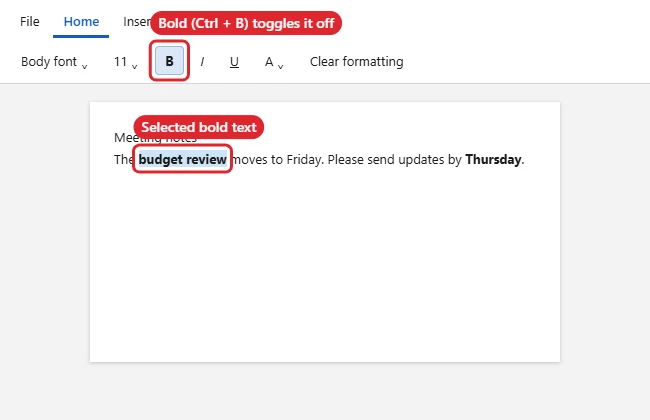
To remove bold formatting in Word 2013, select the text and press Ctrl + B or click the highlighted Bold button on the Home tab. If the bold comes from a style, such as a heading, or you want to strip every kind of formatting, press Ctrl + Space or use Clear All Formatting. Word 2013 reached end of support on April 11, 2023, but these steps are the same in current versions of Word.
Quick Answer
Select the text > press Ctrl + B (or click Bold on the Home tab). To remove bold from the whole document, press Ctrl + A first, then Ctrl + B twice if needed.
Steps to Remove Bold Text
- Select the bold text, or press Ctrl + A to select the whole document.
- Open the Home tab.
- Click Bold in the Font group. When selected text is fully bold, the button is highlighted; clicking it turns bold off.
- If part of the selection was bold and part wasn’t, the first click may make everything bold. Click again to remove it from all.
Other Ways to Remove Bold
| Method | What it removes |
|---|---|
| Ctrl + B / Bold button | Bold only |
| Ctrl + Space | All character formatting added on top of the style |
| Clear All Formatting (Home > Font) | All formatting, back to Normal style |
| Modify the style | Bold built into a style, everywhere it’s used |
Remove Bold That Comes From a Style
- Right-click the style (for example, Heading 1) in the Styles gallery on the Home tab.
- Choose Modify.
- Click the B button to turn off bold, then click OK.
Troubleshooting
- Text still looks bold: The font itself may be a heavy weight, such as a “Black” or “Semibold” font. Change the font. See adding fonts in Word.
- Bold comes back as you type: Bold is on at the cursor. Press Ctrl + B once before typing.
- Need to find every bold word? Use Home > Replace > More > Format > Font > Bold, and replace with Not Bold.
- Want text gone rather than plain? See hiding text in Word.
Frequently Asked Questions
What’s the shortcut to unbold on a Mac?
Press Cmd + B with the text selected.
Does Clear All Formatting remove hyperlinks?
No. Links stay, but their text formatting may reset.
Can I remove bold from only headings?
Yes. Modify the heading style so every heading updates at once.
Summary
- Select the text.
- Press Ctrl + B or click Bold.
- Use Ctrl + Space or Clear All Formatting for stubborn formatting.
- Modify the style if bold comes from a heading.

Kermit Matthews is a freelance writer based in Philadelphia, Pennsylvania with more than a decade of experience writing technology guides. He has a Bachelor’s and Master’s degree in Computer Science and has spent much of his professional career in IT management.
He specializes in writing content about iPhones, Android devices, Microsoft Office, and many other popular applications and devices.