Where you change iTunes update settings on Windows depends on which iTunes you installed. The Microsoft Store version gets its updates through the Store, while the version from Apple’s website checks for updates itself, controlled from Edit > Preferences > Advanced, with Help > Check for Updates for a manual check. Apple now also offers Apple Music, Apple TV and Apple Devices apps for Windows, and you check for updates to those apps in the Microsoft Store.
First, find out where your copy of iTunes came from
Apple distributes iTunes for Windows in two ways, and each one is updated differently:
- Microsoft Store version. Installed from the Microsoft Store app. Apple says new versions of this one are downloaded automatically by the Store.
- Apple website version. Installed from the iTunes download page on Apple’s website. This one has its own update check, which you turn on or off inside iTunes.
If you don’t remember which one you installed, open iTunes and click the Help menu. Apple lists Check for Updates as the manual check for the version from its website. Apple documents that command only for the website version, so if your Help menu doesn’t show it, look for iTunes in the Microsoft Store as described below.
Knowing this saves a lot of confusion. Apple documents the automatic-check checkbox only for the website version, so if you have the Store version, the place to change update behavior is the Microsoft Store, not iTunes Preferences.
Turn automatic update checks on or off in the Apple website version
This is the setting the old iTunes for Windows instructions were about, and Apple still documents it for the version from its download page.
- Open iTunes.
- Choose Edit > Preferences from the menu bar at the top of the iTunes window.
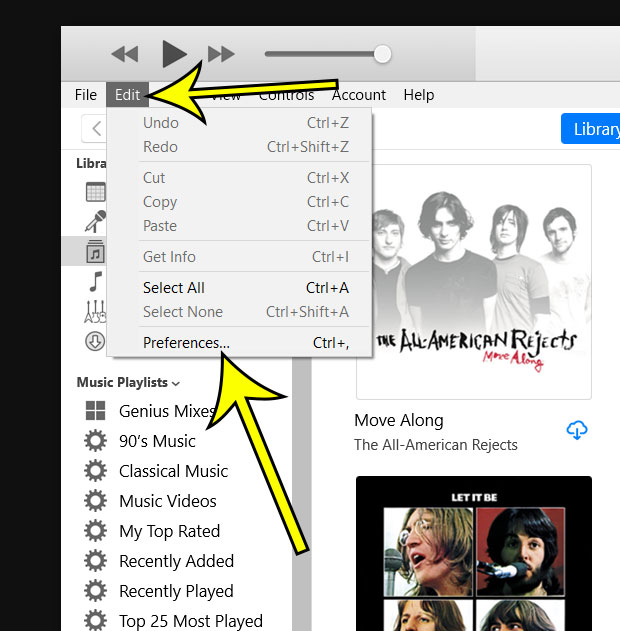
Older iTunes version shown; current screens may look different.
- Click the Advanced tab at the top of the Preferences window.
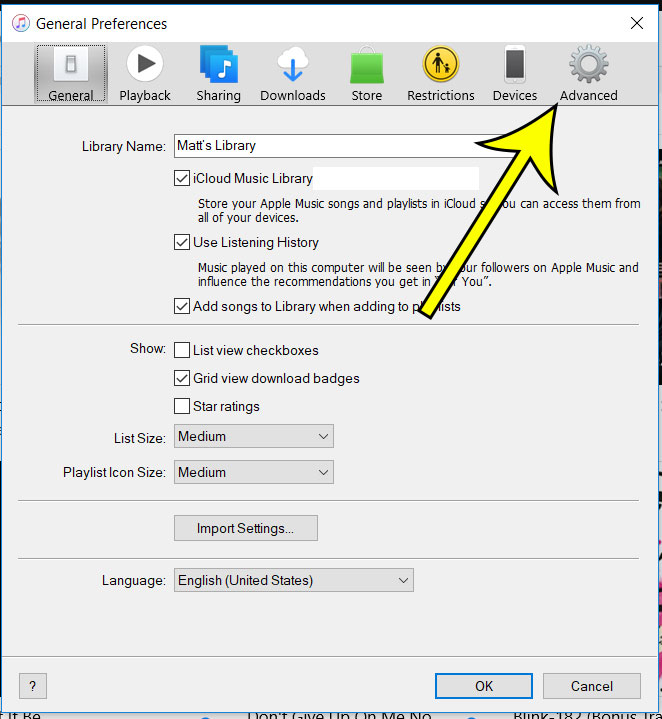
Older iTunes version shown; current screens may look different.
- To turn automatic checks on, make sure Check for new software updates automatically is selected. To turn them off, clear that box.
- Click OK to save the change.
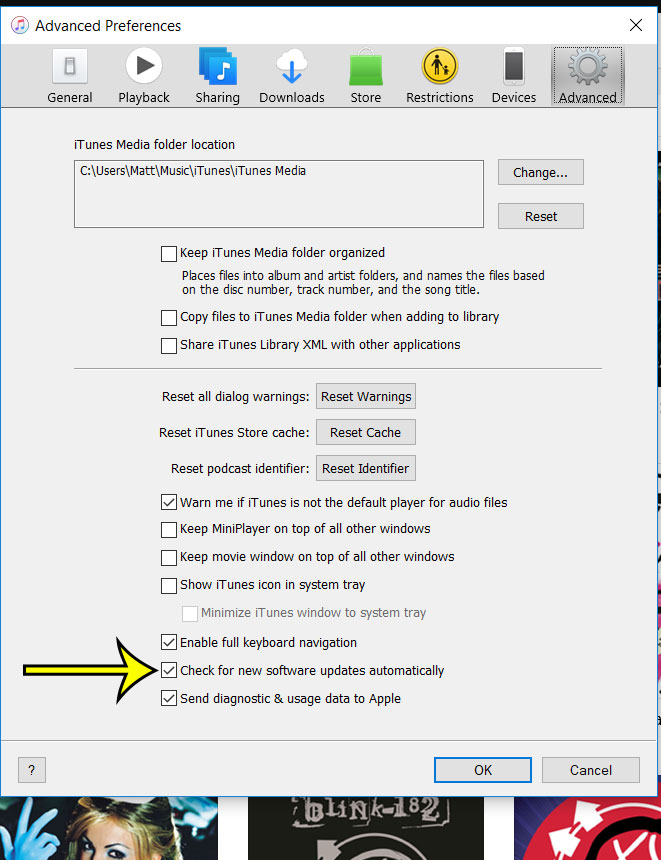
Older iTunes version shown; current screens may look different.
How often iTunes checks
Apple says that with this box selected, iTunes checks for a new version once a week, but only if you have quit and restarted iTunes at least once during that seven-day period. That detail explains a common complaint. If you leave iTunes open for weeks at a time (for example, on a PC that syncs a family member’s iPhone and never closes the app), the weekly check may not run. Quit iTunes now and then, or check by hand as described below.
Should you turn the check off?
Leaving it selected is the safer choice. New versions are how fixes for bugs and security problems reach you, and a copy of iTunes that never checks can fall far behind without you noticing. If you do clear the box, make a habit of running a manual check every so often.
How the Microsoft Store version gets its updates
For the Store version, Apple says new versions are downloaded automatically. The switch that controls those automatic downloads belongs to the Microsoft Store itself, not to iTunes.
Make sure Store updates are turned on
- Select Start, then search for and select Microsoft Store.
- Select Profile (your account photo), then Store Settings.
- Make sure App updates is turned On.
This setting covers every app you installed from the Store, not just iTunes. Microsoft also notes that some app publishers manage their own updates through their app, so the Store is the place to look for iTunes, Apple Music, Apple TV and Apple Devices, but not necessarily for every program on the PC.
See whether an iTunes update is waiting
Apple’s steps: open the Microsoft Store, click Library in the sidebar, then look for iTunes in the list of available apps under Updates & downloads. If it is listed there, update it from that screen.
Check for an iTunes update right now
Changing the settings decides what happens from now on. If you want the newest version today, run a check by hand:
- Apple website version: open iTunes and choose Help > Check for Updates, then follow the prompts.
- Microsoft Store version: use Library > Updates & downloads in the Microsoft Store, as above.
For the full walk-through of both versions, plus what to try when an update fails, see how to update iTunes on Windows.
Where Apple Software Update fits in
Some PCs also have a separate program called Apple Software Update. Apple says it is used if you installed certain older Apple apps (or used Boot Camp to install Windows on a Mac), and that on Windows 10 or later you should get the latest Apple apps from the Microsoft Store instead.
- To find it, use the search box on the Windows taskbar and type its name.
- By default, it checks for updates once a week and whenever you open it.
Apple’s page doesn’t describe any options for changing that schedule. Apple adds that on a Windows 10 or later PC, once you use the Microsoft Store for the latest Apple apps, you no longer need Apple Software Update. On a Mac running Windows through Boot Camp, Apple says to use both the Microsoft Store and Apple Software Update.
Which Apple app gets which updates
On Windows, Apple now splits what iTunes used to do across separate apps, all downloaded from the Microsoft Store:
| What you want to do | App Apple points you to | Where its updates come from |
|---|---|---|
| Listen to your music library and iTunes Store music purchases | Apple Music | Microsoft Store |
| Watch your movies and TV shows | Apple TV | Microsoft Store |
| Manually update, back up, restore, manage and sync an iPhone or iPad | Apple Devices | Microsoft Store |
| Manage podcasts and audiobooks | iTunes | Store or iTunes itself, depending on the version |
So the iTunes update settings above matter most if you still use iTunes for podcasts and audiobooks or prefer to keep using it for everything. Someone who has moved music to Apple Music and phone backups to Apple Devices mainly needs the Microsoft Store setting above, since that one keeps all three newer apps current. To see how the device app handles backups, read how to back up an iPhone to a Windows computer. The newer apps’ availability varies by country or region, according to Apple.
Windows 11 and Windows 10
The iTunes menus (Edit, Preferences, Help) are part of iTunes, so the steps are the same on both versions of Windows. Microsoft’s Store settings steps also apply to both.
One thing has changed for Windows 10 itself: Microsoft ended support for it on October 14, 2025, and no longer provides technical assistance, feature updates or security updates for it. Keeping iTunes updated doesn’t change that, so if your PC can run Windows 11, moving to it is the more important update.
iTunes update questions
Why can’t I find “Check for new software updates automatically”?
Apple documents that checkbox for the iTunes version from its download page. If you installed iTunes from the Microsoft Store, look at the Store’s App updates setting instead. If you do have the Apple website version, make sure you are on the Advanced tab; the Preferences window has several tabs, including General, Playback, Sharing, Downloads, Store, Restrictions and Devices.
Does turning on the check install updates for me?
Apple describes the option as a check for new versions and doesn’t say it installs them silently. If you want to be sure an update is in place, run Help > Check for Updates and follow the prompts.
Can I switch from the Apple website version to the Store version?
Apple’s download page for Windows now sends you to the Microsoft Store for iTunes and the newer apps. Apple doesn’t publish steps for moving an existing installation to the Store version. If you decide to remove the current copy first, here is how to uninstall iTunes on Windows without leaving pieces behind.
Still using iTunes for older tasks? You can also print a playlist in iTunes to share a song list on paper. Apple’s own reference for the settings above is its iTunes for Windows page on how to update iTunes on PC.

Kermit Matthews runs Live2Tech from just outside Philadelphia. He is an IT specialist with over 20 years of experience, from a university help desk to small-business IT, IT management and his own consulting practice, and has written tech guides full time since 2020. Steps are checked against the current software on a real device or the maker’s official documentation. More about Kermit.