To share your wish list in the Amazon iPhone app, open your list and tap the share or ⋯ button at the top, then choose whether people can only view it (best for gift ideas) or edit it with you. Amazon creates a link you can send by Messages, email, or any app on your iPhone. Amazon changes its app layout from time to time, so button labels may differ slightly.
Quick Answer
Amazon app > profile icon > Your Lists > open the list > Share (or ⋯ > Share) > View only > choose how to send it.
Share a Wish List
- Open the Amazon app and tap the profile (person) icon.
- Tap Your Lists, then open the list you want to share.
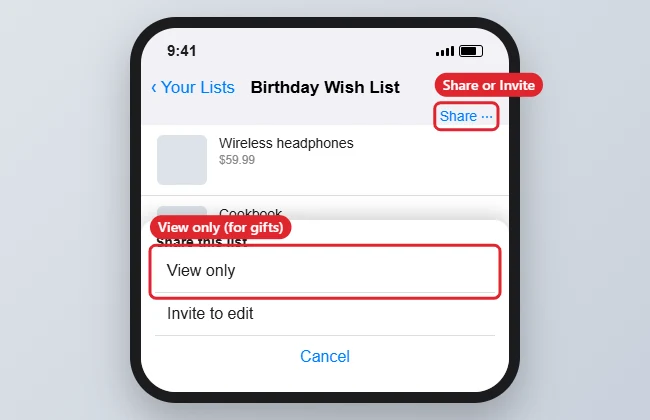
- Tap Share or the ⋯ menu, then choose View only for gift-givers or Invite to edit for someone planning with you.
- Pick Messages, Mail, or another app, and send the link.
Before You Share
- Privacy: In the list’s settings, choose Shared (anyone with the link) rather than Public (searchable) if you only want invited people to see it.
- Shipping address: Add a gift address in list settings so people can send gifts without seeing your full address.
- Purchased items: Choose whether to keep purchased items on the list so the surprise isn’t spoiled.
Sharing Options Compared
| Option | Others can |
|---|---|
| View only | See and buy items |
| Invite to edit | Add, remove and reorder items |
| Private | Nothing; only you can see it |
Troubleshooting
- Recipients can’t open the link: The list may be Private. Change it to Shared in list settings.
- Can’t find Your Lists: Use the app’s search bar and type “Your Lists”, or check the menu (☰) tab.
- Sharing by email? See attaching files to email on iPhone for more sharing options.
Frequently Asked Questions
Can people see my address?
Not if you set a gift address; Amazon ships to it without showing the full address.
Can I stop sharing later?
Yes. Change the list to Private or manage people in the list settings.
Summary
- Open Your Lists and choose the list.
- Tap Share and pick View only or Invite to edit.
- Send the link with any app.
- Set privacy and a gift address in list settings.

Kermit Matthews is a freelance writer based in Philadelphia, Pennsylvania with more than a decade of experience writing technology guides. He has a Bachelor’s and Master’s degree in Computer Science and has spent much of his professional career in IT management.
He specializes in writing content about iPhones, Android devices, Microsoft Office, and many other popular applications and devices.