To export Gmail contacts, go to Google Contacts (contacts.google.com) in a web browser, select the contacts you want (or none to export all), click Export, choose a format and click Export again. Use Google CSV to import into another Google account, Outlook CSV for Outlook and many other email apps, or vCard for phones and the Contacts app on a Mac. The Gmail mobile app can’t export contacts, so use a browser.
Quick Answer
contacts.google.com > select contacts > Export > choose Google CSV, Outlook CSV or vCard > Export.
Steps to Export Contacts
- Open contacts.google.com and sign in with the Gmail account.
- Tick the contacts to export, or pick a label on the left to export a group.
- Click the Export icon (or the three-dot menu > Export).
- Choose Selected contacts or all contacts.
- Pick a format and click Export. The file downloads to your computer.
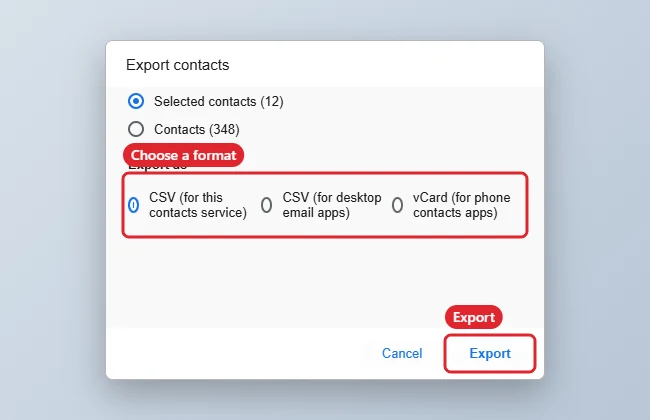
Which Format to Choose
| Format | Best for |
|---|---|
| Google CSV | Another Google account |
| Outlook CSV | Outlook and most email programs |
| vCard (.vcf) | iPhone, Mac Contacts and many phones |
Troubleshooting
- Some contacts are missing: Check Other contacts in the left menu; those are saved from emails and may need exporting separately.
- Special characters look wrong: Open the CSV with UTF-8 encoding, or use vCard.
- Opening a .vcf on Windows: See opening a VCF file.
- Turning on out-of-office replies: See setting a vacation response in Gmail.
Frequently Asked Questions
Can I export from my phone?
Open contacts.google.com in your phone’s browser in desktop mode, or use the phone’s own contacts app to share or export.
Does exporting delete anything?
No. It only creates a copy.
How do I import the file?
In Google Contacts, click Import and choose the file. Other apps have their own import option.
Summary
- Open Google Contacts in a browser.
- Select contacts or a label.
- Click Export and pick a format.
- Import the file where you need it.

Kermit Matthews is a freelance writer based in Philadelphia, Pennsylvania with more than a decade of experience writing technology guides. He has a Bachelor’s and Master’s degree in Computer Science and has spent much of his professional career in IT management.
He specializes in writing content about iPhones, Android devices, Microsoft Office, and many other popular applications and devices.