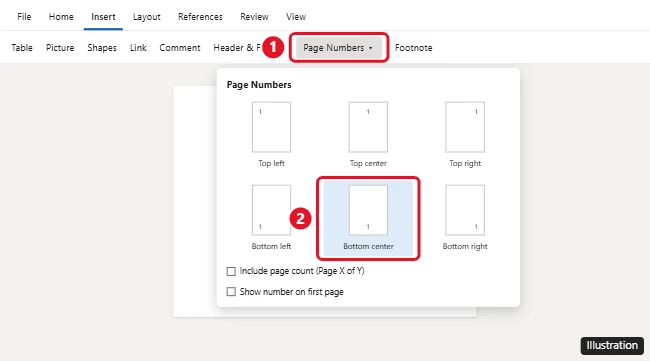
To add page numbers in Word for the web (Word Online), click the Insert tab, click Page Numbers, and choose where you want them, like the bottom center of the page. Word adds the numbers to every page. In the same menu, you can turn on Include page count for “Page X of Y” numbering, or hide the number on the first page. Word for the web has fewer page number options than the desktop app, so for things like starting at a different number or using Roman numerals, click Editing > Open in Desktop App.
How to add page numbers in Word for the web
- Open your document at office.com or word.cloud.microsoft, and make sure you’re in Editing mode.
- Click the Insert tab.
- Click Page Numbers.
- Choose a position: top or bottom, and left, center, or right.
If you don’t see page numbers, switch to View > Print Layout or Reading View. Some views in Word for the web hide headers and footers while you edit.
Show “Page X of Y”
- Go to Insert > Page Numbers.
- Check Include page count.
- Choose a position if you haven’t already.
Hide the page number on the first page
For a title page, uncheck Show number on first page in the Page Numbers menu. The second page still shows 2. You can also go to Insert > Header & Footer > Options and select Different First Page.
Change the font or size of page numbers
- Go to Insert > Header & Footer, or double-click the header or footer area.
- Select the page number.
- Use the Home tab to change the font, size, or color.
- Click in the body of the document, or press Esc, to close the header and footer.
How to remove page numbers
- Double-click the header or footer where the number appears.
- Select the page number and press Delete.
Word removes the numbers from every page in that section.
What you need the desktop app for
These page number options aren’t available in Word for the web:
- Starting numbering at a number other than 1
- Roman numerals (i, ii, iii) or letters
- Different numbering in different sections, like restarting at chapter breaks
- Different odd and even page numbers for printed books
To use them, click Editing > Open in Desktop App. In Word for Windows or Mac, go to Insert > Page Number > Format Page Numbers. Your changes save back to the same file in OneDrive.
Frequently asked questions
Why are my page numbers missing in Word Online?
You might be in a view that hides headers and footers. Switch to View > Reading View or print preview to check that they’re there.
Can I add page numbers in the Word mobile app?
Yes. On a phone, tap the Edit (pencil) icon, open the ribbon menu, choose Insert > Page Numbers, and pick a position.
Do page numbers carry over if I download the file?
Yes. Page numbers are part of the document and appear in Word, PDF exports, and printouts.
Can I add page numbers to only some pages?
That requires section breaks and the desktop app. Word for the web can only hide the number on the first page.

Kermit Matthews is a freelance writer based in Philadelphia, Pennsylvania with more than a decade of experience writing technology guides. He has a Bachelor’s and Master’s degree in Computer Science and has spent much of his professional career in IT management.
He specializes in writing content about iPhones, Android devices, Microsoft Office, and many other popular applications and devices.