To custom sort in Google Sheets, select your data, click Data > Sort range > Advanced range sorting options, check Data has header row, choose the first column to sort by, then click Add another sort column for each extra level. Click Sort. For an order that isn’t alphabetical or numeric, such as High, Medium, Low, use a formula with a custom list, shown below.
Quick Answer
Select data > Data > Sort range > Advanced range sorting options > add sort columns > Sort.
Sort by Several Columns
- Select the range, including headers.
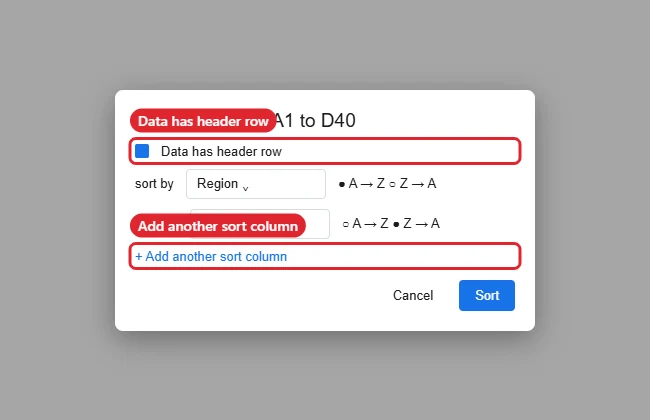
- Click Data > Sort range > Advanced range sorting options.
- Check Data has header row.
- Choose the first column and A → Z or Z → A.
- Click Add another sort column for the next level, and repeat.
- Click Sort.
Sort in a Custom Order
To sort a Priority column as High, Medium, Low, put this in an empty area:
=SORT(A2:D40, MATCH(C2:C40, {“High”,”Medium”,”Low”}, 0), TRUE)
Replace A2:D40 with your data and C2:C40 with the column to order by. The result is a sorted copy that updates when the data changes.
Sorting Options Compared
| Method | Best for |
|---|---|
| Sort range (advanced) | Multi-level sorts that change the data in place |
| Filter > Sort by color | Grouping rows by fill or text color |
| SORT with MATCH | Custom orders like weekdays or priorities |
| Filter views | Personal sorts that don’t change others’ view |
To undo a sort later, see unsorting in Google Sheets.
Troubleshooting
- Headers got sorted into the data: Undo (Ctrl + Z) and check Data has header row.
- Rows got mixed up: You sorted only one column. Always select the whole range.
- Dates sort oddly: They may be text.
- Want to color groups after sorting? See changing cell color.
Related: copy conditional formatting in Google Sheets.
Frequently Asked Questions
Can I save a custom sort?
Use a filter view (Data > Filter views) to save a sort you can reapply.
Does sorting break formulas?
Formulas referencing other rows can shift. Check results after sorting.
Summary
- Data > Sort range > Advanced options.
- Add a sort column for each level.
- Use SORT with MATCH for custom orders.
- Use filter views to avoid changing others’ view.

Kermit Matthews runs Live2Tech from just outside Philadelphia. He is an IT specialist with over 20 years of experience, from a university help desk to small-business IT, IT management and his own consulting practice, and has written tech guides full time since 2020. Steps are checked against the current software on a real device or the maker’s official documentation. More about Kermit.