If swiping up on the lock screen of your iPhone does nothing, Control Center has probably been blocked on the lock screen. That also blocks the flashlight button, so you have to unlock the phone before you can turn on the light. One setting fixes it.
Quick Answer
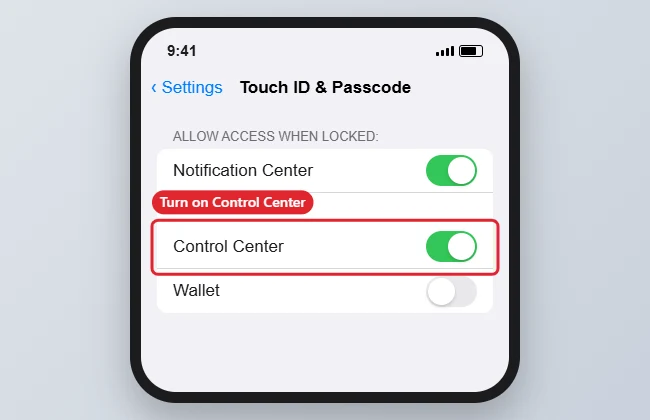
Go to Settings, Touch ID and Passcode (Face ID and Passcode on newer models), enter your passcode, and turn on Control Center under Allow Access When Locked. You can then open the flashlight from the lock screen.
How to Use the Flashlight Without Unlocking
- Open the Settings app.
- Tap Touch ID and Passcode (or Face ID and Passcode) and enter your passcode.
- Scroll to Allow Access When Locked.
- Turn on the Control Center switch.
- Lock the phone, swipe up from the bottom edge (or down from the top-right corner on Face ID models), and tap the flashlight button.
Why the Flashlight May Not Open
| Cause | Fix |
|---|---|
| Control Center blocked when locked | Turn it on under Allow Access When Locked |
| Flashlight removed from Control Center | Add it back in Settings, Control Center |
| Camera in use | Close the camera app |
| Phone too hot or battery very low | Let it cool or charge it |
Troubleshooting
- The flashlight button is greyed out: close any app using the camera and try again.
- The button is missing from Control Center: add it in Settings, Control Center, Customize Controls.
- Once it is on, here is how to turn off the flashlight on an iPhone.
- New to Control Center? Read how to open Control Center on an iPhone 7.
Frequently Asked Questions
Is it safe to allow Control Center when locked?
Mostly. Someone holding your phone could toggle settings like Wi-Fi or Airplane Mode without unlocking it, so weigh convenience against that risk.
Can I turn on the flashlight with Siri?
Yes. Say turn on my flashlight if Siri is allowed when locked.
Do newer iPhones have a lock-screen flashlight button?
Yes. Face ID models show a flashlight button at the bottom-left of the lock screen.
Summary
- Open Settings, Touch ID and Passcode.
- Enter your passcode.
- Turn on Control Center under Allow Access When Locked.
- Open Control Center from the lock screen and tap the flashlight.

Kermit Matthews is a freelance writer based in Philadelphia, Pennsylvania with more than a decade of experience writing technology guides. He has a Bachelor’s and Master’s degree in Computer Science and has spent much of his professional career in IT management.
He specializes in writing content about iPhones, Android devices, Microsoft Office, and many other popular applications and devices.