Skip to content
Live2Tech
Menu

Text Box

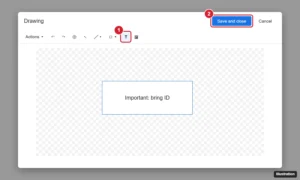
Google Docs Drawing window with the Text box tool highlighted and the Save and close button

How to Insert a Text Box in Google Docs

September 24, 2026June 16, 2021 by Kermit Matthews

Click Insert > Drawing > New, choose the Text box tool, draw and type, then Save and close. Or use a one-cell table. How to style, move, and edit it.

Categories Google Docs Tags Featured Docs Guides, Text Box

Join Our Free Newsletter

Featured guides and deals

You may opt out at any time.
Read our Privacy Policy

  • About Us
  • Contact
  • Disclaimer
  • Privacy Policy
© Live2Tech.com 2026
  • Popular
  • iPhone
  • Excel
  • Word
  • Docs
  • Sheets
  • Tutorials