Count on the page width, not a menu limit: Microsoft doesn’t publish a maximum number of text columns for Word, so the real ceiling is how many columns fit between your margins at a usable width. Table columns are the same story: no published maximum, only what fits on the page.
Below is how to find the limit for your own page in Word for Microsoft 365, what raises it, and when a table is the better tool.
What Microsoft documents about column limits
Quiz sites and older articles give confident figures for the most columns Word allows, and they don’t agree with each other. None of those figures appears on Microsoft’s own pages:
- The Columns dialog box page describes Presets, Number of columns and Width and spacing, but gives no maximum.
- Microsoft’s list of operating parameter limitations and specifications in Word has no entry for text columns or table columns.
- The pages on creating multiple columns and adjusting column widths on a page explain the settings without a number either.
So the honest answer to “how many columns can Word have?” is: as many as fit on your page at the width Word will accept. If a homework or quiz question expects a specific number, it is quoting a source other than Microsoft’s documentation, so check the course material it came from.
Find the limit for your page in the Columns dialog
The quickest way to learn your own ceiling is to ask Word. The dialog below is the place to try it.
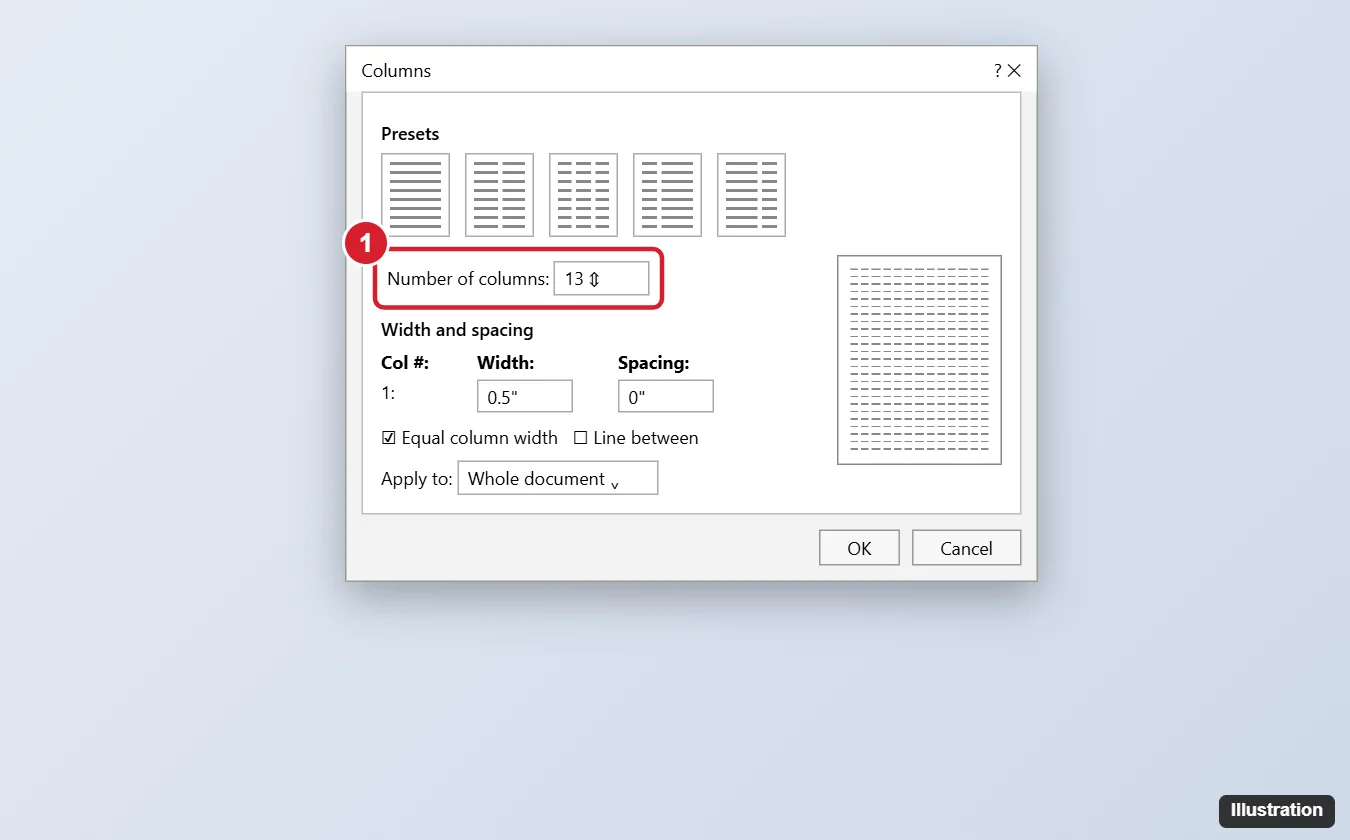
The illustration above is an older drawing of the Columns dialog. The column count it shows and the half-inch minimum in its caption are not stated on any Microsoft page, so test your own page with the steps below.
- Click in the text you want in columns. To put only part of the document in columns, select those paragraphs first.
- On the Layout tab, select Columns, then More Columns at the bottom of the menu.
- In Number of columns, type a larger number than you need and watch the Width and spacing boxes. Each column’s width shrinks as the count rises.
- Select OK. If Word rejects the number, it shows a message instead of applying it. Lower the number, or reduce the spacing, and try again.
- Look at the result in Print Layout. A count Word accepts can still leave only a word or two per line, which is the practical limit for most documents.
Write down the highest number that works and the margins and orientation you used. If you change either of those later, test again, because the ceiling moves with them.
Settings that change how many columns fit
Every text column needs a minimum width plus the gap beside it, so anything that adds width to the text area lets more columns fit. These are the settings to adjust, all on the Layout tab:
| Setting | Where | Effect on columns |
|---|---|---|
| Margins | Layout > Margins (a preset or Custom Margins) | Smaller side margins widen the text area. Microsoft notes each page starts with a one-inch margin. |
| Orientation | Layout > Orientation | Landscape turns the long edge sideways, so more columns fit. |
| Paper size | Layout > Size | A wider sheet gives more room, if your printer supports it. Microsoft’s Word limitations list gives a maximum paper size of 22 by 22 inches. |
| Spacing | Columns > More Columns > Width and spacing | Less space between columns leaves more for the text itself. |
Microsoft’s margins training page covers the margin presets and Custom Margins, and its page orientation training page has you select Layout > Orientation, then Portrait or Landscape. Font size matters too: it doesn’t change what Word accepts, but smaller text makes narrow columns readable. Text columns are a good fit for a newsletter or a brochure; for a simple left and right half, splitting a page in half in Word compares columns, tables and other layouts.
Text columns or a table?
People often ask about the column limit when what they really have is data: names, dates, prices, scores. Text columns flow one stream of text down the first column and on into the next, so they can’t keep a row of values lined up. A table can.
- Use text columns for running text that should read like a newspaper: newsletters, flyers, word lists, glossaries.
- Use a table when each row belongs together, such as a schedule or a price list. Each cell only needs to fit its own contents, and every row stays aligned.
Microsoft doesn’t publish a maximum number of table columns either; the practical limit is again the page width. To grow a table, see adding columns to a table in Word, and for resizing, merging and other changes see editing a table in Word. If the data has more columns than any page can hold, a spreadsheet is a better home for it, with a summary pasted into Word.
Different column counts in one document
Column settings belong to a section, so one document can mix a full-width heading, a three-column body and a two-column sidebar.
- Select the paragraphs that need a different count and apply Layout > Columns. Word adds section breaks around the selection for you.
- Or place the breaks yourself with Layout > Breaks > Continuous (Microsoft’s section break page notes it is often used to change the number of columns without starting a new page), then set columns inside each section.
- To push text to the top of the next column, put the cursor where it should move and press Ctrl + Shift + Enter, or select Layout > Breaks > Column, as Microsoft’s column break page shows.
- Turn on Show/Hide on the Home tab to see where breaks sit if text jumps unexpectedly.
A vertical rule helps readers tell narrow columns apart; adding lines between columns in Word shows the Line between setting. If your columns drifted to different widths, making all columns the same width in Word puts them back.
Word column limit answers
Why does Word refuse the number of columns I typed?
At that count the columns would be narrower than Word allows on your page. Lower the number, reduce the spacing, narrow the margins or switch to landscape, then try again.
Can columns have different widths?
Yes. Microsoft’s column-width page has you clear Equal column width under More Columns and then set each column’s width and spacing.
Do the limits change with each version of Word?
Microsoft’s Columns dialog page applies to Word for Microsoft 365, 2024, 2021, 2019 and 2016, and none of them lists a fixed maximum. The practical limit depends on the page, not the version.
Can I set up columns in Word for the web?
Microsoft’s pages on this disagree, so check your own Layout tab. If the More Columns options aren’t there, open the file in the Word desktop app to set the count, widths and spacing.
For a framed, magazine-style finish once the columns are set, adding borders in Word covers paragraph and page borders.

Kermit Matthews runs Live2Tech from just outside Philadelphia. He is an IT specialist with over 20 years of experience, from a university help desk to small-business IT, IT management and his own consulting practice, and has written tech guides full time since 2020. Steps are checked against the current software on a real device or the maker’s official documentation. More about Kermit.