In Minecraft: Java Edition, press F11 to switch full screen on or off, the key Mojang lists for it. Bedrock Edition has no full-screen key in Mojang’s help, so that edition goes through its Video settings or a maximized window. Java is the edition with snapshots and older release versions; Bedrock is the one with the Minecraft Marketplace and play on consoles and phones.
Once you know the edition, the steps below take a minute.
Which Minecraft is on your PC
Mojang describes the split on its Java or Bedrock comparison page. A few signs make it easy to tell them apart:
| Sign | Java Edition | Bedrock Edition |
|---|---|---|
| What it offers | Snapshots, older release versions and room to customize the game | Minecraft Marketplace, add-ons, previews and a Character Creator |
| Where else it runs | Mac and Linux | Xbox, PlayStation, Nintendo Switch, phones and tablets |
If you crossplay with friends on a console or phone, you’re on Bedrock. If you can choose an older release version to play, you’re on Java.
On Windows you may already own both. Mojang sells them together as Minecraft: Java & Bedrock Edition for PC, and its guide to the different Minecraft editions lists which devices each one covers. If the edition you want isn’t installed yet, installing Minecraft on Windows walks through getting it from the launcher.
Java Edition: F11 and the key binds list
Mojang’s list of input actions in Java Edition lists F11 with the description “Toggles fullscreen.” That is the documented control:
- Start Java Edition from the Minecraft Launcher and wait for the title screen or load a world.
- Press F11. The game switches to full screen.
- Press F11 again to go back to a window. Because it’s a toggle, the same key works both ways.
If F11 does nothing, check two things:
- The key was rebound. Mojang says most of these actions can be rebound by going to Options > Controls > Key Binds. Open that list. If the full-screen action is listed there, check which key it uses now or set it back to F11.
- Your laptop’s top row. On many laptops the F keys control volume or brightness first. Hold Fn while pressing F11, or turn on your keyboard’s function lock if it has one. This varies by laptop maker and isn’t something Mojang documents.
Java Edition’s display options sit in Options > Video Settings, the path Mojang’s Java Edition video settings help uses. That page is about performance, though, and doesn’t describe a full-screen switch.
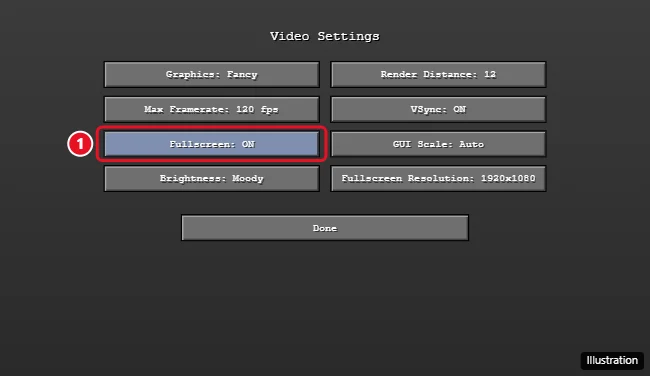
The illustration shows a Fullscreen option in a Java-style Video Settings menu. Mojang’s help pages don’t document that option or whether the game remembers it next time, so if your menu looks different, use F11.
Bedrock Edition: what Mojang documents
Here the honest answer is short. Mojang’s Bedrock Edition video settings help covers the game’s Video settings for performance but says nothing about full screen, and Mojang’s F11 list is written for Java Edition only.
What that leaves you with:
- Open Bedrock Edition and go to Settings, then the Video settings Mojang’s page describes.
- Look for a full-screen choice there and turn it on if you see one. Mojang’s help pages don’t document one.
- If there’s no such option, maximize the window with the button in its title bar. That fills the screen apart from the taskbar.
Trying F11 costs nothing, but don’t count on it in Bedrock, since Mojang only lists it for Java.
For the keys other apps and games use, see going full screen on Windows; making Undertale full screen shows a game that relies on a single key from its tutorial.
When the picture leaves black edges or looks soft
If the game looks soft or framed in full screen, check the Windows resolution first. Microsoft’s guide to screen resolution and layout warns that a lower resolution can look less sharp and may appear small, centered, edged with black or stretched.
- Close Minecraft or switch it back to a window.
- Select Start > Settings > System > Display.
- Under Scale & layout on Windows 11 (Scale and layout on Windows 10), set Display resolution to the option marked (Recommended).
- Check that Scale is also on its recommended value, then start the game again.
For what each Windows scale percentage changes, see adjusting display scaling in Windows 11.
Minecraft full screen questions
Do I need to buy Minecraft again to get the other edition?
Not on a Windows PC. Mojang says owners of Windows 10 or 11 get the Java & Bedrock Edition bundle, and owning one edition entitles you to the other for free. To move from one to the other, see switching from Minecraft Java to Bedrock.
Does Bedrock Edition need a particular Windows 10 build?
Yes: Mojang’s Java & Bedrock Edition for PC store page lists Windows 10 version 19041.0 or higher for Bedrock. For Java, the minimum is Windows 10 64-bit or Windows on ARM, with Windows 11 64-bit recommended. Note that Microsoft states “Windows 10 has reached the end of support on October 14, 2025,” on its Windows 10 end of support page, so a Windows 11 PC is the better long-term home for either edition.
Can I see my frame rate while playing full screen?
Yes, and each edition does it differently. Showing FPS in Minecraft covers the Java debug screen and, for Bedrock, the Xbox Game Bar Performance widget.
Is Bedrock Edition the same as Minecraft for Windows?
Yes for Windows PCs. Mojang’s current help pages call the Windows version of Bedrock “Minecraft: Bedrock Edition for Windows,” so that’s the name to search for in its support articles. The full-screen notes above apply to it.
Start with F11 if you play Java, check the Video settings if you play Bedrock, and fix the Windows resolution if the picture still doesn’t fill the screen cleanly.

Kermit Matthews runs Live2Tech from just outside Philadelphia. He is an IT specialist with over 20 years of experience, from a university help desk to small-business IT, IT management and his own consulting practice, and has written tech guides full time since 2020. Steps are checked against the current software on a real device or the maker’s official documentation. More about Kermit.