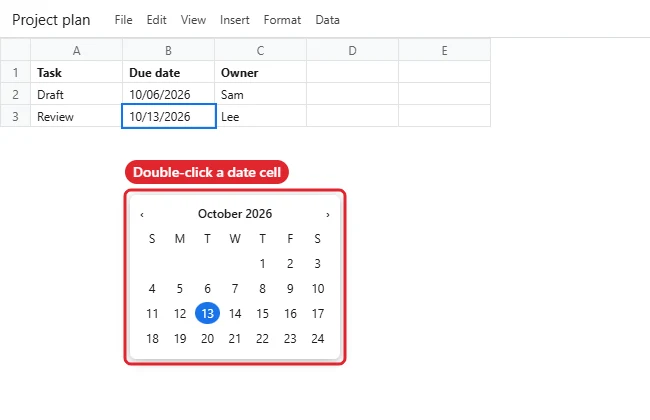
To add a pop-up calendar to cells in Google Sheets, select the cells, open Data, Data validation, add a rule set to Is valid date, and click Done. Double-click a cell to open the calendar picker. Pick the date picker for forms and trackers. For planning, Google Sheets can also give you a full monthly calendar layout from a template.
How to Insert a Calendar in Google Sheets
- Select the cells where dates will go.
- Click Data, then Data validation, then Add rule.
- Under Criteria, choose Is valid date.
- Click Done.
- Double-click any of those cells to open the date picker and choose a date.
- For a full calendar, go to File, New, From template gallery and choose Annual calendar, or build your own grid.
Calendar Options
| Option | Best for |
|---|---|
| Date picker (Is valid date) | Entering dates in a list |
| Annual calendar template | Printable yearly calendar |
| Formula-built grid | Custom monthly layouts |
| Dropdown of dates | Picking from a fixed set |
Build a Monthly Calendar With One Formula
If you want a calendar grid that updates when you change the month, Google Sheets can generate it for you:
- In cell A1, type the first day of the month you want, for example
11/1/2026, and format it as a month and year (Format, Number, Custom date and time). - In A2 to G2, type the weekday names Sun, Mon, Tue, Wed, Thu, Fri and Sat.
- In A3, enter
=SEQUENCE(6, 7, A1-WEEKDAY(A1)+1). This fills a six-week grid starting on the Sunday on or before the 1st. - Select A3:G8 and choose Format, Number, Custom date and time, then set it to show only the day number.
- To grey out days from the neighbouring months, open Format, Conditional formatting, choose Custom formula is and enter
=MONTH(A3)<>MONTH($A$1), then pick a light grey text colour.
Change the date in A1 and the whole calendar redraws for the new month. Add a row under each week for notes, or widen the rows to make room for events.
Highlight Today and Deadlines
Conditional formatting also works well with date-picker columns. Select your date cells, open Format, Conditional formatting and choose Date is, Today to highlight today’s date, or Date is before, Today to flag overdue items in red. Combined with the date picker, this turns a simple list into a lightweight task tracker.
If the Picker or Template Doesn’t Show Up
- Picker does not appear: the cell may contain text. Clear it, or enter a real date first.
- Wrong date format: change File, Settings, Locale, or use Format, Number, Date.
- Template missing: some work accounts hide templates; make a copy from someone who has one.
- Related: inserting dates in Google Sheets and auto-filling dates.
Other Questions About Calendars in Sheets
Can I insert today’s date quickly?
Press Ctrl+; for today’s date.
Does the date picker work on phones?
The mobile app shows its own date entry; results vary.
Can I link to Google Calendar?
Not directly without Apps Script or an add-on.

Kermit Matthews runs Live2Tech from just outside Philadelphia. He is an IT specialist with over 20 years of experience, from a university help desk to small-business IT, IT management and his own consulting practice, and has written tech guides full time since 2020. Steps are checked against the current software on a real device or the maker’s official documentation. More about Kermit.