Windows 11 can create a QR code for a saved Wi-Fi network so another device can connect without manually typing the password. If you only need the credentials themselves, you can also see a saved Wi-Fi password in Windows 11.
Open Settings > Network & internet > Wi-Fi > Properties, then select Show by the Wi-Fi network password.
Step 1: Open Settings
Press Windows + I.
Step 2: Select Network & Internet
Click Network & internet.
Step 3: Select Wi-Fi
Choose Wi-Fi.
Step 4: Open the Network Properties
Select Properties for the network.
Step 5: Show the Wi-Fi Password
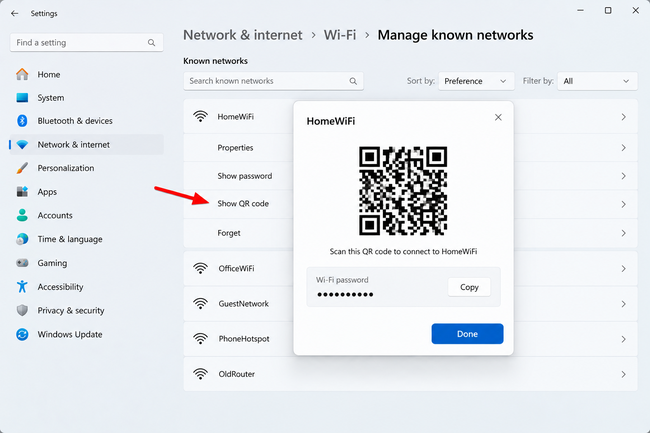
Find Wi-Fi network password and click Show. Windows displays the password and QR code.
Step 6: Scan the QR Code
Use the other device’s camera or compatible QR scanner and follow its prompt to join the network.
How to Create a QR Code for a Previously Saved Wi-Fi Network
Go to Settings > Network & internet > Wi-Fi > Manage known networks, select the saved network, and choose Show by its password.
How to Scan a Wi-Fi QR Code with Another Windows 11 PC
A Windows 11 PC with a camera can use the Camera app’s barcode scanning capability to recognize a compatible Wi-Fi QR code and connect.
Why Use a QR Code?
It avoids typing long passwords and reduces entry errors. Treat the QR code like the password itself and share it only with people you trust.
What If the QR Code Doesn’t Work?
Check device compatibility, screen brightness, camera focus, and distance. You can enter the displayed password manually if necessary.
Related: how to make a QR code for a Google Form.
Summary
Windows 11 can display a QR code for current and previously saved Wi-Fi networks, making it easier to connect another compatible device.
Frequently Asked Questions
Can Windows 11 create a QR code for my Wi-Fi password?
Yes, on current supported Windows 11 versions.
Can I share a network I’m not connected to?
Yes, if it remains in Manage known networks.
Can iPhone or Android scan it?
Compatible phones can recognize Wi-Fi QR codes.
Can another Windows PC scan it?
Yes, a compatible Windows PC with a camera can scan it.
Is sharing the QR code secure?
Anyone who can use it may be able to join the network, so share it carefully.

Kermit Matthews is a freelance writer based in Philadelphia, Pennsylvania with more than a decade of experience writing technology guides. He has a Bachelor’s and Master’s degree in Computer Science and has spent much of his professional career in IT management.
He specializes in writing content about iPhones, Android devices, Microsoft Office, and many other popular applications and devices.