Windows 7 doesn’t have a “Reset this PC” button, so how you factory reset it depends on your computer. Most PCs that came with Windows 7 include a manufacturer recovery partition: restart, press F8 repeatedly before Windows loads, choose Repair Your Computer, and look for the maker’s factory restore tool (or press the maker’s recovery key, like F11 or F10, at startup). If there’s no recovery partition, reinstall Windows 7 from an installation disc or USB drive, which erases the drive.
Before you begin: Windows 7 hasn’t received security updates since January 2020 (paid extended updates for businesses ended in 2023). If you’re resetting to keep using the PC online, consider upgrading the hardware or installing a supported operating system instead. Back up your files first, because a factory reset erases everything.
Option 1: Use the manufacturer’s recovery partition
- Back up your files to an external drive.
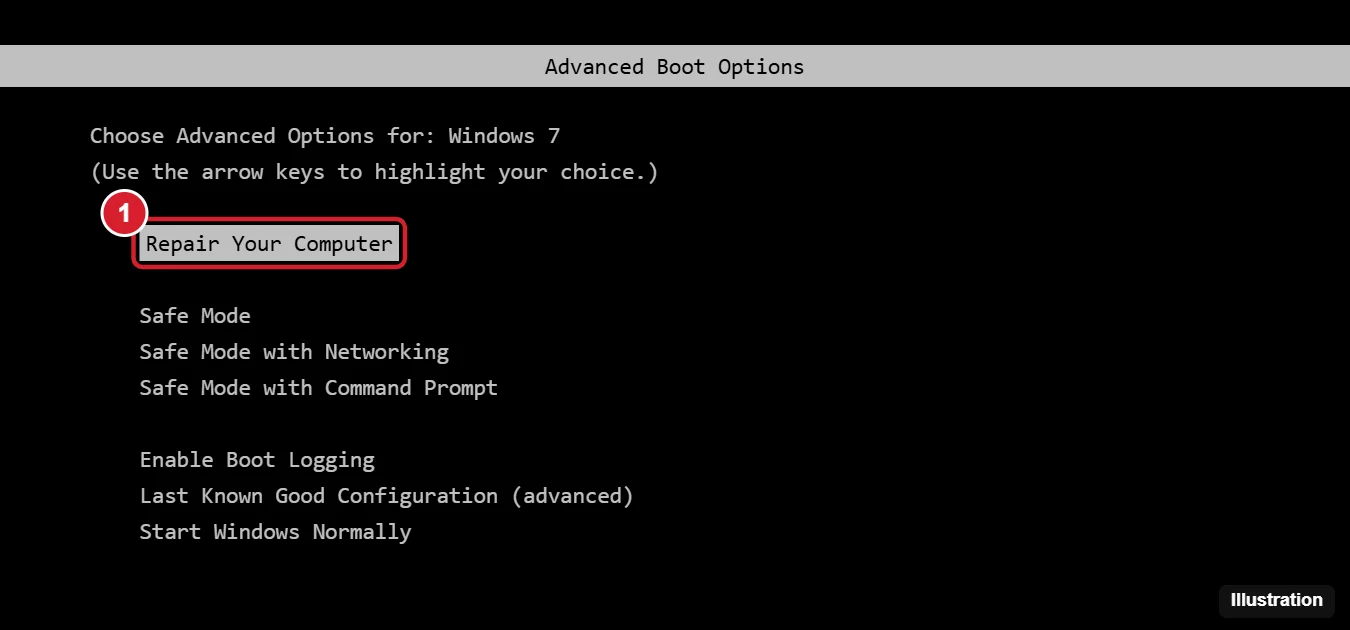
- Restart the PC and press F8 repeatedly as it starts, before the Windows logo appears.
- Choose Repair Your Computer and press Enter.
- Pick your keyboard layout and sign in with an administrator account.
- In System Recovery Options, look for a tool from your PC maker, such as a factory image restore or recovery manager. Follow its prompts to restore the PC to factory condition.
Common manufacturer recovery keys
| PC brand | Key to press at startup |
|---|---|
| HP | F11 |
| Dell | F8, then Repair Your Computer, then Dell Factory Image Restore |
| Lenovo | The Novo or OneKey Recovery button (some models) |
| Acer | Alt + F10 |
| ASUS | F9 |
| Toshiba | 0 (zero) while powering on |
Keys vary by model. If none work, the recovery partition may have been removed, or you may have recovery discs that came with the PC.
Option 2: Reinstall from a Windows 7 disc or USB
- Insert your Windows 7 installation disc or USB drive and restart.
- Press the boot menu key (often F12 or Esc) and choose the disc or USB drive.
- Click Install now, accept the license, and choose Custom (advanced).
- Click Drive options (advanced), delete or format the Windows partition, and continue.
- Enter your product key when asked. It’s often on a sticker on the PC.
After installing, you’ll need to download drivers from your PC maker’s website.
Will a factory reset remove viruses?
Yes, restoring the factory image or doing a clean install removes malware on the Windows drive.
Can I upgrade a Windows 7 PC to Windows 11?
Most Windows 7-era PCs don’t meet Windows 11’s requirements. Check with the PC Health Check app, or consider a newer PC.
Just want to undo recent problems?
If you don’t need a full reset, try System Restore: click Start, type System Restore, and choose an earlier restore point. It keeps your personal files.

Kermit Matthews runs Live2Tech from just outside Philadelphia. He is an IT specialist with over 20 years of experience, from a university help desk to small-business IT, IT management and his own consulting practice, and has written tech guides full time since 2020. Steps are checked against the current software on a real device or the maker’s official documentation. More about Kermit.