If one Windows-only app is all you need, the right install method depends on the chip inside your Mac. An Intel Mac can install Windows 10 in its own partition with Apple’s Boot Camp Assistant. A Mac with Apple silicon (M1 or later) cannot use Boot Camp, so it runs Windows 11 for Arm in a virtual machine, and Parallels Desktop is the option Microsoft names as authorized. Either way, you download Windows from Microsoft and need a license to activate it.
Which Mac do you have?
Click the Apple menu > About This Mac. The first lines tell you what you have:
- Chip: Apple M1 (or M2, M3 and later): an Apple silicon Mac. Use the virtual machine route.
- Processor: Intel Core something: an Intel Mac. You can choose Boot Camp or a virtual machine.
| Intel Mac, Boot Camp | Intel Mac, virtual machine | Apple silicon Mac, virtual machine | |
|---|---|---|---|
| Windows version | Windows 10 (64-bit Home or Pro) | Windows 11 or 10 | Windows 11 for Arm |
| Runs at the same time as macOS | No, you restart to switch | Yes | Yes |
| Best for | Games and heavy apps that need full hardware | Everyday apps alongside macOS | Everyday apps alongside macOS |
| Extra cost | None beyond Windows | VM app (some are free) | VM app (some are free) |
If you are still weighing whether you need full Windows at all, getting Windows on a Mac compares the options in more depth, and running Windows programs on a Mac covers routes that skip a full install.
Download Windows from Microsoft
Only download Windows from Microsoft’s own pages. Copies from other sites can be modified or carry malware.
Windows 10 ISO for Boot Camp
- Open Microsoft’s Windows 10 disc image page in Safari on your Mac.
- Under Select an edition, choose Windows 10 (multi-edition ISO) and click Confirm.
- Pick a language (use the same one you plan to install), then click Confirm again.
- Click the 64-bit download. The link stays valid for 24 hours, and the file lands in your Downloads folder.
The Windows 10 ISO download walkthrough explains the edition choices and how to check the file’s hash.
Windows 11 Arm ISO for an Apple silicon Mac
On Microsoft’s Windows 11 Arm64 download page, go to Download Windows 11 Disk Image (ISO) for Arm-based PCs, select the edition and click Download Now, choose a language and click Confirm, then download the file (the link is valid for 24 hours). Parallels Desktop can also fetch Windows 11 for you, so you may not need this step.
Install Windows 10 on an Intel Mac with Boot Camp
Before you start, check these points from Apple’s Boot Camp requirements:
- A supported Mac: MacBook (2015 to 2017), MacBook Air (2012 to 2020, not M1), MacBook Pro (2012 to 2020, not the 13-inch M1), Mac mini (2012 to 2018), iMac (2012 to 2020), every iMac Pro, and Mac Pro (2013 to 2019).
- Free space: at least 64 GB on the startup disk; Apple recommends 128 GB for a better experience.
- A full 64-bit Windows 10 Home or Pro ISO, not an upgrade version, for a first install.
- A 16 GB or larger USB drive only if your Mac model needs one; Boot Camp Assistant tells you.
- Current macOS updates, an administrator account and the charger connected for a laptop.
The partition size you choose cannot be changed later, so decide before you click Install. A Windows partition that leaves room for your apps and updates saves a full reinstall down the road.
- Back up the Mac with Time Machine. Partitioning changes the startup disk.
- Open Boot Camp Assistant from Applications > Utilities.
- Choose the Windows 10 ISO you downloaded.
- Drag the divider between the macOS and Windows sections to set the Windows partition size.
- Click Install. The Mac restarts into Windows Setup.
- If Setup asks where to install Windows, select the partition named BOOTCAMP and click Format. Do not touch the other partitions, because those hold macOS.
- Finish Windows Setup (language, network, account).
- When the Boot Camp installer opens, follow it to the end and do not click Cancel. It adds Apple’s drivers for the keyboard, trackpad, Wi-Fi, audio and graphics.
To switch between systems, restart and hold the Option (Alt) key, then pick macOS or Windows. On Macs with the Apple T2 Security Chip, Apple says Secure Boot should stay at its default Full Security setting.
If you would rather prepare installation media on a USB drive yourself, creating a Windows 10 bootable USB on a Mac covers it.
Install Windows 11 on an Apple silicon Mac
Microsoft’s page on Windows 11 on Apple silicon Macs names Parallels Desktop as an authorized way to run Windows 11 Pro and Enterprise for Arm on M1, M2 and M3 Macs. Parallels also says Windows 10 for Arm is no longer supported there, so Windows 11 is the version to use.
The Parallels route, as its knowledge base describes it:
- Install Parallels Desktop and open Control Center.
- Click the + button.
- Choose Get Windows 11 from Microsoft and click Continue, then Install Windows. Parallels downloads and sets up Windows for you.
- To use the ISO you downloaded instead, choose Install Windows or another OS from a DVD or image and select the file.
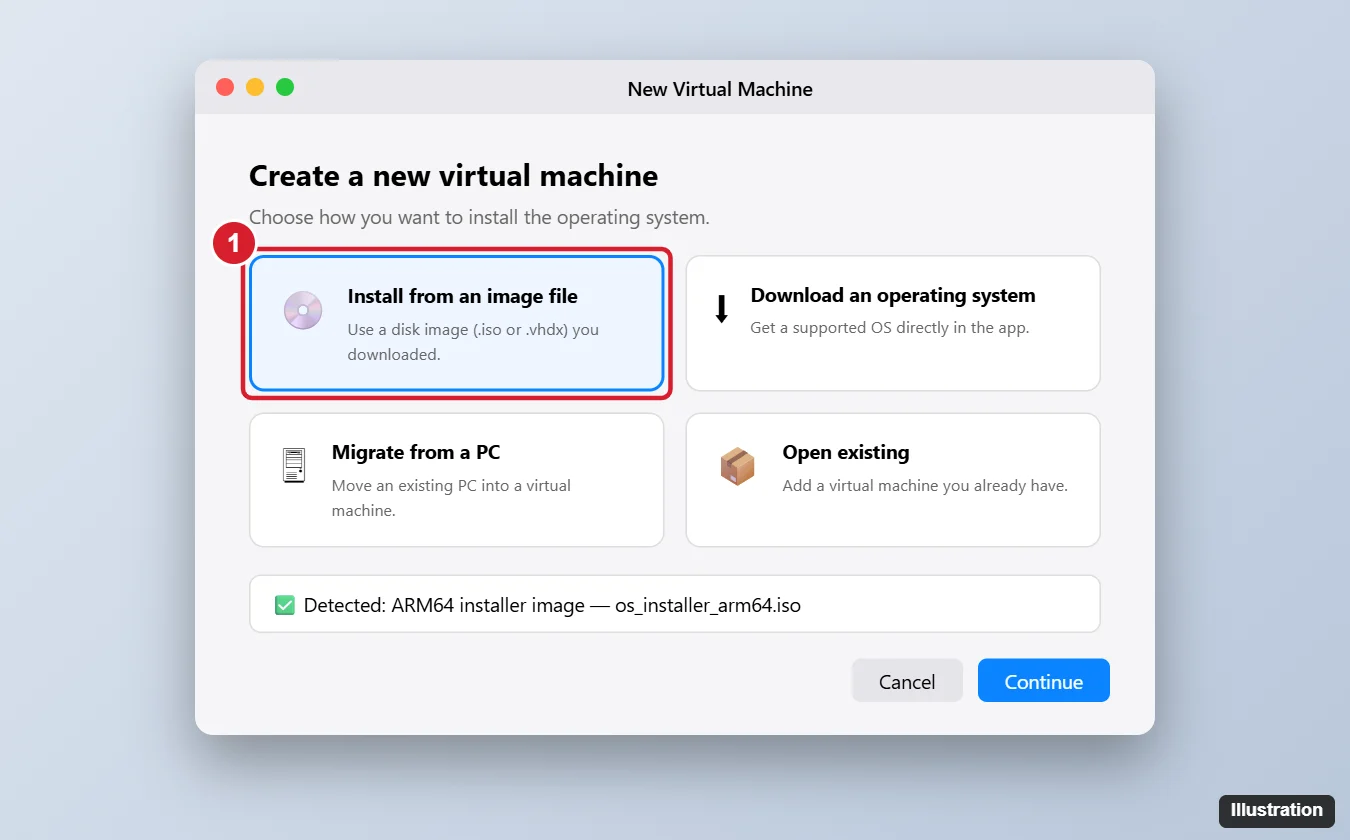
- Accept the license terms and let Windows Setup finish. Parallels then finishes setting up the virtual machine.
Windows 11 for Arm runs most regular Windows apps through built-in emulation, but Microsoft lists limits in a virtual machine on these Macs: some hardware and games or apps that rely on DirectX 12 may not work, 32-bit Arm apps from the Store aren’t supported, and features that need nested virtualization (Windows Subsystem for Linux, Windows Sandbox and virtualization-based security) don’t run. Check the app maker’s support page before you pay for a license.
Other options: VMware Fusion is now free for personal, educational and commercial use according to Broadcom’s licensing note (version 13.5.2 or later); check VMware’s own documentation for Windows 11 on Arm support before relying on it. Microsoft also names Windows 365, which streams a cloud Windows 11 PC to your Mac by subscription, so nothing is installed locally.
Windows 11 on an Intel Mac
Boot Camp only supports Windows 10. If you want Windows 11 on an Intel Mac, use a virtual machine: Parallels says version 18 or later can download and install Windows 11 automatically on Intel Macs and adds the virtual TPM chip Windows 11 requires. For a Windows 10 virtual machine instead, see installing Windows 10 in Parallels on a Mac.
Activate Windows and plan around Windows 10 support
Windows needs a license. Without one it still runs, but it shows an Activate Windows watermark and locks personalization settings. Enter or buy a key in Settings > System > Activation on Windows 11, or Settings > Update & Security > Activation on Windows 10. Microsoft says each Windows 11 Pro installation needs its own license, including one inside a virtual machine, and Windows 11 Pro keys work for both the x64 and Arm versions. The full process is in activating Windows 11 or Windows 10.
Windows 10 reached end of support on October 14, 2025, and consumer Extended Security Updates run until October 12, 2027, according to Microsoft’s end of support notice. A Boot Camp install of Windows 10 still works, but for long-term security updates a Windows 11 virtual machine is the better plan.
If the install goes wrong
- No keyboard, trackpad or Wi-Fi in Windows after Boot Camp: the Windows support software did not finish. In Boot Camp Assistant, download the support software to a 16 GB USB drive formatted MS-DOS (FAT) with a Master Boot Record scheme, then in Windows open the WindowsSupport or BootCamp folder, run setup.exe and choose Repair, as Apple’s support software article describes.
- Boot Camp Assistant is missing or says your Mac is not supported: the Mac has Apple silicon or is older than the supported list. Use a virtual machine.
- Not enough space to partition: free up space until at least 64 GB is available, then try again.
- A Windows app will not start in the Arm virtual machine: look for an Arm version of the app, or ask its maker whether it supports Windows on Arm.
Windows on Mac questions
Can I switch between macOS and Windows without restarting?
Only with a virtual machine. Boot Camp runs one system at a time, so you restart and hold Option to change.
Will installing Windows erase my Mac files?
No, as long as you pick only the BOOTCAMP partition during Setup. A virtual machine stores Windows as a file inside macOS, so your Mac data is untouched. Back up first anyway.
Can I use the same Windows license on my old PC and my Mac?
A retail license can usually move to a new device if you stop using it on the old one. A license that came preinstalled on a PC generally stays with that PC. Check the license terms that came with your copy.
Can I remove Windows from my Mac later?
Yes, with Boot Camp Assistant, and Apple says not to use any other utility. Back up anything on the Windows partition first, because removal erases it. Start up in macOS, quit open apps, open Boot Camp Assistant and click Continue. If Select Tasks appears, choose Remove Windows 10 or later version, then click Continue and Restore. For a virtual machine, delete it in the VM app instead.
How much memory should a Windows virtual machine get?
Windows 11 needs at least 4 GB of RAM, which is Microsoft’s minimum. The VM app usually suggests a setting; give Windows more only if your Mac has memory to spare, because macOS needs its share while both run.
Start with the About This Mac check, then follow the one section that matches your chip.

Kermit Matthews runs Live2Tech from just outside Philadelphia. He is an IT specialist with over 20 years of experience, from a university help desk to small-business IT, IT management and his own consulting practice, and has written tech guides full time since 2020. Steps are checked against the current software on a real device or the maker’s official documentation. More about Kermit.