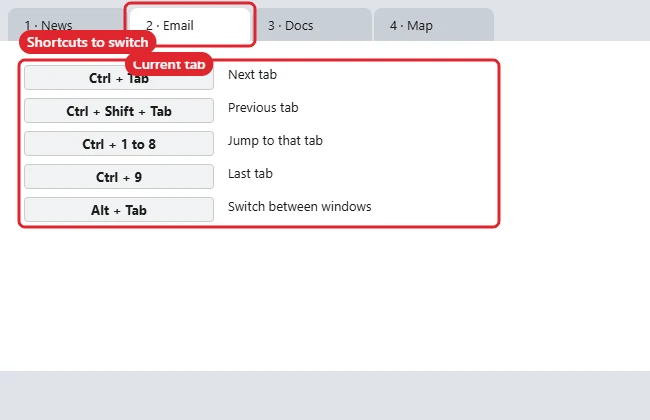
To change tabs on Windows, press Ctrl + Tab to go to the next tab and Ctrl + Shift + Tab to go back. In most browsers, Ctrl + 1 to Ctrl + 8 jump to a specific tab and Ctrl + 9 goes to the last one. To switch between whole windows or apps rather than tabs, use Alt + Tab.
In Firefox you can also fill the tab strip without leaving the page you are on: see how to open links in a new tab in Firefox.
Keyboard Shortcuts for Tabs
| Shortcut | Action |
|---|---|
| Ctrl + Tab | Next tab |
| Ctrl + Shift + Tab | Previous tab |
| Ctrl + Page Down / Page Up | Next / previous tab |
| Ctrl + 1 to 8 | Jump to that tab |
| Ctrl + 9 | Last tab |
| Ctrl + T | New tab |
| Ctrl + W | Close tab |
| Ctrl + Shift + T | Reopen closed tab |
Switch Tabs With the Mouse or Touchpad
- Click the tab at the top of the window.
- Scroll the mouse wheel over the tab strip (works in some browsers).
- Drag a tab out of the window to open it in its own window.
Tabs in Other Places
- File Explorer (Windows 11): Ctrl + Tab and Ctrl + T work like a browser.
- Dialog boxes: Ctrl + Tab moves between tabs such as in Properties windows.
- Windows and apps: Alt + Tab cycles through open windows; Windows + Tab shows Task View.
If Ctrl + Tab Isn’t Enough
- Ctrl + Tab doesn’t work: The page or an extension may capture keys. Click the tab strip or address bar first.
- Too many tabs: Use tab groups or vertical tabs in your browser. See splitting tabs on Windows.
- Working across windows: See seeing all open windows.
Other Tab-Switching Questions
How do I go back to the last tab I used?
Some browsers support this through settings or extensions; Ctrl + Shift + Tab goes to the tab on the left instead.
Do these shortcuts work in Excel?
Excel uses Ctrl + Page Down and Ctrl + Page Up to change worksheets.
Can I change tabs on a laptop without Page Up keys?
Use Ctrl + Tab, or Fn with the arrow keys if your laptop maps Page Up there.

Kermit Matthews runs Live2Tech from just outside Philadelphia. He is an IT specialist with over 20 years of experience, from a university help desk to small-business IT, IT management and his own consulting practice, and has written tech guides full time since 2020. Steps are checked against the current software on a real device or the maker’s official documentation. More about Kermit.