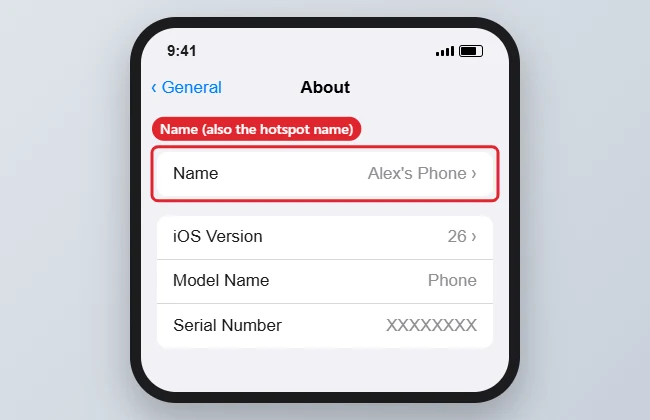
Your iPhone’s Personal Hotspot uses the same name as the phone itself, so there is no separate hotspot name field. Change the device name in Settings, General, About, and the new name appears in the Wi-Fi list on laptops and tablets. The steps are the same on an iPhone 7 and on current models.
Quick Answer
Open Settings, tap General, then About, then Name. Type a new name and tap Done. The Personal Hotspot network now shows that name.
How to Change Your iPhone Hotspot Name
- Open the Settings app.
- Tap General, then About.
- Tap Name at the top.
- Delete the current name, type a new one, and tap Done.
- Open Settings, Personal Hotspot and make sure Allow Others to Join is on.
- On the other device, refresh the Wi-Fi list and look for the new name.
What the Name Changes
| Where it shows | Uses the new name? |
|---|---|
| Personal Hotspot in Wi-Fi lists | Yes |
| AirDrop | Yes |
| Bluetooth devices | Yes |
| Finder or iTunes backups | Yes |
| Find My | Yes, after it syncs |
Troubleshooting
- Old name still showing on a laptop: forget the old network on that device and reconnect.
- Hotspot missing from the list: keep the Personal Hotspot screen open on the iPhone while the other device searches.
- Name will not change: a work or school profile may lock it. Check Settings, General, VPN and Device Management.
- For the hotspot password and other options, see how to share your iPhone internet connection.
Frequently Asked Questions
Can I use a different name only for the hotspot?
No. iOS uses the device name for the hotspot, AirDrop and Bluetooth.
Can I use emoji or apostrophes?
Yes, but some older laptops and routers display special characters oddly. Plain letters and numbers are safest.
Does this work on newer iPhones?
Yes. See how to change the device name on an iPhone 14; the path is identical.
How do I change the hotspot password?
Open Settings, Personal Hotspot and tap Wi-Fi Password.
Summary
- Settings, General, About.
- Tap Name.
- Type a new name and tap Done.
- Reconnect other devices to the renamed hotspot.
- Change the password under Personal Hotspot if needed.

Kermit Matthews is a freelance writer based in Philadelphia, Pennsylvania with more than a decade of experience writing technology guides. He has a Bachelor’s and Master’s degree in Computer Science and has spent much of his professional career in IT management.
He specializes in writing content about iPhones, Android devices, Microsoft Office, and many other popular applications and devices.