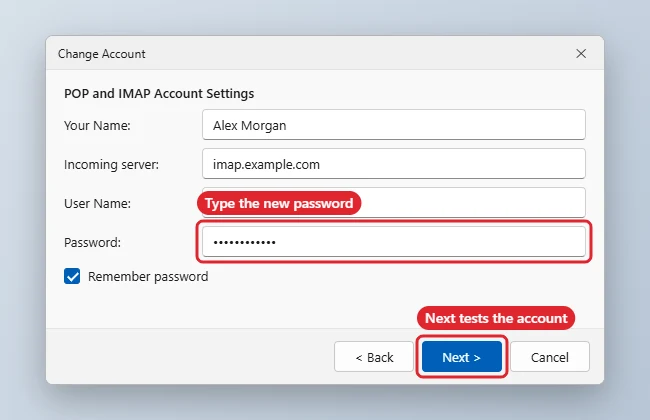
If you changed your email password with your provider, update it in Outlook 2013 so it can keep sending and receiving. Go to File > Account Settings > Account Settings, select the account, click Change, type the new password in the Password box and click Next, then Finish. This updates the password Outlook stores; to change the password itself, use your email provider’s website. Office 2013 reached end of support on April 11, 2023, and it may no longer connect to some services such as Microsoft 365.
Quick Answer
File > Account Settings > Account Settings > select account > Change > new Password > Next > Finish.
Steps for POP and IMAP Accounts
- First change the password on your provider’s website if you haven’t already.
- In Outlook, click File > Account Settings > Account Settings.
- On the Email tab, select the account and click Change.
- Enter the new password in Password and keep Remember password ticked.
- Click Next. Outlook tests the account; when it succeeds, click Close and Finish.
Exchange and Microsoft Accounts
Exchange-type accounts don’t show a password box in Change Account. Outlook asks for the new password when the old one stops working. If it keeps using the old one, open Control Panel > Credential Manager > Windows Credentials, remove entries for your mail server, and restart Outlook to be asked again.
Which Method Applies
| Account type | Where to update |
|---|---|
| POP or IMAP | Account Settings > Change > Password |
| Exchange / work account | Password prompt, or Credential Manager |
| Accounts using app passwords | Create a new app password with your provider and enter that |
| Outlook data file (.pst) password | Account Settings > Data Files > Settings > Change Password |
Moving to another app? See exporting Outlook 2013 contacts.
Troubleshooting
- Keeps asking for the password: Your provider may require two-step sign-in, which older Outlook versions may not support; an app password may help if your provider offers one.
- Test fails on Next: Check the server names and ports with your provider.
- Setting up mail somewhere new: See setting up email on Windows 10.
- Finding saved credentials: See finding saved credentials in Windows.
- Other Outlook 2013 settings: See turning off spell check.
Frequently Asked Questions
Can I change my email password from Outlook?
No. Outlook only stores it. Change the password with your email provider.
Will I lose my emails?
No. Updating the stored password doesn’t affect your messages.
Should I upgrade from Outlook 2013?
It no longer gets security updates, so a supported version is safer.
Summary
- Change the password with your provider.
- Open File > Account Settings > Account Settings.
- Select the account, click Change and enter the new password.
- Use Credential Manager for Exchange accounts.

Kermit Matthews is a freelance writer based in Philadelphia, Pennsylvania with more than a decade of experience writing technology guides. He has a Bachelor’s and Master’s degree in Computer Science and has spent much of his professional career in IT management.
He specializes in writing content about iPhones, Android devices, Microsoft Office, and many other popular applications and devices.