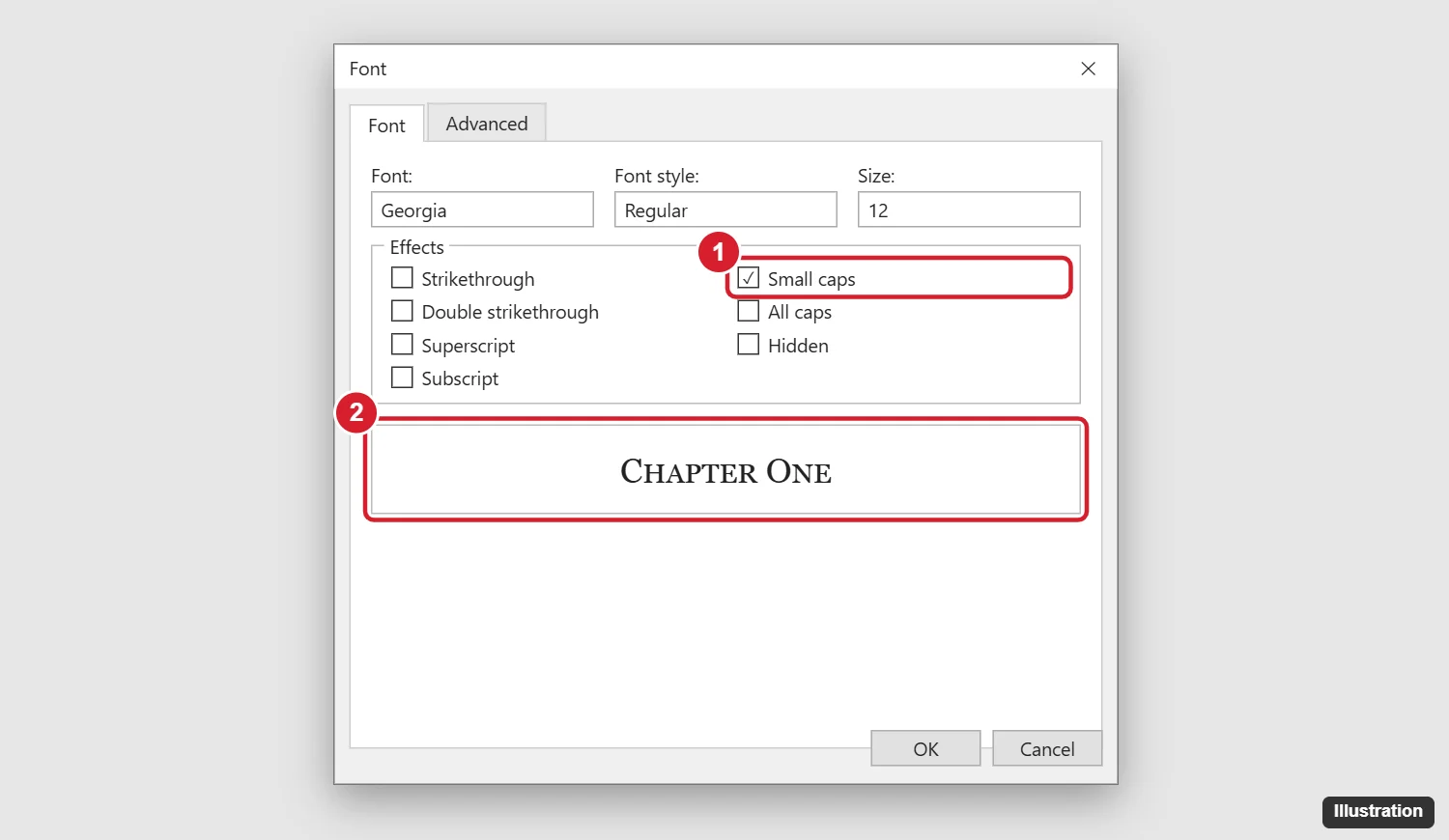
To type in small caps in Word 2013, select the text and press Ctrl + Shift + K. Press it again to turn small caps off. You can also press Ctrl + D (or click the small arrow in the Font group on the Home tab), check Small caps under Effects, and click OK. Small caps shows lowercase letters as smaller capital letters, while capital letters you typed stay full size.
These steps also work in Word 2016, 2019, 2021, 2024, and Microsoft 365. Here’s how to use small caps in headings, styles, and on a Mac.
Method 1: Use the keyboard shortcut
- Select the text, or place your cursor where you’re about to type.
- Press Ctrl + Shift + K.
On a Mac, press Command + Shift + K.
Method 2: Use the Font dialog
- Select the text.
- Press Ctrl + D, or click the dialog launcher in the corner of the Font group on the Home tab.
- Under Effects, check Small caps.
- Check the Preview, then click OK.
Small caps vs. All caps
| Effect | Shortcut | Result for “Chapter One” |
|---|---|---|
| Small caps | Ctrl + Shift + K | Chapter One (lowercase shown as small capitals) |
| All caps | Ctrl + Shift + A | CHAPTER ONE (all full-size capitals) |
| Change case | Shift + F3 | Actually changes the letters |
Small caps and All caps only change how text looks. The letters underneath stay the same, so spell check and search still work normally.
Use small caps in a style
To make every heading use small caps:
- On the Home tab, right-click a style like Heading 1 and choose Modify.
- Click Format > Font, check Small caps, and click OK.
- Click OK again. All text with that style updates.
Tips for good-looking small caps
- Choose a font with true small caps for professional documents. Word creates small caps by shrinking capitals, which can look thin in some fonts.
- Use small caps for acronyms in body text, like nasa or usa, so they don’t stand out too much.
- Legal and academic styles often use small caps for names, court cases, or the first words of a chapter.
Frequently asked questions
Why doesn’t small caps change my text?
Small caps only affects lowercase letters. If you typed the text in all capitals, it stays full size. Retype it in lowercase, or use Shift + F3 to change the case first.
How do I remove small caps?
Select the text and press Ctrl + Shift + K again, or uncheck Small caps in the Font dialog.
Does small caps work in Word for the web?
Word for the web can display small caps but has limited options to apply them. Use the desktop app for full control.
Can I use small caps in Google Docs?
Google Docs doesn’t have a small caps effect. You can use a font that includes small caps, or convert text to uppercase and shrink it manually.

Kermit Matthews is a freelance writer based in Philadelphia, Pennsylvania with more than a decade of experience writing technology guides. He has a Bachelor’s and Master’s degree in Computer Science and has spent much of his professional career in IT management.
He specializes in writing content about iPhones, Android devices, Microsoft Office, and many other popular applications and devices.