A Google One plan can be shared with up to five other people in your Google family group at no extra cost. Everyone gets access to the shared storage, but each person’s files, photos, and email stay private. You need a Google One membership and a family group to turn sharing on.
Quick Answer
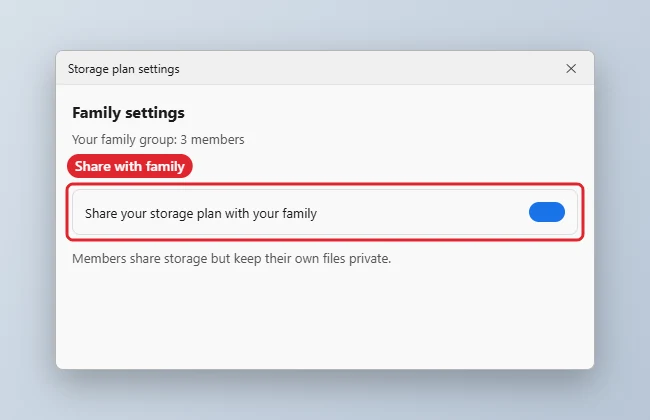
Go to one.google.com, open Settings, choose Manage family settings, and turn on Share Google One with family. Invite family members first if you do not already have a family group.
- Sign in at one.google.com with the account that pays for Google One.
- Open Settings and select Manage family settings.
- Create a family group or invite members if you have not already.
- Turn on Share Google One with family.
- Family members accept the invitation and the shared storage appears in their Google One page.
Family Sharing Basics
| Item | Details |
|---|---|
| Members | You plus up to five others |
| Privacy | Each person’s files stay private |
| Storage | Shared from the plan’s total |
| Cost | Included in the plan |
| Free 15 GB | Each account keeps its own free storage |
Troubleshooting
- The sharing option is missing: some promotional or work accounts cannot share. Check your plan in Google One.
- A member cannot join: they may already be in another family group, or their account type may not be supported.
- To free up room first, see how to empty Google trash.
Frequently Asked Questions
Can family members see my files?
No. They share the storage space, not the content.
What happens if I stop sharing?
Members lose access to the extra space. Files over their free limit stay, but they may not be able to add more until they free space.
Can I share a plan I get through a device offer?
Some offers cannot be shared. Check the plan details in Google One.
Summary
- Open Google One Settings.
- Choose Manage family settings.
- Create or confirm a family group.
- Turn on Share Google One with family.

Kermit Matthews runs Live2Tech from just outside Philadelphia. He is an IT specialist with over 20 years of experience, from a university help desk to small-business IT, IT management and his own consulting practice, and has written tech guides full time since 2020. Steps are checked against the current software on a real device or the maker’s official documentation. More about Kermit.