Brainstorm with a purpose: an AirTag’s name is the label you see in Find My, so the best names are short, funny and still tell you at a glance which bag, key ring or case the tag is on. The rename steps for iPhone and iPad come first, then a few tips for picking a name that stays useful, and then original name ideas sorted by object. None of them needs your real name, phone number or address, and none should.
Change an AirTag’s name and emoji on iPhone or iPad
You pick a name when you first pair an AirTag, but you can change it whenever you like. Apple’s current iPhone User Guide lists these steps; on an iPad, look for the same options in Find My:
- Open the Find My app.
- Tap Items, then tap the AirTag whose name or emoji you want to change.
- Tap the More or Info button shown for the item. Apple’s current guide calls it the More button; some layouts show a small “i” instead.
- Tap Change Name and Emoji. Older versions of Find My called this option Rename Item, which is the label in the first illustration below.

- Choose a name from the list, or choose Custom Name to type your own name and select an emoji.
- Tap the Done checkmark to save.
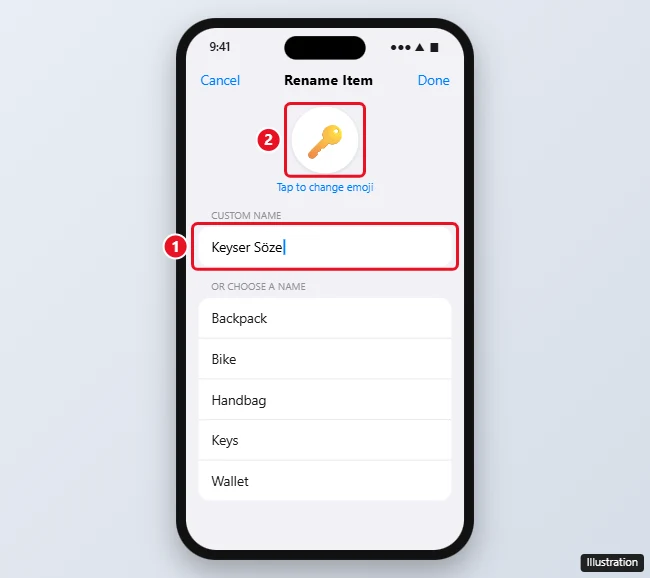
Both illustrations show an older layout, so the screens on your device may look a little different. The full instructions are on Apple’s Add an AirTag page in the iPhone User Guide, which also covers the naming screen you see during setup. If the tag isn’t in your Items list yet, start with adding a device or item to Find My, and you’ll get the same name picker as part of pairing.
Renaming from a Mac
Apple’s Find My guide for the Mac explains how to see an item’s details (click Items, select the item, click the More or Info button shown for the item, then scroll to the bottom), but it doesn’t describe a rename option. If you see one on your Mac, it works like the iPhone version. If you don’t, rename the AirTag on your iPhone or iPad, where Apple documents the steps. Because the AirTag is registered to your Apple Account, it’s simplest to treat the iPhone as the place where names get changed.
What makes a good AirTag name
A funny name is great, but it still has to do a job when you’re standing at the door looking for your keys. A few rules keep it useful:
- Put the object in the name. “Key Player” is a joke and a label at once. A pun with no hint of the object (“Sir Fluffington”) is fun until you own five AirTags and can’t remember which one is the gym bag.
- Keep it short. Two or three words read cleanly in a list. Apple doesn’t publish a character limit, so let readability decide.
- Use the emoji as a second label. A key emoji, a suitcase or a bike makes the right tag easier to spot on the map.
- Use a pattern for several tags. If your household has matching suitcases, a shared theme with a color or number (“Big Blue Roller”, “Small Blue Roller”) beats two near-identical jokes.
- Leave out personal details. Skip your full name, phone number and address. If something gets lost, Apple’s Mark an item as lost steps let you show a message with your phone number or email address, and a finder can view that message on a supported device. That’s the right place for contact details, not the name.
- Plain names are fine too. “Blue Backpack” or “Spare Keys” is a perfectly good name if you’d rather not be clever.
Names for keys
- Key Player: the one item you can’t leave without.
- Lock Star: for keys that deserve a little fame.
- Jangles: named for the sound you listen for in every coat pocket.
- Pocket Jingle: the same idea, a bit more musical.
- Key Lime: pair it with a green emoji.
- Spare Me: for the spare set that always goes missing.
- The Door Opener: says exactly what it does.
- Cushion Regular: for keys that keep ending up in the sofa.
Names for wallets and purses
- Pocket Bank: small branch, short opening hours.
- Receipt Museum: for the wallet that holds everything but cash.
- Coin Castle: good for a change purse.
- Snack Fund: honest about where the money goes.
- Fold and Hold: a neat fit for a bifold wallet.
- Purse Things First: a pun you can say out loud.
- Mostly Coupons: for the bargain hunter.
- Budget Buddy: friendly, short and clear.
Names for luggage and travel bags
Keep luggage names cheerful and plain. Skip anything about what’s inside the bag; a plain, cheerful name is easier to read at a busy baggage belt.
- Carousel Champion: first off the baggage belt, hopefully.
- Rolling Along: for a rolling suitcase.
- Overpacked Again: for the bag that never quite zips.
- Souvenir Storage: the return-trip suitcase.
- Socks Abroad: because something has to travel light.
- Zip and Go: a good weekend-bag name.
- Roll Call: handy if you number several bags (“Roll Call 1”, “Roll Call 2”).
- The Big Blue One: funny because it’s so practical.
Names for backpacks and day bags
- Everything Bag: for the bag that carries everything.
- Laptop Sandwich: for a bag with a padded laptop sleeve.
- Strap Happy: short and bright.
- Water Bottle Garage: for the side-pocket hero.
- Commute Companion: for the bag that rides along every day.
- Zipper Zone: for a bag with too many pockets.
- Snack Satchel: for a day bag on long outings.
Names for a car
Use these for a car that’s yours. Apple says AirTags shouldn’t be used to track property that doesn’t belong to you.
- Where Did I Park: the question the tag answers.
- Parking Puzzle: for big lots and garages.
- Horn Section: a car with a dramatic horn.
- Cup Holder HQ: for the car that doubles as an office.
- Wheel Deal: a pun that still says “car”.
- Road Trip Ready: for the family wagon.
Names for a bike or scooter
- Pedal Pal: friendly and clear.
- Spoke Too Soon: for the bike you said you’d ride more often.
- Handlebar Hero: works for bikes and scooters.
- Bell Ringer: for a bike with a loud bell.
- Scoot Scoot: easy to spot for a scooter.
- Downhill Dash: for the fast one.
- Tire-d Out: for the bike that lives in the garage.
Names for everyday things
- TV remote: Sofa Explorer, Channel Chaser, Cushion Diver
- Umbrella: Drizzle Shield, Puddle Partner, Brella Buddy
- Gym bag: Sneaker Storage, Rep Holder, Stretchy Things
- Laptop bag: Desk To Go, Charger Cave, Work Tote
- Headphones case: Earbud Igloo, Quiet Box, Tune Pod
- Camera bag: Lens Lunchbox, Shutter Shelter
- Instrument case: Strum Box, Note Keeper
One-word names
If you’d rather keep it short, these work on almost anything: Breadcrumb, Homebound, Lighthouse, Weathervane, Waypoint, Lantern, Magnet, Homeward, Roundtrip (for a bag that always comes home) and Which Way Home.
What an AirTag is for
Apple describes AirTag as a way to keep track of and find your belongings, and its AirTag page suggests attaching one to everyday items like your keys or a backpack. Its unwanted tracking page is direct: AirTags and other Find My accessories “should not be used to track people, and should not be used to track property that does not belong to you.” The same page explains that an iPhone can show an alert such as “AirTag Found Moving With You” when an AirTag separated from its owner travels with someone else. That’s why every name on this page is for an object, and why a tag’s name is never a good place for a joke about who carries it.
If a tag stops updating its location, the name isn’t the cause: see what to do when an AirTag shows as not reachable.
AirTag name answers
Can I change the name more than once?
Yes. Repeat the steps above whenever you move a tag to a different item. Moving a tag from your suitcase to your camera bag is a good moment to update both the name and the emoji, so the map shows the right thing.
Can I pick only an emoji and skip the words?
Apple’s steps pair a typed name with a selected emoji, and Apple doesn’t say whether an emoji-only name is accepted. A short word plus the emoji is the safer choice, because the word stays readable even where the emoji is small.
Is the name the same as engraving?
No. The name lives in Find My and can change anytime. Engraving is printed on the tag: Apple’s AirTag page says you can personalize an AirTag with initials, an emoji or both when you buy it from the Apple website or the Apple Store app. For ideas that fit the small space, see these AirTag engraving ideas.
Do people I share an AirTag with see the name?
Apple lets you share an AirTag with up to five people. Its sharing page doesn’t spell out how the name appears to them, so choose a name you’d be happy for the whole group to read.
Naming your AirPods too? Funny name ideas for AirPods has a separate list and the rename steps for earbuds.

Kermit Matthews runs Live2Tech from just outside Philadelphia. He is an IT specialist with over 20 years of experience, from a university help desk to small-business IT, IT management and his own consulting practice, and has written tech guides full time since 2020. Steps are checked against the current software on a real device or the maker’s official documentation. More about Kermit.