If your Windows 10 PC still connects at an older Wi-Fi standard after a new router or laptop, one part in the chain is holding it back. Microsoft’s own wording is that “Windows 10 supports Wi-Fi 6 and WPA3.” To see which standard you’re using now, check what your adapter reports with one command, then compare it with the connection you actually get and with your router.
What you see and which part is limiting
Two quick checks below fill in the left column; the row you land on tells you which part to fix.
| What you see | Part that’s limiting | What to do |
|---|---|---|
| No 802.11ax under Radio types supported | The adapter, or its driver | Update the driver first; if it still isn’t listed, check the PC maker’s spec for the adapter |
| 802.11ax listed, but the connection shows an older standard | The router, its settings, or the network you joined | Check the router maker’s documentation for Wi-Fi 6 support and its wireless settings |
| 802.11ax disappeared after a driver change | The driver | Reinstall the maker’s driver (see the driver steps below) |
| A 6 GHz network never appears | Windows 10 itself | See the Wi-Fi 6E section: Intel ties 6 GHz to Windows 11 |
See what your adapter and driver report
Microsoft’s Faster and more secure Wi-Fi in Windows page describes Wi-Fi 6 as “also known as IEEE 802.11ax High Efficiency (HE),” the sixth generation of the Wi-Fi standard. For Windows 10 it lists requirements (a router and a wireless adapter that support Wi-Fi 6/6E, and Windows 10 itself), not a setting to turn on.
Microsoft’s page gives a quick test that answers the adapter question in one step:
- Open Command Prompt (or Terminal).
- Type
netsh wlan show driversand press Enter. - Look next to Radio types supported. If it includes 802.11ax, Microsoft says the adapter supports Wi-Fi 6/6E.
- While you’re there, look under Authentication and cipher supported in infrastructure mode for WPA3 Personal, Microsoft’s check for WPA3 support.
The command is listed in Microsoft’s netsh wlan command reference, which says it “Lists properties and details of installed wireless LAN drivers.” Because it reads from the installed driver, an adapter with a missing or generic driver may report less than the hardware can do.
A model name alone isn’t proof. Intel, for example, sells both Wi-Fi 6 and Wi-Fi 6E adapters under similar AX names, so check the exact model on the maker’s specification page.
Check which standard you connected with
The adapter can support 802.11ax while your current connection still uses an older standard. Open Settings > Network & Internet > Wi-Fi and select your network to see its properties. On many PCs that page lists the Wi-Fi standard and link speed, though Microsoft doesn’t document the exact Windows 10 labels.
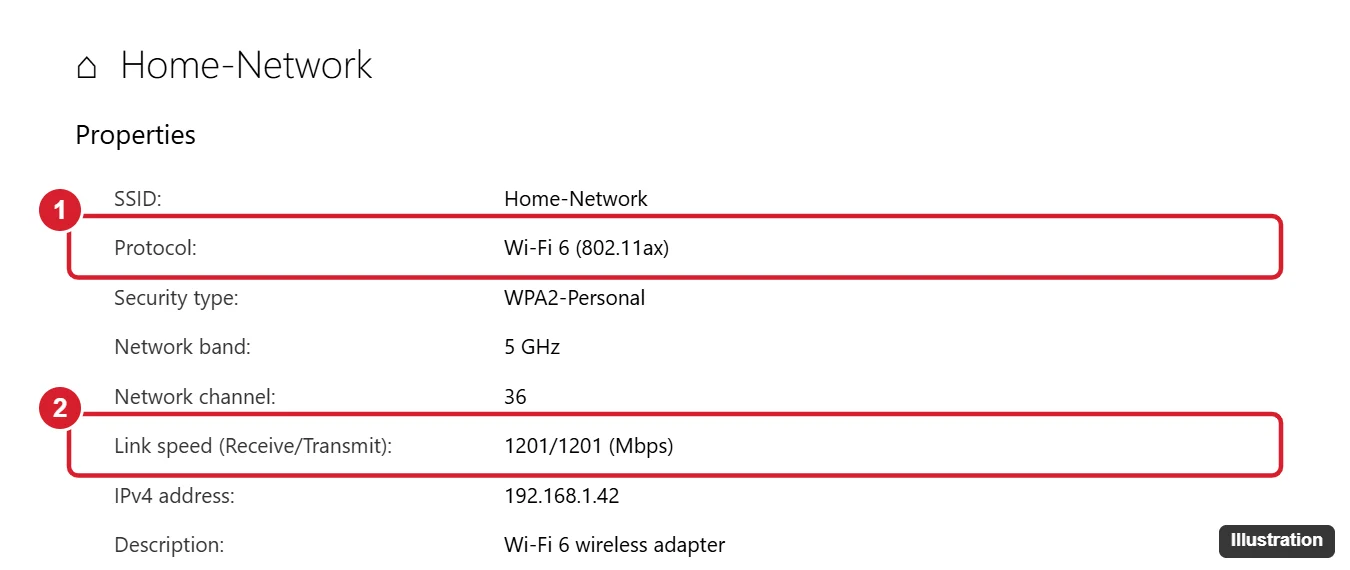
The illustration shows an example layout; your properties page may arrange or name the lines differently. Microsoft’s reference also lists netsh wlan show interfaces, which shows the details of the Wi-Fi connection you’re on if you prefer the command line.
Fix the part that falls short
The driver
Microsoft says, “The best way to get driver updates in Windows is automatically using Windows Update.” On Windows 10 that’s Settings > Update & Security > Windows Update > Check for updates, the same route Microsoft gives for keeping Windows 10 current. Microsoft’s page on updating drivers through Device Manager adds that a driver can also be updated there, either automatically or manually; your Wi-Fi adapter is listed under Network adapters.
If Windows Update doesn’t offer anything newer, get the driver from your PC maker’s support page for your exact model, or from the adapter maker. Avoid driver-download sites and driver updater apps. If the PC can’t get online without the driver, follow installing a Wi-Fi driver on Windows 10 without internet; if the current driver is broken, reinstalling the Wi-Fi driver on Windows 10 covers a clean reinstall.
The adapter’s own settings
Some adapters expose a wireless mode setting on the Advanced tab of their Properties in Device Manager. ASUS’s FAQ on checking Wi-Fi 6 support describes looking at the wireless mode there. Names and values differ by adapter, so change it only if your adapter or PC maker documents the setting, and set it as the maker says. If there’s no such setting, leave the adapter alone.
The router
Microsoft’s advice for the router is to check the documentation that came with it or visit the router manufacturer’s website. That’s where you’ll find whether the model supports Wi-Fi 6, which wireless mode to choose for each band, and how to update its firmware. Router menus vary too much between makers and models to give one path.
The adapter itself
If the adapter doesn’t list 802.11ax even with the maker’s newest driver, Windows can’t add Wi-Fi 6 to it. A different internal or USB adapter that the maker lists as Wi-Fi 6 and Windows 10 compatible is the way forward; ask the PC maker which options fit a laptop.
Windows 10 after October 14, 2025
Microsoft’s Windows 10 end of support page says: “Windows 10 has reached the end of support on October 14, 2025. At this point technical assistance, feature updates and security updates is no longer provided.” It adds that the consumer Extended Security Updates (ESU) program “can protect your Windows 10 device till October 12, 2027.” Microsoft’s Wi-Fi page still lists Wi-Fi 6 support for Windows 10, but newer wireless features go to Windows 11: the same page says Wi-Fi 7 is available starting with Windows 11, version 24H2.
Wi-Fi 6E and the 6 GHz band
Wi-Fi 6E is Wi-Fi 6 extended to the 6 GHz band. Intel’s article on an AX210 adapter that can’t connect to a 6 GHz band spells out the bands: “Wi-Fi 6 devices support 2.4 GHz and 5 GHz bands, and Wi-Fi 6E (or higher) devices support 2.4 GHz, 5 GHz, and 6 GHz bands.” It also says “Wi-Fi 6 (or lower) devices do not support the 6 GHz band.” Its fix asks for the latest Wi-Fi drivers (version 22.70.0 or later) and the latest version of Windows 11.
Microsoft’s Wi-Fi page doesn’t say Windows 10 can use the 6 GHz band, so if a 6 GHz network is the goal, plan on a PC running a current version of Windows 11. Ignore pages that offer modified drivers to force it on Windows 10.
When it still shows an older standard
- If the Wi-Fi adapter is switched off or missing, start with enabling the Wi-Fi adapter in Windows 10.
- If the connection drops or misbehaves after driver changes, resetting a network adapter in Windows 10 clears its settings.
- If you’re connected with Wi-Fi 6 but speeds are still disappointing, the signal and power suggestions in improving Wi-Fi speed on a laptop (written for Windows 11) are a reasonable next check. Skip “booster” apps and registry tweaks.
Wi-Fi 6 on Windows 10 answers
My adapter supports WPA3. Does that mean it supports Wi-Fi 6?
No. Microsoft checks them separately: 802.11ax under Radio types supported for Wi-Fi 6, and WPA3 Personal under the authentication line for WPA3. An adapter can have one without the other.
Run netsh wlan show drivers first. Its answer tells you whether to look at the adapter, the driver or the router next.

Kermit Matthews runs Live2Tech from just outside Philadelphia. He is an IT specialist with over 20 years of experience, from a university help desk to small-business IT, IT management and his own consulting practice, and has written tech guides full time since 2020. Steps are checked against the current software on a real device or the maker’s official documentation. More about Kermit.