Configure a Custom Location on the proxy host: Nginx Proxy Manager (NPM) sends one path, such as /api/, to a different server and port while the rest of the domain keeps its usual target. Whether the app receives /api/users or just /users depends on one Nginx rule about a URI on the forward address, covered below with placeholder hosts (example.com, 192.168.1.20).
What a custom location does
A proxy host in NPM answers for a domain, such as example.com, and forwards it to one service. A custom location carves out a path on that same host and gives it its own Scheme, Forward Hostname / IP and Forward Port. A request for example.com/api/ can go to an API on 192.168.1.20:3000 while example.com/ still reaches the main app set on the host’s Details tab.
NPM’s documentation site doesn’t describe custom locations, so the labels here come from the strings in NPM’s own interface and the behavior from its source code on GitHub. Your version may show them slightly differently.
What you need first
- A working NPM install. The admin interface listens on port 81 by default, as the Nginx Proxy Manager setup page shows in its compose example. NPM’s current interface includes a first-run screen that asks you to create your admin account; whatever you sign in with first, set a strong, unique password.
- An existing proxy host for the domain. Locations are added to a host, not created on their own.
- The address and port of each service. If the service runs in Docker on another Linux machine and won’t start, sort that out first (see fixing the docker.service unit not found error).
- Only ports 80 and 443 need forwarding on your router. NPM’s guide lists those two; keep port 81 on your local network.
Add a custom location to a proxy host
- Open the NPM admin interface and go to Hosts > Proxy Hosts.
- Open the host for your domain for editing (the menu beside the host).
- Switch to Custom Locations and click Add Location.
- Type the path to match, such as /api/, in the location’s path field.
- Pick the Scheme the service itself speaks, usually http inside a home network.
- Enter the Forward Hostname / IP, such as 192.168.1.20, and the Forward Port, such as 3000.
- Save, then open https://example.com/api/ in a browser to test it.
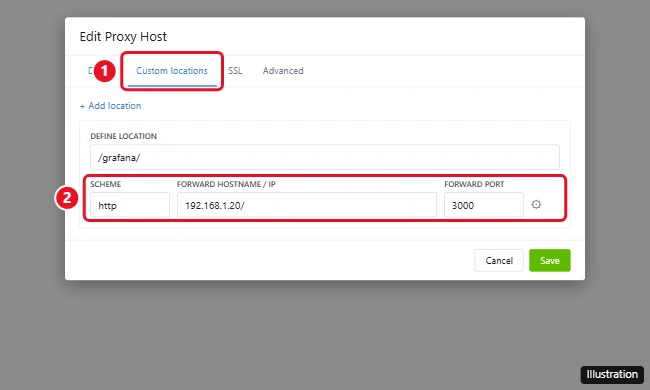
Anything that doesn’t match a location still goes to the forward address on the Details tab.
Keep the path or strip it
NPM turns each location into an Nginx location block with a proxy_pass line. Its source code shows that if the Forward Hostname / IP field contains a slash, the part after the host becomes a URI on that line. The nginx.org proxy_pass documentation then decides what happens: with a URI, the part of the request that matched the location is replaced by that URI; without one, the request path is passed on unchanged.
| Location | Forward Hostname / IP | Request | The app receives |
|---|---|---|---|
| /api/ | 192.168.1.20 | /api/users | /api/users (path kept) |
| /api/ | 192.168.1.20/ | /api/users | /users (/api/ replaced by /) |
NPM doesn’t document this form; if your version rejects a slash in the field, put the full location block with its own proxy_pass in the location’s Custom Nginx Configuration instead.
Keep the path when the app has a base URL or sub-path setting that matches the location. Strip it when the app expects to live at the root. A stripped app can still build links that point to the root, so this suits APIs and simple tools best. End the location and any forward path the same way (both with a trailing slash, or neither) so the replacement doesn’t produce doubled or missing slashes.
Custom Nginx configuration for one location
Each location can also carry its own Custom Nginx Configuration. NPM’s location template places that text at the top of the generated location block, before its own proxy_set_header and proxy_pass lines, so write only directives that are valid inside a location, such as proxy_read_timeout 300s; or a proxy_set_header line. NPM’s own placeholder warns that you add it at your own risk.
For WebSockets, turn on Websockets Support for the host first. NPM’s location template adds the Upgrade and Connection headers when that option is on, which matches what the nginx.org WebSocket proxying page requires, because those headers aren’t passed to the backend on their own. By default Nginx closes the connection if the backend sends no data for 60 seconds, so a longer proxy_read_timeout helps dashboards that sit quiet.
Fix 404s, 502s and redirect loops
- 404 Not Found: the app received the path in the form it didn’t expect. Add or remove the trailing slash in the forward field (see the table).
- Blank page or no styling: the app loads its scripts from the root. Set its base URL option, or move it to a subdomain.
- 502 Bad Gateway: NPM can’t reach the service. Check the scheme, address and port, and that the service is running. A port test from another computer helps (see checking whether a port is open on Windows).
- Redirects to an internal address: set the app’s external URL to the public address.
- The whole host goes offline after saving: NPM tests the generated file and, according to its source, renames a failing config to .err under /data/nginx/proxy_host/ inside the container. Remove the custom configuration you just added and save again.
Custom location or subdomain
A subdomain such as app.example.com works with almost any app, because the app sits at its own root. A custom location lives inside one proxy host and inherits its options (NPM’s config writer copies host settings such as Force SSL and Websockets Support onto each location), which suits APIs, tools with a base URL option, or setups with a single domain. If an app keeps breaking on a sub-path, a subdomain is usually the quicker fix. To restrict who reaches a host, use an access list in Nginx Proxy Manager.
Custom location questions
Can a location point to a different machine?
Yes. Each location has its own address and port, so one domain can front services on several machines on your network. If you manage those machines from a Windows PC, the methods for connecting to a server on Windows 10 help you reach them.
Can I use a regular expression as the location?
Nginx supports regex locations with ~ and ~*, but nginx.org says proxy_pass must then be given without a URI. Keep custom locations to plain prefixes unless you are comfortable writing the full block yourself.
Where can I see the config NPM generated?
Inside the container, under /data/nginx/proxy_host/, one file per host numbered by its ID, as NPM’s config writer on GitHub shows. Reading it is the quickest way to confirm what a location really does.

Kermit Matthews runs Live2Tech from just outside Philadelphia. He is an IT specialist with over 20 years of experience, from a university help desk to small-business IT, IT management and his own consulting practice, and has written tech guides full time since 2020. Steps are checked against the current software on a real device or the maker’s official documentation. More about Kermit.