On a German keyboard, the Print Screen key is labeled Druck (often Druck S-Abf or Druck/S-Abf), usually at the top right next to F12. It works exactly like Print Screen: press Windows + Druck to save a full-screen screenshot to Bilder (Pictures) > Screenshots, Alt + Druck to copy the active window, or Windows + Umschalt (Shift) + S to select an area. The Shift key is marked ⇧ or Umschalt, and Ctrl is Strg.
German keyboard screenshot shortcuts
| Press | English equivalent | What it does |
|---|---|---|
| Druck | Print Screen | Windows 11: opens the Snipping Tool. Windows 10: copies the full screen. |
| ⊞ + Druck | Windows + Print Screen | Saves the full screen to Bilder > Screenshots |
| Alt + Druck | Alt + Print Screen | Copies the active window |
| ⊞ + ⇧ Umschalt + S | Windows + Shift + S | Select an area, window, or full screen |
| Strg + V | Ctrl + V | Pastes the screenshot |
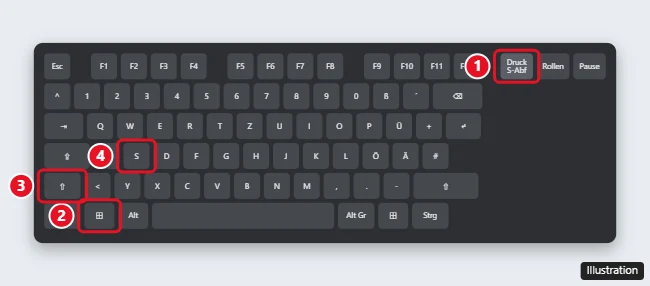
How to take a screenshot with a German keyboard
- Press ⊞ Windows + ⇧ Umschalt + S. The screen dims.
- Choose Rechteck (Rectangle), Fenster (Window), Vollbild (Full screen), or Freihand (Freeform) if Windows is in German.
- Drag to select the area.
- Paste with Strg + V, or click the notification to edit and save it.
Laptops with a German layout
- On many laptops, Druck shares a key with another function. Press Fn + Druck, or Fn + ⊞ + Druck to save a file.
- Some compact keyboards put Druck on the Einfg (Insert) or Entf (Delete) key as a second function.
- If you can’t find it, ⊞ + ⇧ + S always works.
Where screenshots are saved
Screenshots taken with ⊞ + Druck go to Bilder > Screenshots (Pictures > Screenshots if Windows is in English). Screenshots taken with Druck or Alt + Druck stay on the clipboard until you paste them.
Using a German keyboard with English Windows (or the reverse)
The physical key label doesn’t matter. Druck always acts as Print Screen, Strg as Ctrl, and Umschalt as Shift, no matter which language Windows uses. The Y and Z keys are swapped on German keyboards, but that doesn’t affect screenshot shortcuts.
For every screenshot method, including the Snipping Tool, see how to take a screenshot on Windows 11 and 10.
Frequently asked questions
What does “S-Abf” mean on the Druck key?
It stands for Systemabfrage, the German name for SysRq, a legacy function most people never use.
Why does Druck open the Snipping Tool?
Windows 11 does this by default. Turn it off in Settings > Accessibility > Keyboard (Einstellungen > Barrierefreiheit > Tastatur) under the Print Screen option.
How do I screenshot on a Mac with a German keyboard?
Press ⇧ + ⌘ + 3 for the full screen or ⇧ + ⌘ + 4 to select an area.

Kermit Matthews runs Live2Tech from just outside Philadelphia. He is an IT specialist with over 20 years of experience, from a university help desk to small-business IT, IT management and his own consulting practice, and has written tech guides full time since 2020. Steps are checked against the current software on a real device or the maker’s official documentation. More about Kermit.