Send the file from WhatsApp on the laptop: open the chat, select the attach icon, choose Document and pick the Word file. If WhatsApp isn’t installed, WhatsApp Web in your browser does the same job once it is linked to your phone. These steps follow WhatsApp’s own Help Center for WhatsApp for Windows and WhatsApp Web, plus Word in current Microsoft 365 apps.
Where to start depends on your situation
| Your situation | Best route |
|---|---|
| WhatsApp is already on the laptop | Attach > Document in the chat, or drag the file in |
| WhatsApp is only on your phone | Link the laptop once (WhatsApp for Windows or WhatsApp Web), then send |
| The reader must see your exact layout, maybe on a phone | Save a PDF copy in Word and send that |
| Several people need to edit one version | Share a link to the file instead of a copy |
Before you send: save and pick a format
- Save in Word first. WhatsApp sends the file as it sits on the disk, so changes you haven’t saved stay behind.
- .docx or PDF? Send the .docx when the other person needs to edit the text. Send a PDF when they only need to read, sign off or print it.
- Size. WhatsApp’s media help page says “The maximum allowed document size is 2 GB,” which is far above a typical Word file.
- Check what’s inside. The copy includes any comments and tracked changes saved in the file, so review them before you send.
Set up WhatsApp on the laptop (one time)
You need WhatsApp on your phone first; the laptop links to that account. WhatsApp’s download help for Windows says to get WhatsApp Desktop from the Microsoft App Store, and its desktop overview adds the WhatsApp Download page as the other source. It lists Windows 10 64-bit version 1903 or newer as the requirement. WhatsApp’s download page also offers a Mac version and a link to use WhatsApp in your browser. Install it only from those places; unofficial “WhatsApp for PC” builds and modified apps are not WhatsApp’s software.
To link the laptop to your phone:
- Open WhatsApp on the laptop, or WhatsApp Web in the browser. A QR code appears.
- On an Android phone, open WhatsApp and tap More options > Linked devices > Link a device. On an iPhone, open Linked devices from WhatsApp’s settings.
- Confirm with your phone’s fingerprint, face or PIN if asked.
- Point the phone at the laptop screen and scan the QR code.
WhatsApp’s linked devices help allows up to four linked devices and says you need to log in to WhatsApp on your primary phone every 14 days to keep them connected. If you’ll also make calls from the laptop, turning on the microphone for WhatsApp covers the permission.
Send the Word file from WhatsApp for Windows
- Open the individual or group chat.
- Click the attach icon beside the message box.
- Click Document.
- Browse to the Word file, select it and open it.
- Click the send icon.
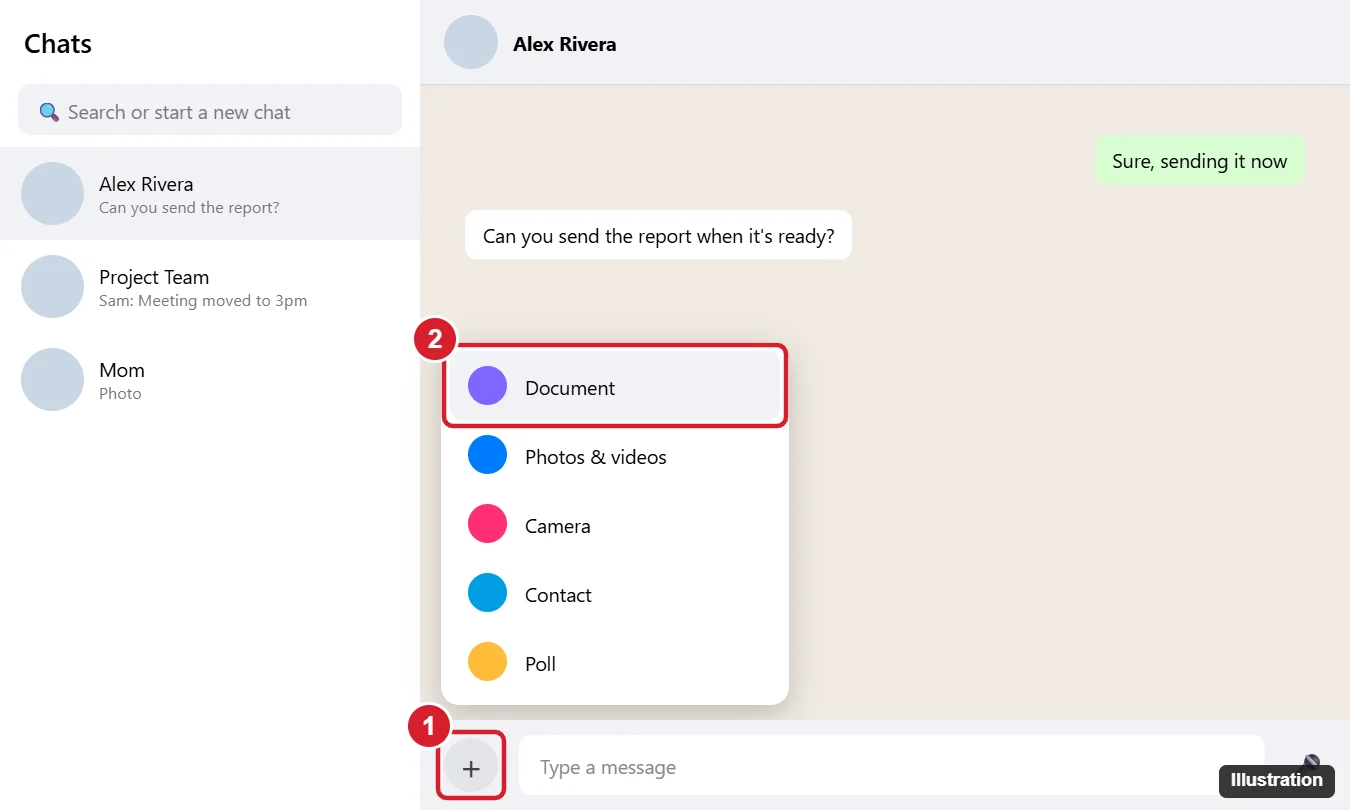
WhatsApp’s help lists four choices in the attach menu: Photos & Videos, Camera, Document and Contact. A Word file always goes through Document, even when it contains pictures.
Send it from WhatsApp Web
On a shared or borrowed computer where you can’t install apps, the browser works. WhatsApp’s help page on sending media gives the same steps for the web: open the chat, click the attach icon, click Document “to select documents, including PDFs, from your computer,” then click send. When you finish on a computer that isn’t yours, remove it from Linked devices on your phone.
Drag the file into the chat
If the file is already open in a folder window, skip the menus. WhatsApp says you can “drag and drop a document directly into the text field.” Open the chat, drag the .docx from File Explorer or the desktop into the message box, and send it. The mechanics of dragging files between windows are covered in dragging and dropping a Word document.
Send a PDF so the layout holds
A .docx is rebuilt by whatever app opens it, so fonts, spacing and page breaks can shift on a phone. A PDF fixes the layout. To make one in Word for Windows, following Microsoft’s save or convert to PDF steps:
- If the file was saved before, select File > Save a Copy. If it was never saved, select File > Save As or Save a Copy.
- Select Browse and choose a folder.
- In the file type drop-down list, select PDF.
- Select Save.
Then send the PDF with the Document option. Your .docx stays untouched, so you can keep editing it. On the receiving end, WhatsApp opens a PDF in a full-screen preview, and its help page describes an Edit PDF option there with tools such as Draw and Highlight text.
Every file you send is a separate copy. If three people edit three copies, someone has to merge them. When the document lives in OneDrive, a link avoids that:
- Save the document to OneDrive.
- In Word, select Share and choose whether people can view or edit.
- Copy the link and paste it into the WhatsApp chat.
Microsoft’s share a file page notes that you must first save the file to the cloud for the link to work. Setting up a document a group edits together is covered in creating a shared Word document your team can edit, and if your group uses Google instead, see saving a Word document to Google Drive. The same view-only link also works when you post a Word document on Facebook or in a Facebook group.
If the document won’t send
There’s no Document option
Make sure you clicked the attach icon in an open chat, not the new-chat button. If the menu still looks different, update WhatsApp from the place you installed it, or try WhatsApp Web, which shows the menu WhatsApp’s help describes.
The file is too big
WhatsApp’s limit for documents is 2 GB. If a file is larger, share a link to it instead.
The file stays on the clock icon
Check the laptop’s internet connection, then try again.
WhatsApp on the laptop stopped connecting
Open WhatsApp on your phone first: WhatsApp keeps linked devices connected only while you log in on the primary phone at least every 14 days. If the laptop has been logged out, link it again with the QR code.
You can’t find the file in the picker
Open the document in Word and use Save a Copy to put a copy in Documents or on the desktop, then pick it from there.
WhatsApp file answers
Will the other person be able to edit what I send?
A .docx arrives as their own copy, so they can edit it in Word or another editor, but their changes never reach your file. A PDF is meant for reading; WhatsApp’s markup tools draw on top of it rather than change your text.
Can I send several Word files at once?
WhatsApp’s help describes selecting documents with Document and dragging a document into the text field; it does not give a number for documents. If the files belong together, one PDF or a shared folder link is tidier.
What if the person uses Messenger, not WhatsApp?
The routes are similar but the menus differ; see sending a Word file in Messenger.
Once the file is in the chat, you can add a note with crossed-out text by following strikethrough in WhatsApp, and if the conversation moves to a call, recording WhatsApp calls explains what is and isn’t possible.

Kermit Matthews runs Live2Tech from just outside Philadelphia. He is an IT specialist with over 20 years of experience, from a university help desk to small-business IT, IT management and his own consulting practice, and has written tech guides full time since 2020. Steps are checked against the current software on a real device or the maker’s official documentation. More about Kermit.