To vertically align text on a page in Word, click the Layout tab and click the small arrow in the corner of the Page Setup group. On the Layout tab of the dialog, set Vertical alignment to Center (or Top, Justified, or Bottom), choose what to apply it to, and click OK. This is how you center a title page between the top and bottom margins.
Vertical alignment works differently for pages, table cells, and text boxes. Here’s how to do each.
How to vertically center text on a page
- Click anywhere on the page. To align just one page, select the text on that page first.
- Click the Layout tab.
- Click the dialog launcher (small arrow) in the bottom-right corner of the Page Setup group.
- Click the Layout tab in the dialog.
- Under Page, set Vertical alignment to Center.
- Next to Apply to, choose Whole document, This section, or Selected text.
- Click OK.
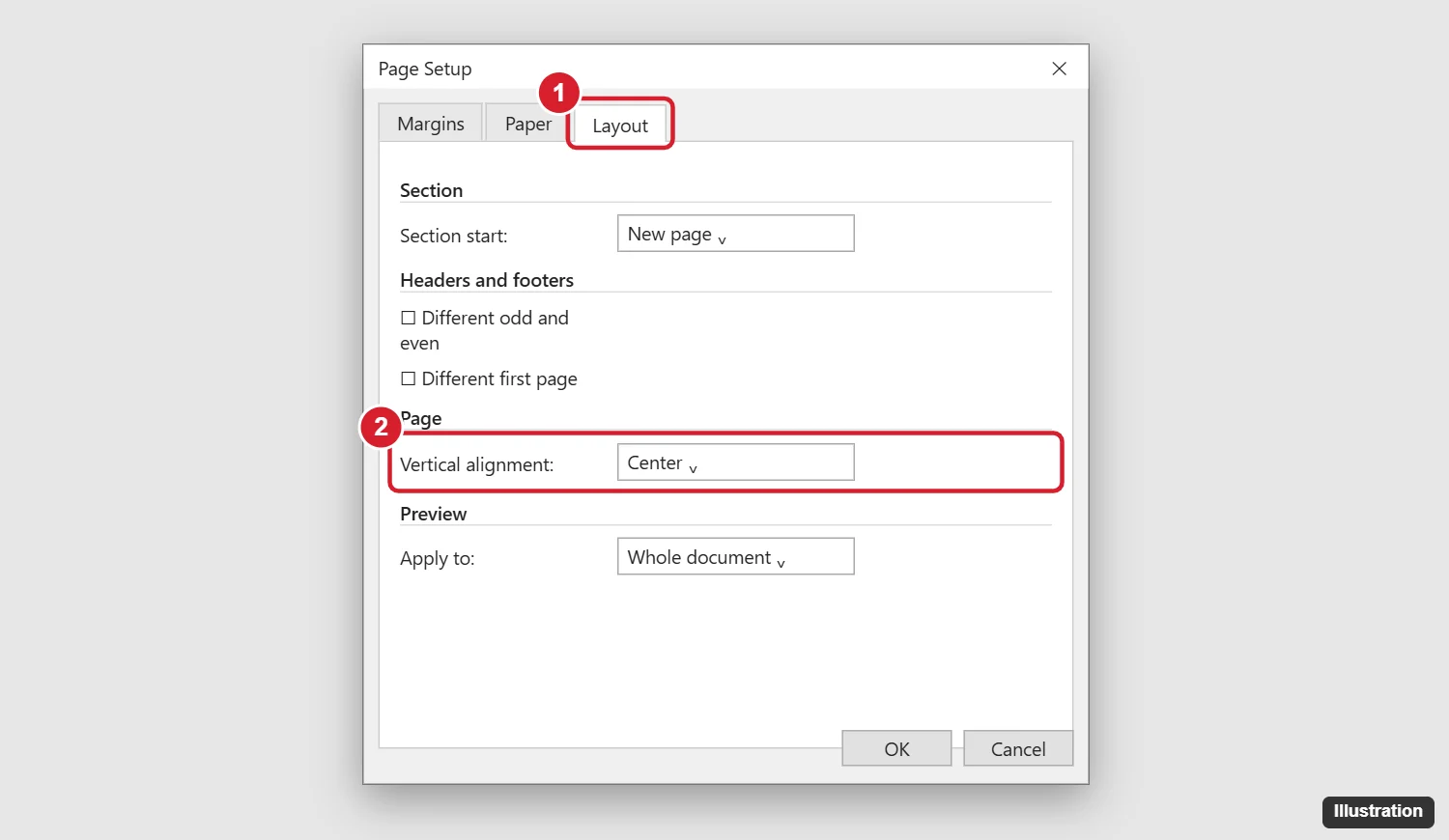
Center only the cover page
Select the text on the first page, then choose Selected text under Apply to. Word adds section breaks so only that page is centered. Or insert a section break yourself with Layout > Breaks > Next Page and choose This section.
Vertical alignment options
| Option | What it does |
|---|---|
| Top | Text starts at the top margin (default) |
| Center | Text sits in the middle of the page |
| Justified | Paragraphs spread out to fill the page from top to bottom |
| Bottom | Text sits at the bottom margin |
Vertical alignment only has a visible effect on pages that aren’t full of text.
How to vertically align text in a table cell
- Click in the cell, or select several cells.
- Click the Layout tab under Table Tools (the one next to Table Design).
- In the Alignment group, click one of the nine buttons, like Align Center, to center text both ways.
How to vertically align text in a text box or shape
- Click the text box or shape.
- On the Shape Format tab, click Align Text.
- Choose Top, Middle, or Bottom.
Word for Mac and the web
- Word for Mac: Go to Format > Document > Layout and set Vertical alignment.
- Word for the web: Page vertical alignment isn’t available. Open the file in the desktop app with Editing > Open in Desktop App. Table cell alignment works on the web.
Frequently asked questions
Why didn’t my text move to the center?
The page may be full, or there are empty paragraphs above or below the text. Turn on Show/Hide ¶ and delete the extra paragraph marks.
How do I center text horizontally?
Select the text and press Ctrl + E, or click Center on the Home tab.
Can I vertically center text in a header?
Not with page alignment. Adjust the header distance in Layout > Margins > Custom Margins > Layout, or use a table in the header.
Does vertical alignment affect printing?
Yes. The printed page matches what you see in Print Layout view.

Kermit Matthews is a freelance writer based in Philadelphia, Pennsylvania with more than a decade of experience writing technology guides. He has a Bachelor’s and Master’s degree in Computer Science and has spent much of his professional career in IT management.
He specializes in writing content about iPhones, Android devices, Microsoft Office, and many other popular applications and devices.