Quick Machine Recovery is a Windows 11 recovery feature that can look online for a Microsoft-provided fix when a serious problem prevents your computer from starting normally.
You can enable it at Settings > System > Recovery > Quick machine recovery.
How to Turn On Quick Machine Recovery in Windows 11
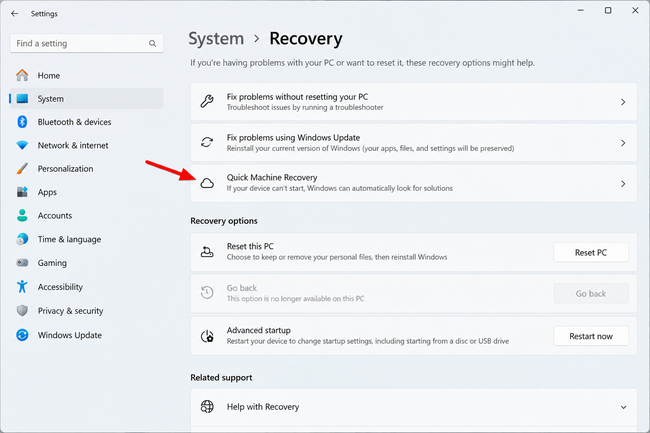
Step 1: Open Settings
Press Windows + I.
Step 2: Select System
Choose System.
Step 3: Select Recovery
Scroll down and click Recovery.
Step 4: Select Quick Machine Recovery
Click Quick machine recovery.
Step 5: Turn On Quick Machine Recovery
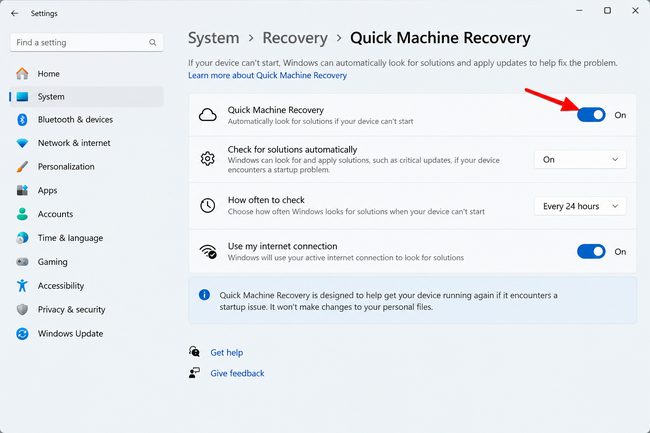
Turn on Quick machine recovery.
Step 6: Choose Whether to Check Automatically
Enable Automatically check for solutions if you want Windows to perform the process automatically.
What Does Quick Machine Recovery Do?
After repeated boot failures, Windows can enter WinRE. QMR can establish a network connection and check Windows Update for a Microsoft-provided remediation. If an applicable solution exists, Windows can download and apply it before restarting.
Quick Machine Recovery vs. Startup Repair
Startup Repair performs local recovery operations. QMR adds an online component that can check Windows Update for a Microsoft-provided remediation. You can also boot into Windows 11 Recovery Mode manually when you need access to WinRE troubleshooting tools.
What Happens If Windows Can’t Find a Solution?
You may still need Startup Repair, System Restore, uninstalling an update, Reset this PC, or other recovery tools.
Quick Machine Recovery Network Requirements
QMR needs network access. Microsoft currently documents wired Ethernet and WPA/WPA2 password-based Wi-Fi support for recovery networking.
Why Don’t I See Quick Machine Recovery?
QMR is available on Windows 11 version 24H2 starting with build 26100.4700. Press Windows + R, type winver, and press Enter to check your build.
Should You Enable Quick Machine Recovery?
It gives Windows another recovery option for certain serious boot failures, but it is a best-effort feature and is not a replacement for backups.
Summary
Open Settings > System > Recovery > Quick machine recovery to configure QMR and its automatic solution checks.
Related: Use a recovery drive in Windows 11.
Frequently Asked Questions
Does Quick Machine Recovery erase my files?
It is intended to apply a remediation, not perform a Reset this PC operation.
Does it need the Internet?
Yes, cloud remediation requires network access.
Is it the same as Startup Repair?
No. Startup Repair is local; QMR can check Windows Update.
Why is it missing?
Your Windows build may be too old or the setting may be managed.
Will it fix every startup problem?
No. An applicable Microsoft remediation may not exist for every failure.

Kermit Matthews is a freelance writer based in Philadelphia, Pennsylvania with more than a decade of experience writing technology guides. He has a Bachelor’s and Master’s degree in Computer Science and has spent much of his professional career in IT management.
He specializes in writing content about iPhones, Android devices, Microsoft Office, and many other popular applications and devices.