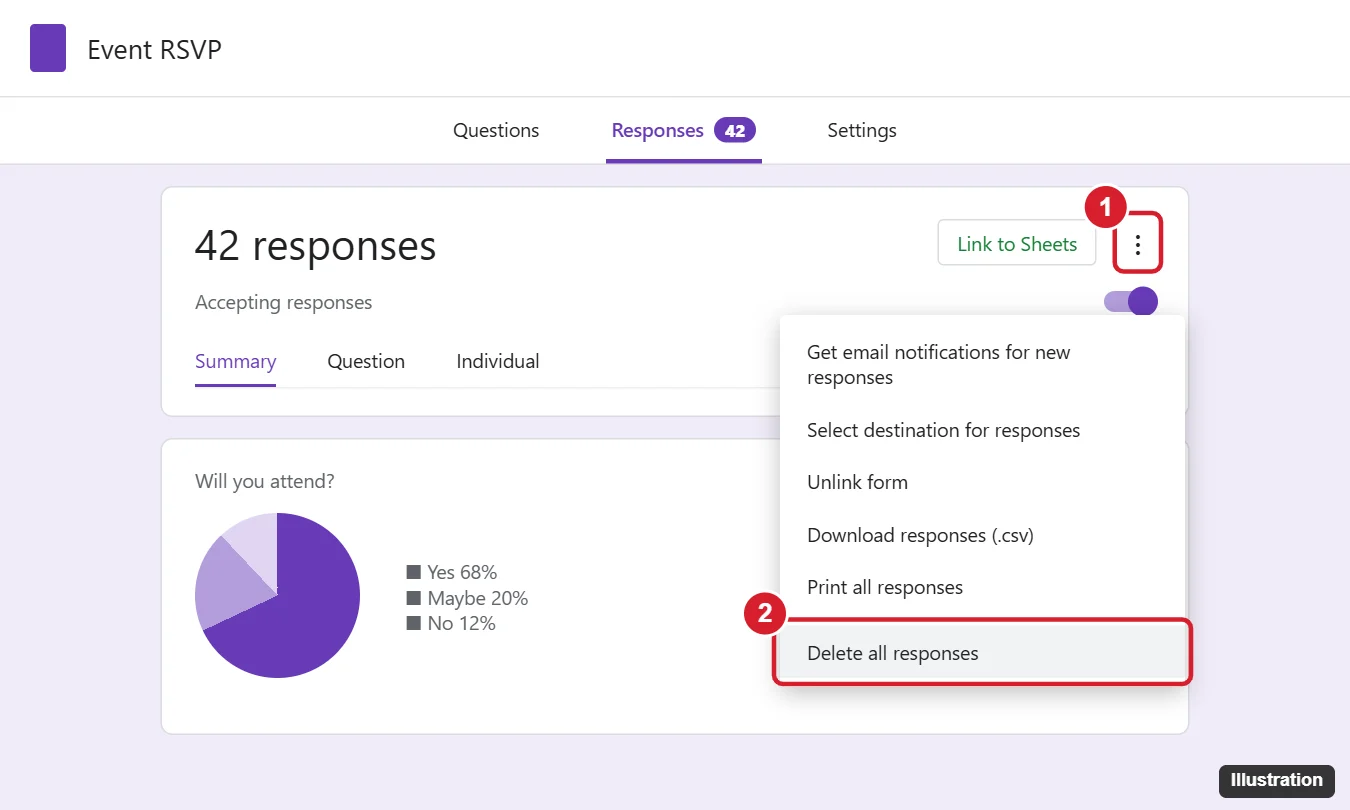
To delete one Google Forms response, open the form, click Responses > Individual, go to the response, and click the trash icon. To delete them all, click ⋮ (More) > Delete all responses on the Responses tab and confirm. Rows in a linked Google Sheet are not deleted, so remove them in the sheet separately. Deleted responses can’t be recovered, so keep a backup first.
Before You Delete: Back Up the Responses
Google Forms has no undo or trash for responses. To keep a copy:
- On the Responses tab, click ⋮ > Download responses (.csv).
- Or click Link to Sheets (or View in Sheets) to keep a spreadsheet copy.
How to Delete One Response
- Open the form in Google Forms (edit mode).
- Click the Responses tab.
- Click Individual.
- Use the arrows (or the drop-down if emails are collected) to find the response.
- Click the trash icon (Delete response) and confirm.
You can’t delete just one answer within a response. The whole submission is removed. The Summary charts update right away.
How to Delete All Responses
- Open the form and click the Responses tab.
- Click the ⋮ (More) icon at the top right of the responses card.
- Choose Delete all responses.
- Click OK to confirm.
What About the Linked Google Sheet?
| Action | Effect on the Form | Effect on the Sheet |
|---|---|---|
| Delete a response in Forms | Removed from Summary, Question, and Individual views | The row stays in the sheet |
| Delete a row in the Sheet | Still counted in Forms | The row is removed |
| Delete all responses in Forms | Response count resets to 0 | Old rows stay. New responses are added below them. |
To clean the sheet, open it, select the rows (not the header row), right-click, and choose Delete rows. To start completely fresh, click ⋮ > Unlink form on the Responses tab, then Link to Sheets again and choose Create a new spreadsheet.
Reuse a Form for a New Event or Year
- Download or link the old responses as a backup.
- Delete all responses.
- Unlink the old sheet and link a new one.
- Turn Accepting responses back on if you had turned it off.
Alternatively, click ⋮ > Make a copy of the form. The copy starts with no responses, and the original keeps its history.
Prevent Unwanted Responses
- Stop accepting responses: on the Responses tab, turn off Accepting responses and add a closing message.
- Limit to 1 response: in Settings > Responses, turn on Limit to 1 response. This requires respondents to sign in to a Google account.
- Restrict to your organization (Google Workspace accounts) in Settings.
- Test with Preview: use the eye icon to preview, and delete test submissions before sharing.
To put a summary in a document, see copying a Forms chart to Word.
Problems Deleting Responses
I don’t see the trash icon or Delete option
You need edit access to the form. Viewers and respondents can’t delete responses. Ask the owner to add you as an editor.
Responses keep reappearing in the sheet
That’s expected. The sheet keeps all rows until you delete them there.
A respondent wants to change their answer
Turn on Allow response editing in Settings > Responses. Respondents then get an edit link after submitting, instead of you deleting and asking them to resubmit.
Related: create an order form in Google Forms.
Related: Get Google Forms responses by email.
Related: How to lock a Google Form.
Other Things People Ask About Form Responses
Can I recover deleted Google Forms responses?
No, not from Forms. If the form was linked to a sheet, the rows are probably still there. Version history in Google Sheets can also restore deleted rows.
Does deleting a response notify the respondent?
No. Respondents aren’t notified.
Can I delete responses on my phone?
Google Forms has no mobile app. Open the form in your phone’s browser (the desktop site works best) and use the same steps.

Kermit Matthews runs Live2Tech from just outside Philadelphia. He is an IT specialist with over 20 years of experience, from a university help desk to small-business IT, IT management and his own consulting practice, and has written tech guides full time since 2020. Steps are checked against the current software on a real device or the maker’s official documentation. More about Kermit.