To remove McAfee from Windows 10 or Windows 11, open Settings > Apps > Apps & features (Windows 10) or Installed apps (Windows 11), find McAfee, and choose Uninstall. Follow the McAfee uninstaller, then repeat for any other McAfee items like McAfee WebAdvisor and restart your PC. If the normal uninstall fails, McAfee’s own removal tool from its support site cleans up what’s left. Microsoft Defender turns on automatically once McAfee is gone.
Before you uninstall
- Cancel auto-renewal if you have a paid subscription. Uninstalling doesn’t cancel billing. Sign in to your McAfee account online to turn off auto-renew.
- Note your McAfee password manager data (True Key) or other features you use, and export anything you need.
Uninstall McAfee on Windows 11
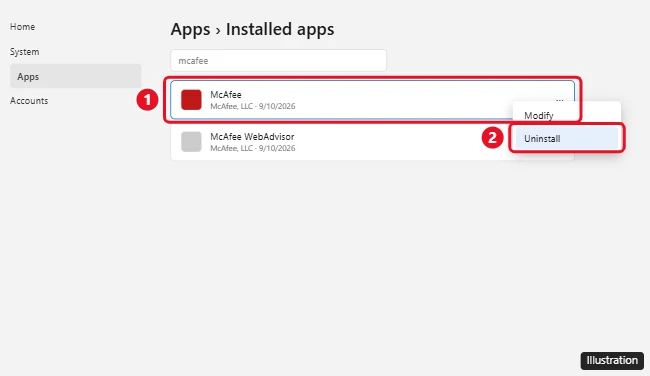
- Right-click Start and choose Installed apps, or go to Settings > Apps > Installed apps.
- Type McAfee in the search box.
- Click the three dots (⋯) next to McAfee and choose Uninstall, then Uninstall again.
- In the McAfee window, check the items to remove and follow the prompts.
- Repeat for McAfee WebAdvisor and other McAfee entries, then restart.
Uninstall McAfee on Windows 10
- Open Settings > Apps > Apps & features.
- Click McAfee (for example, McAfee Total Protection or McAfee LiveSafe) and click Uninstall.
- Follow the prompts, remove any other McAfee apps, and restart your PC.
You can also use Control Panel > Programs > Uninstall a program.
If McAfee won’t uninstall
- Restart your PC and try again before opening other apps.
- Download McAfee’s removal tool (Consumer Product Removal, often called MCPR) from McAfee’s official support website.
- Run it, accept the agreement, complete the security check, and let it finish.
- Restart your PC when it says Removal Complete.
Only download removal tools from mcafee.com. Fake “McAfee removal” tools on other sites can contain malware.
After removing McAfee
- Open Windows Security > Virus & threat protection and confirm Microsoft Defender Antivirus is on.
- Remove the McAfee browser extension (WebAdvisor) from Chrome, Edge, or Firefox if it’s still there.
- If you still see “McAfee” pop-ups in your browser, they’re likely fake website notifications. See how to stop McAfee pop-ups.
Related: Remove McAfee WebAdvisor.
Frequently asked questions
Is it safe to remove McAfee?
Yes. Windows includes Microsoft Defender, which provides solid protection and turns on automatically when no other antivirus is installed.
Why did McAfee come preinstalled?
Many PC makers include a McAfee trial. You can keep it by subscribing or uninstall it.
Will uninstalling McAfee cancel my subscription?
No. Cancel auto-renewal in your McAfee account online.
Can I reinstall McAfee later?
Yes. Sign in to your McAfee account and download it again if you have an active subscription.

Kermit Matthews runs Live2Tech from just outside Philadelphia. He is an IT specialist with over 20 years of experience, from a university help desk to small-business IT, IT management and his own consulting practice, and has written tech guides full time since 2020. Steps are checked against the current software on a real device or the maker’s official documentation. More about Kermit.