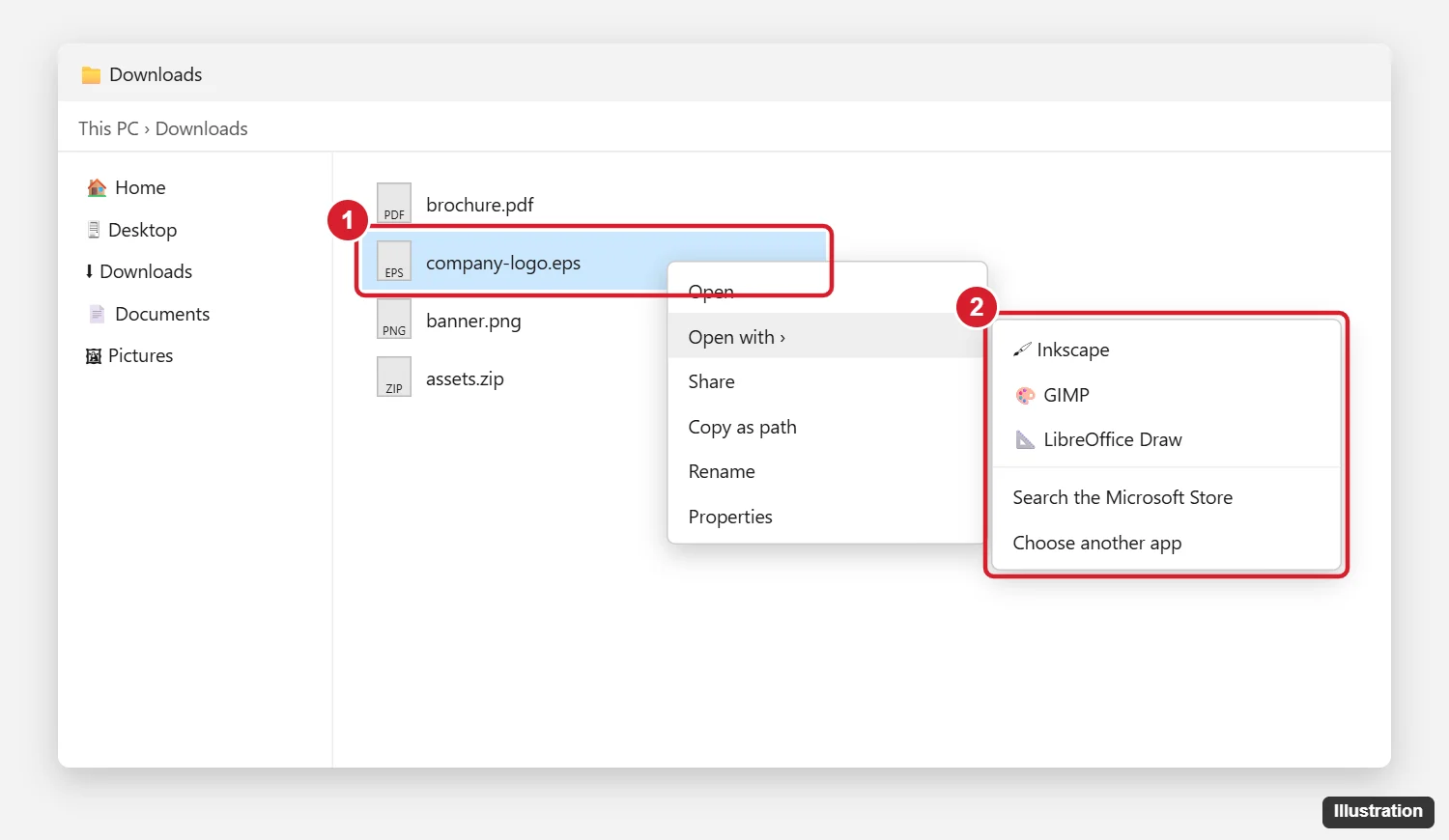
Windows can’t open EPS files on its own, and Microsoft Office no longer inserts them. To view or edit an EPS file for free, install Inkscape, GIMP, or LibreOffice Draw, then right-click the file, choose Open with, and pick the app. Inkscape and GIMP also need the free Ghostscript program installed to read EPS files. If you have Adobe Illustrator or Photoshop, you can open EPS files there directly.
EPS (Encapsulated PostScript) is an older vector graphics format often used for logos and print files. Here’s which app to use, how to set it up, and how to convert EPS to a more common format like PDF, PNG, or SVG.
Best ways to open EPS files on Windows
| App | Cost | Best for | Notes |
|---|---|---|---|
| Inkscape | Free | Editing vector logos and graphics | Needs Ghostscript for EPS import |
| GIMP | Free | Viewing or turning EPS into a PNG or JPG | Converts vectors to pixels on import |
| LibreOffice Draw | Free | Quick viewing | May only show a low-resolution preview of some files |
| Adobe Illustrator | Paid | Full editing with no quality loss | The standard tool for EPS files |
| Adobe Photoshop | Paid | Converting to a high-resolution image | Asks for a size when you open the file |
Method 1: Open EPS files with Inkscape (free)
- Download and install Inkscape from inkscape.org.
- Download and install Ghostscript for Windows (64-bit) from ghostscript.com. Inkscape uses it to read EPS and PS files.
- Restart your computer, or at least sign out and back in, so Inkscape can find Ghostscript.
- Right-click the EPS file and choose Open with > Inkscape. Or open Inkscape and use File > Open.
If Inkscape shows an error about ps2pdf or Ghostscript, add Ghostscript’s bin folder (for example, C:\Program Files\gs\gs10.xx\bin) to your Path environment variable and restart.
Method 2: Open EPS files with GIMP (free)
- Install GIMP from gimp.org, and install Ghostscript if GIMP can’t open the file.
- Open GIMP and choose File > Open, then select the EPS file.
- In the import window, set a Resolution, like 300 pixels per inch for print or 150 for screens, and turn on antialiasing for smooth edges.
- Click Import.
GIMP turns the vector artwork into a regular image. That’s fine for viewing or saving a PNG, but you lose the ability to resize it without losing quality.
Method 3: Open EPS files with LibreOffice Draw (free)
- Install LibreOffice from libreoffice.org.
- Open LibreOffice Draw and choose File > Open, or drag the EPS file into it.
Many EPS files include a built-in preview image. LibreOffice may show only that preview, which can look blurry. Use Inkscape for better quality.
How to convert EPS to PDF, PNG, or SVG
- In Inkscape: Open the file, then use File > Save As and choose PDF or Plain SVG. To get a PNG, use File > Export.
- In GIMP: After importing, choose File > Export As and type a name ending in .png or .jpg.
- Online converters: These are quick, but avoid uploading confidential or client files to sites you don’t trust.
If you need an EPS file for Word or PowerPoint, convert it to SVG or PNG first, then use Insert > Pictures. Microsoft turned off EPS support in Office in 2017 for security reasons.
If the EPS file won’t open or looks wrong
- “Failed to load the requested file” in Inkscape: Ghostscript isn’t installed or can’t be found. Install it and restart.
- The image looks pixelated: The app is showing the file’s low-resolution preview. Open it in Inkscape or Illustrator instead.
- The file opens blank: The EPS may use fonts you don’t have or be damaged. Ask the sender for a PDF or SVG version.
- The file is from an unknown source: EPS files can contain code. Only open EPS files from people you trust.
More questions about EPS files
Can the Photos app open EPS files?
No. The Windows Photos app doesn’t support EPS. Use one of the apps above or convert the file to PNG first.
Is EPS the same as SVG?
Both are vector formats, so they can scale without losing quality. SVG is newer and works in web browsers and most modern apps.
How do I set a default app for EPS files?
Right-click the file, choose Open with > Choose another app, select the app, and check Always use this app to open .eps files.
Can I open EPS files in Adobe Acrobat?
Acrobat Pro can convert EPS files to PDF. The free Acrobat Reader can’t open them.

Kermit Matthews runs Live2Tech from just outside Philadelphia. He is an IT specialist with over 20 years of experience, from a university help desk to small-business IT, IT management and his own consulting practice, and has written tech guides full time since 2020. Steps are checked against the current software on a real device or the maker’s official documentation. More about Kermit.