When someone shares a Google Photos album with you, you can view it anytime, but you may want copies of your own. On a computer you can download the whole album as a zip file, and on a phone you can save individual photos to your device or add the album to your own library.
Quick Answer
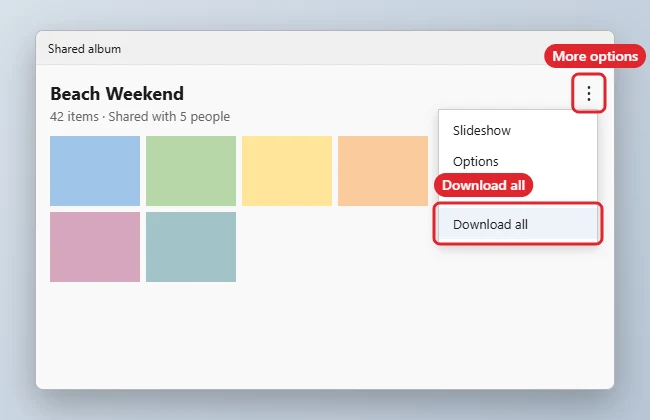
On a computer, open the shared album at photos.google.com, click the three-dot menu, and choose Download all. Google Photos saves the album as a zip file to your Downloads folder.
- Open the shared album link, or go to photos.google.com and click Sharing.
- Open the album you want.
- Click the three-dot menu in the top-right corner.
- Choose Download all. Large albums may take a moment to prepare.
- Open the zip file in your Downloads folder and extract the photos. To save single photos, open one and choose Download from its three-dot menu, or press Shift+D.
| Method | Result |
|---|---|
| Download all (computer) | Zip file of the whole album |
| Download (single photo) | Saves one photo at original quality |
| Save to device (phone) | Copies a photo to your phone’s gallery |
| Add to library | Puts shared photos in your own Google Photos |
Troubleshooting
- Download all is missing: the owner may have limited sharing options, or you are viewing the album on a phone, where the option may not appear.
- The zip will not open: make sure the download finished, then right-click it and choose Extract All.
- Want your own album to share back? Read how to make a Google Photos album.
Related: Share a Google Photos album.
Related: Transfer Google Photos to Amazon Photos.
Related: Download all Google Photos at once.
Frequently Asked Questions
Are downloaded photos full quality?
Downloads use the quality the owner uploaded, which may be compressed if their account uses Storage saver.
Will the owner know I downloaded the album?
As far as we know, Google Photos does not currently notify the owner when you download from a shared album.
Do shared photos count against my storage?
Viewing does not. Photos you add to your own library or save count only if you upload them again.
Summary
- Open the shared album.
- Click the three-dot menu.
- Choose Download all.
- Extract the zip file.

Kermit Matthews is a freelance writer based in Philadelphia, Pennsylvania with more than a decade of experience writing technology guides. He has a Bachelor’s and Master’s degree in Computer Science and has spent much of his professional career in IT management.
He specializes in writing content about iPhones, Android devices, Microsoft Office, and many other popular applications and devices.