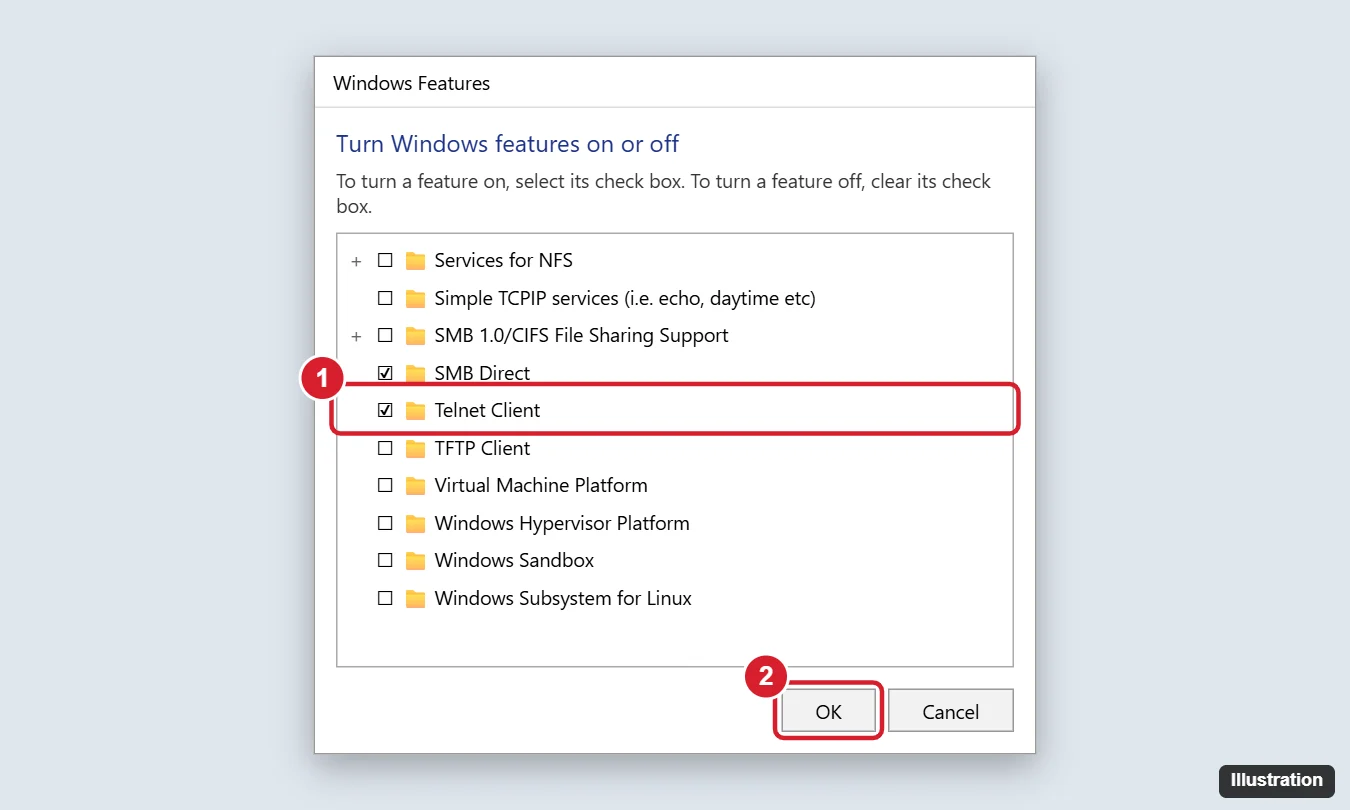
To enable Telnet on Windows 11, press Windows + R, type optionalfeatures, and press Enter. In the Windows Features window, check Telnet Client and click OK. Windows installs it in a few seconds. Or open Terminal (Admin) and run dism /online /Enable-Feature /FeatureName:TelnetClient. Then type telnet followed by a host and port, like telnet example.com 80, to connect. The same steps work on Windows 10.
Telnet is off by default because it sends everything, including passwords, as plain text. It’s still handy for testing whether a port is open or talking to older network gear. Here’s how to turn it on, use it, and turn it off.
Method 1: Windows Features
- Press Windows + R, type optionalfeatures, and press Enter. Or open Control Panel > Programs > Turn Windows features on or off.
- Scroll down and check Telnet Client.
- Click OK and wait for Windows to finish.
- Click Close. A restart usually isn’t needed.
Does Windows 11 Home have Telnet?
Yes. Telnet Client is available in all editions.
Method 2: Command line
Right-click Start, choose Terminal (Admin) (or Windows PowerShell (Admin) on Windows 10), and run one of these:
- Command Prompt or PowerShell:
dism /online /Enable-Feature /FeatureName:TelnetClient - PowerShell:
Enable-WindowsOptionalFeature -Online -FeatureName TelnetClient
How to check that Telnet is installed
Open Command Prompt and type telnet. If you see Microsoft Telnet>, it’s working. Type quit to exit. If you see “‘telnet’ is not recognized,” it isn’t installed yet.
How to use Telnet
- Test if a port is open:
telnet mail.example.com 25. A blank screen or a server message means the port is open. “Could not open connection” means it’s closed or blocked. - Connect to a device:
telnet 192.168.1.1connects to port 23, used by some routers and switches. - Exit a session: Press Ctrl + ] to get the Microsoft Telnet> prompt, then type
quit.
Can I use PuTTY instead?
Yes. PuTTY supports Telnet and SSH and doesn’t need the Windows feature.
A better way to test ports
PowerShell’s built-in Test-NetConnection example.com -Port 443 checks a port without installing anything and shows TcpTestSucceeded: True if it’s open.
Security tips
- Don’t use Telnet to log in to anything over the internet. Use SSH instead, which is built into Windows 10 and 11 (
ssh username@hostname). - The Telnet Client only lets you connect to other devices. It doesn’t let others connect to your PC. Windows no longer includes a Telnet Server.
- Turn it off when you’re done if you don’t need it regularly.
How to turn off Telnet
Uncheck Telnet Client in Windows Features, or run dism /online /Disable-Feature /FeatureName:TelnetClient as administrator.
For signing in to a device’s command line rather than testing a port, the encrypted option is SSH, and connecting to an IoT device over SSH shows how to set it up on a home network.
If Telnet won’t install or connect
- Telnet Client isn’t listed: Your PC may be managed by an organization that removed optional features. Ask your IT department.
- DISM error 0x800f0954 or similar: Your PC may be set to get features from a company update server. Try again on a home network, or ask IT.
- Connection times out: A firewall may be blocking the port, or the service isn’t running on the other device.

Kermit Matthews runs Live2Tech from just outside Philadelphia. He is an IT specialist with over 20 years of experience, from a university help desk to small-business IT, IT management and his own consulting practice, and has written tech guides full time since 2020. Steps are checked against the current software on a real device or the maker’s official documentation. More about Kermit.