To cancel a Google One subscription, go to one.google.com, click Settings, then Cancel membership, and confirm. In the Google One app on Android, tap Menu > Settings > Cancel membership. If you subscribed on an iPhone or iPad through the App Store, cancel it in Settings > your name > Subscriptions instead. You keep your extra storage and benefits until the end of the current billing period, then your account drops back to the free 15 GB.
Before you cancel: check your storage
After your membership ends, you’ll have 15 GB of free storage shared across Gmail, Google Drive, and Google Photos. If you’re using more than that:
- You can’t upload new files to Drive or back up new photos.
- Gmail may stop sending and receiving email.
- If you stay over the limit for two years, Google may delete your content.
Check your usage at one.google.com/storage and free up space first. See how to manage Google storage.
Cancel Google One on a computer
- Go to one.google.com and sign in.
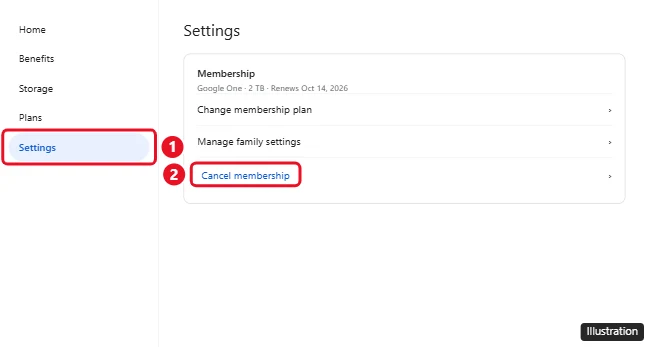
- Click Settings.
- Click Cancel membership (you may need to click Manage membership first).
- Follow the prompts and click Cancel membership again to confirm.
Cancel Google One on Android
- Open the Google One app.
- Tap Menu (or your profile picture) > Settings.
- Tap Cancel membership, then confirm.
You can also cancel from the Play Store: tap your profile picture > Payments & subscriptions > Subscriptions > Google One > Cancel subscription.
Cancel Google One on iPhone or iPad
If you signed up in the Google One app on iOS, you pay through Apple:
- Open Settings and tap your name.
- Tap Subscriptions.
- Tap Google One, then Cancel Subscription.
If you subscribed on the web or Android, cancel at one.google.com instead, even if you use an iPhone.
What happens after you cancel
- You keep your plan’s storage and benefits until the end of the billing period.
- After that, storage returns to 15 GB, and any family members sharing your plan lose access to the shared storage.
- Your files, email, and photos stay in your account. Nothing is deleted just because you cancel.
- Extras included with some plans, like Gemini features in Google AI plans, end too.
Downgrade instead of canceling
If you still need some extra space, switch to a smaller plan: go to one.google.com > Settings > Change membership plan, and pick a cheaper option.
For business plans, read how to cancel Google Workspace.
Related: Use VPN by Google.
Related: Cancel a subscription on your iPhone.
Frequently asked questions
Can I get a refund for Google One?
Google One payments are generally non-refundable, except where required by law. For purchases through Google Play, you can request a refund in your Play order history. For App Store purchases, request one from Apple.
Why don’t I see Cancel membership?
You may be signed in to the wrong Google account, you might be a family member rather than the plan manager, or your plan is billed through Apple or a phone carrier.
Will I lose my photos if I cancel?
No. Your photos stay, but you won’t be able to back up new ones if you’re over 15 GB.
Can I rejoin later?
Yes. Sign up again any time at one.google.com.

Kermit Matthews runs Live2Tech from just outside Philadelphia. He is an IT specialist with over 20 years of experience, from a university help desk to small-business IT, IT management and his own consulting practice, and has written tech guides full time since 2020. Steps are checked against the current software on a real device or the maker’s official documentation. More about Kermit.