Canvas can publish your course calendar as a feed that Google Calendar subscribes to. Once connected, assignments and course events show up next to everything else in Google Calendar. The link is one-way, so changes in Canvas flow to Google, but not the reverse.
Quick Answer
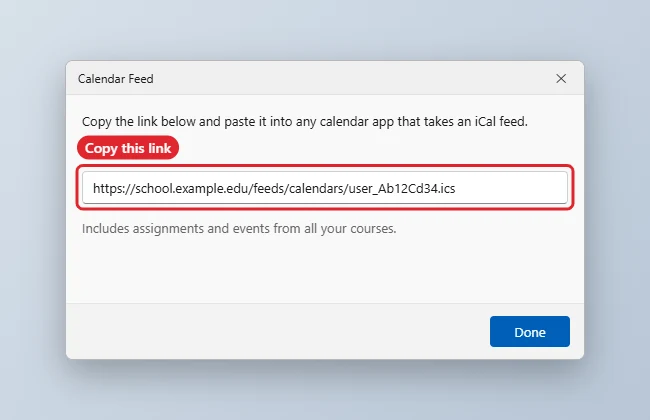
In Canvas, open Calendar and click Calendar Feed to copy the link. In Google Calendar on a computer, click the plus next to Other calendars, choose From URL, paste the link and click Add calendar.
How to Add Canvas to Google Calendar
- Sign in to Canvas in a web browser and click Calendar in the left menu.
- Click Calendar Feed, usually in the lower-right corner, and copy the link.
- Open Google Calendar on a computer. Subscriptions by URL cannot be added in the phone app.
- Next to Other calendars, click the plus sign and choose From URL.
- Paste the Canvas link and click Add calendar.
- Give it a few hours. The Canvas calendar then appears under Other calendars and syncs to the Google Calendar app on your phone.
What Syncs and What Does Not
| Item | In Google Calendar? |
|---|---|
| Assignment due dates | Yes |
| Course calendar events | Yes |
| To-do items without dates | No |
| Changes you make in Google | No, the feed is read-only |
| Updates made in Canvas | Yes, after Google refreshes the feed |
Troubleshooting
- If nothing appears, check you pasted the whole link and that you are signed in to the right Google account.
- If updates are slow, that is normal. Google refreshes subscribed calendars on its own schedule, which can take several hours or up to a day.
- If the calendar is missing on your phone, open the Google Calendar app settings, tap the calendar and turn on Sync.
- For one-off files instead of a live feed, see how to import an ICS file into Google Calendar.
Frequently Asked Questions
Can I edit Canvas events in Google Calendar?
No. Edit them in Canvas; subscribed calendars are view-only.
How do I change reminders for Canvas events?
Set notifications for that calendar in Google Calendar settings. See how to change default notification times.
Is my feed link private?
Treat it like a password. Anyone with the link can see your course calendar.
How do I remove it?
In Google Calendar settings, select the Canvas calendar and choose Unsubscribe or Remove calendar.
Summary
- Canvas, Calendar, Calendar Feed.
- Copy the link.
- Google Calendar on a computer: Other calendars, From URL.
- Paste and add.
- Allow time for updates to sync.

Kermit Matthews runs Live2Tech from just outside Philadelphia. He is an IT specialist with over 20 years of experience, from a university help desk to small-business IT, IT management and his own consulting practice, and has written tech guides full time since 2020. Steps are checked against the current software on a real device or the maker’s official documentation. More about Kermit.