To make your iPhone Camera remember the last filter you used, go to Settings > Camera > Preserve Settings and turn on Creative Controls. The Camera app will then keep your last filter, aspect ratio, lighting effect, or depth setting instead of resetting every time you open it. On the same screen, you can also keep your last camera mode (like Video or Portrait), exposure adjustment, Night mode, and Live Photo setting.
How to keep your Camera filter on iPhone
- Open the Settings app.
- Tap Camera (on iOS 18 and later, you may need to tap Apps > Camera).
- Tap Preserve Settings.
- Turn on Creative Controls.
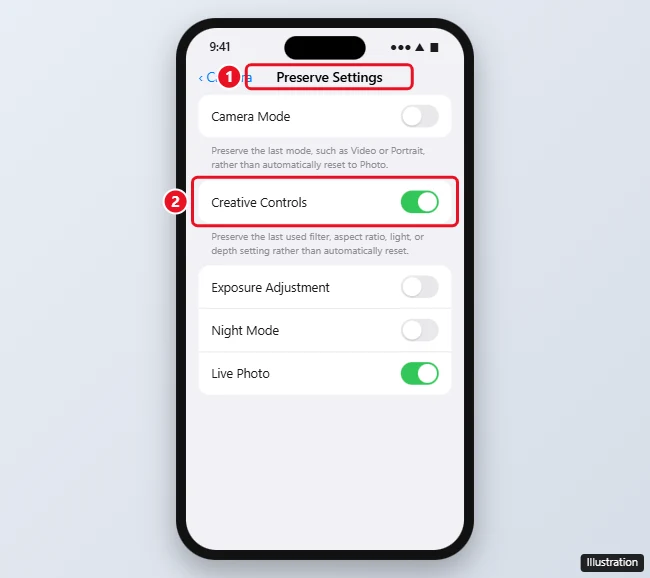
What each Preserve Settings option does
| Option | What it keeps |
|---|---|
| Camera Mode | The last mode, like Video, Portrait, or Pano, instead of resetting to Photo |
| Creative Controls | The last filter, aspect ratio, Portrait lighting, or depth setting |
| Exposure Adjustment | Your last exposure setting |
| Night Mode | Whether you turned Night mode off |
| Live Photo | Whether Live Photos are on or off |
Options vary by iPhone model and iOS version. Newer iPhones may also list settings like Portrait Zoom, Action Mode, or Apple ProRAW.
How to choose a filter in the Camera app
- Open Camera in Photo mode.
- Tap the arrow at the top of the screen, or swipe up above the shutter button, to show more controls.
- Tap the Filters button (three overlapping circles).
- Swipe to pick a filter like Vivid, Dramatic, or Mono.
On newer iPhones, Photographic Styles are separate from filters and are saved in Settings > Camera > Photographic Styles. They stay on until you change them.
Frequently asked questions
Why does my iPhone Camera filter keep resetting?
Creative Controls is off in Preserve Settings. Turn it on to keep your last filter.
Can I remove a filter after taking a photo?
Yes. Open the photo in Photos, tap Edit, tap the Filters button, and choose Original.
Does this affect videos?
Filters apply to photos. Keeping Camera Mode on preserves Video mode if that’s what you used last.

Kermit Matthews is a freelance writer based in Philadelphia, Pennsylvania with more than a decade of experience writing technology guides. He has a Bachelor’s and Master’s degree in Computer Science and has spent much of his professional career in IT management.
He specializes in writing content about iPhones, Android devices, Microsoft Office, and many other popular applications and devices.