To jump to a page in Word, press Ctrl + G (or F5) on Windows, make sure Page is selected, type the page number, and press Enter. Word moves the cursor straight to the top of that page. You can also use the Navigation pane’s Pages view to click a thumbnail instead of typing a number.
Quick Answer
Press Ctrl + G > Page > type the number > Enter.
Use Go To
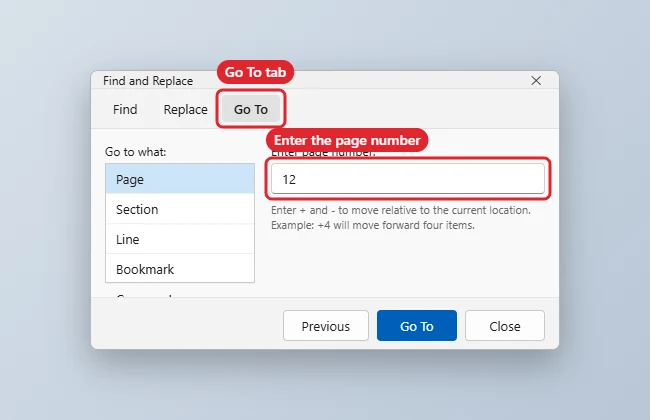
- Press Ctrl + G or F5. You can also click Home > the arrow next to Find > Go To, or click the page number in the status bar.
- In the Find and Replace window, the Go To tab opens with Page selected.
- Type the page number and press Enter (or click Go To).
- Click Close.
Handy Go To Tricks
| Type | Result |
|---|---|
| 12 | Jumps to page 12 |
| +5 or -5 | Moves forward or back five pages |
| s2 | Jumps to section 2 |
| p3s2 | Page 3 of section 2, useful when page numbering restarts |
The Go to what list also jumps to lines, bookmarks, comments, tables, headings and more.
Other Ways to Move Around
- Navigation pane: Press Ctrl + F (or View > Navigation Pane) and click Pages to see thumbnails, or Headings to jump by section.
- Keyboard: Ctrl + Home goes to the start, Ctrl + End to the end, and Ctrl + Page Down moves to the next page on many setups.
- Return to your last edit: Shift + F5 cycles through recent editing spots.
- Word for Mac: Use Edit > Find > Go To.
To write hands-free, try dictating in Word 2016.
For readable links in long documents, see renaming hyperlinks.
With sections set up, you can change the footer for one section.
Troubleshooting
- Lands on the wrong page: Your page numbering may restart or start at a different number. Use the p#s# format.
- F5 doesn’t work on a laptop: Press Fn + F5, or use Ctrl + G.
- Want reusable text instead? See how to use Quick Parts in Word.
Frequently Asked Questions
Can I jump to a page in Word for the web?
Use the Navigation pane or scroll; the web version doesn’t offer the full Go To dialog.
How do I see the current page number?
Look at the status bar at the bottom left. Right-click the status bar to turn on Page Number if it’s hidden.
Summary
- Press Ctrl + G or F5.
- Keep Page selected and type a number.
- Use + or – for relative jumps and p#s# for sections.
- Use the Navigation pane for thumbnails and headings.

Kermit Matthews is a freelance writer based in Philadelphia, Pennsylvania with more than a decade of experience writing technology guides. He has a Bachelor’s and Master’s degree in Computer Science and has spent much of his professional career in IT management.
He specializes in writing content about iPhones, Android devices, Microsoft Office, and many other popular applications and devices.