Facebook’s Trash is inside your Activity log. On the app or the website, open your profile menu, go to Settings & privacy, open Activity log, and look for Trash. Posts you move to Trash stay there for 30 days. During that time you can restore them to your profile or delete them for good.
Facebook moves its menus around fairly often, and the exact labels can vary by app version and account. So each set of steps below includes what to look for if your screen doesn’t match exactly. You’ll also learn how Trash differs from Archive, and what to do if a deleted post isn’t there.
Quick Answer
- Open Facebook and tap or click your profile picture or the menu.
- Go to Settings & privacy, then find Activity log. On mobile it may be under Settings or Your activity.
- Select Trash. In some versions it’s called Recycle bin.
- Choose a post, then Restore to put it back or Delete to remove it permanently.
- Act within 30 days. After that, Facebook deletes items in Trash automatically.
In This Guide
- Before you start: how Trash works
- Find the Trash in the Facebook app
- Find the Trash on a computer
- Restore or permanently delete items
- Move posts to Trash or Archive in bulk
- Trash vs. Archive: which should you use?
- Troubleshooting
- Frequently Asked Questions
Before You Start: How Trash Works
This guide reflects Facebook’s Help Center topics and Meta’s announcements as of September 2026. It covers personal Facebook profiles in the Facebook app for Android and iPhone, and on facebook.com in a web browser. Business Pages are managed separately. Facebook labels can differ by app version, region and account, so treat the menu names here as signposts and look for the closest match.
Some quick definitions:
- Activity log: a private list of things you’ve done on Facebook, such as posts, likes, comments and tags. Only you can see it.
- Trash: a holding area for posts you’ve chosen to delete through Move to trash. Meta says items stay there for 30 days, and you can restore them or delete them permanently before they’re removed automatically.
- Archive: a place for posts you want to hide from others but keep for yourself. Archived posts aren’t on a 30-day clock.
Meta introduced these tools together as Manage activity in 2020. Its announcement of Manage Activity describes how archive and trash work.
What you need:
- Access to your own Facebook account, signed in on the app or a browser. You can only see your own Trash.
- The latest version of the Facebook app, if you use a phone. Older versions may show different menu names.
Not everything you delete goes to Trash. Trash is mainly for posts removed with Move to trash from your profile or Activity log. If you delete something another way, it may be removed right away instead.
Find the Trash in the Facebook App
These steps apply to both Android and iPhone. The menu button is at the bottom right on iPhone and at the top right on most Android phones. Some versions show your profile picture instead of three lines.
- Open the Facebook app and tap the Menu button (three lines or your profile picture).
- Scroll down and tap Settings & privacy, then tap Settings.
Expected result: the settings page opens, often with a search box at the top. - Look for Activity log. It’s usually in a section named something like Your activity or Your information. If you can’t find it, type “activity log” in the settings search box.
- Near the top of Activity log, tap Trash. It may appear as a button, a tab, or under a filter menu, and some versions call it Recycle bin.
Expected result: you see the posts you moved to Trash in the last 30 days.
Shortcut from your profile
Many versions of the app also let you reach Activity log from your profile. Tap your profile picture to open your profile, tap the three-dot button (More) next to Edit profile, and look for Activity log. Then open Trash as in step 4.
If you just moved to a new phone and the app looks different, sign in to the same account first. See how to move your Facebook account to a new phone.
Find the Trash on a Computer
- Go to facebook.com in a web browser and sign in.
- Click your profile picture in the top right corner.
- Click Settings & privacy, then look for Activity log. If it isn’t listed, open Settings and search for “activity log.”
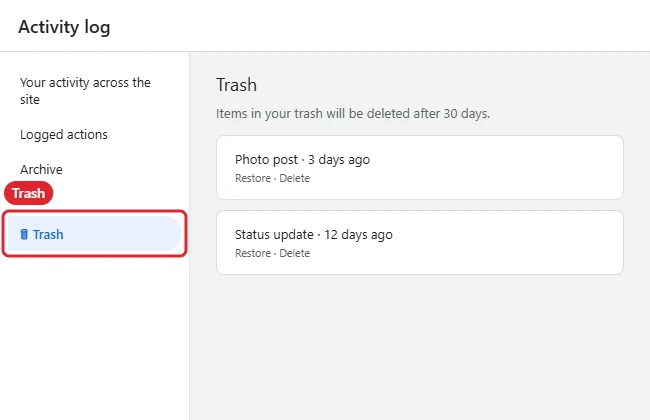
Expected result: Activity log opens, with a list of categories on the left side. - In the left-hand menu, click Trash.
Expected result: your trashed posts from the last 30 days appear.
You can also open your profile, click the three-dot button near Edit profile, and choose Activity log. Facebook’s Help Center covers where to find it in Find your Facebook activity log.
Restore or Permanently Delete Items
Once you’re in Trash, you can bring posts back or get rid of them for good. Before deleting, keep in mind that permanent deletion can’t be undone.
Restore a post
- In Trash, select the post you want back. On most versions there’s a checkbox or circle next to each item, and you can select several.
- Tap or click Restore.
- Confirm if asked.
Expected result: the post returns to your profile.
Delete a post permanently
- In Trash, select the post or posts.
- Tap or click Delete.
- Confirm.
Expected result: the item leaves Trash and can’t be restored from there.
If you do nothing, Facebook removes items from Trash automatically after 30 days. Facebook’s Help Center explains the options in Archive or delete content on Facebook.
Move Posts to Trash or Archive in Bulk
If you’re cleaning up old posts, Facebook’s Manage activity tools let you handle many at once. Meta says you can filter posts by date or by people tagged, select several, and then archive or trash them together.
- Open Activity log using either set of steps above.
- Look for Manage activity or Your posts. On some versions, you can also open your profile and look for Manage posts.
- Use the filters to narrow the list, for example to a specific year.
- Select the posts, then choose Archive to hide them or Move to trash to start the 30-day deletion clock.
Expected result: archived posts move to Archive, and trashed posts move to Trash.
Facebook’s Help Center has more on this in Use Manage Activity in your Activity Log to archive or delete content. Watch history for videos is separate from posts. To clear that, see how to clear your Facebook watch history.
Trash vs. Archive: Which Should You Use?
| Archive | Trash | |
|---|---|---|
| Who can see the post | Only you | Only you, until it’s deleted |
| How long it stays | Until you restore or delete it | 30 days, then deleted automatically |
| Can you restore it? | Yes | Yes, within 30 days |
| Best for | Posts you want to keep privately | Posts you want gone, with a safety net |
If you’re unsure whether you’ll want a post again, archive it. You can always move it to Trash later.
Troubleshooting
I can’t find Activity log or Trash
Update the Facebook app, then use the search box on the Settings page and type “activity log.” Labels can vary, so also look for Recycle bin, or for a filter or category menu inside Activity log. If the app still looks different, try facebook.com in a browser, where Trash is usually in Activity log’s left-hand menu.
My deleted post isn’t in Trash
Check three things. First, has it been more than 30 days? Items older than that are deleted automatically. Second, was the post deleted in a way that skipped Trash, or was it removed by someone else, such as a group admin? Third, are you signed in to the right account? If none of these explains it, the post may not be recoverable. Facebook’s Help Center is the place to ask.
Trash is empty
An empty Trash means nothing was moved there in the last 30 days, or everything was restored or permanently deleted. Also check Archive, in case the post was archived instead of trashed.
I restored a post but can’t see it on my profile
Refresh the page or restart the app. A restored post usually returns to its original spot in your timeline, so scroll back to when it was first posted. Also check the post’s audience setting.
I’m looking for a post on a Facebook Page
Pages have their own tools for hiding and removing posts, separate from your personal Activity log. Switch to the Page and look in its own settings or content tools.
Frequently Asked Questions
How long do posts stay in Facebook’s Trash?
30 days. After that, Facebook deletes them automatically, according to Meta.
Can other people see what’s in my Trash?
No. Trash and Activity log are private to you.
Can I recover a post after I delete it from Trash?
Not from Trash. Once you choose Delete in Trash, or 30 days pass, you can’t restore it there.
What’s the difference between Archive and Trash?
Archive hides a post from everyone but you and keeps it until you decide otherwise. Trash holds a post for 30 days before it’s permanently deleted.
Is the Trash called something else on my phone?
Possibly. Some app versions have used the name Recycle bin. Look for either name inside Activity log.
Can I empty Trash all at once?
Many versions let you select several items, or all of them, and choose Delete. If you don’t, Trash clears itself after 30 days.
Summary
- Trash is in Activity log, reached from Settings & privacy or the three-dot menu on your profile.
- On a computer, it’s usually in Activity log’s left-hand menu.
- Select a post and choose Restore or Delete.
- Trashed items are deleted automatically after 30 days.
- Use Archive instead if you want to hide a post but keep it.
Next step: open your Activity log now and check Trash for anything you want to keep before its 30 days run out.

Kermit Matthews is a freelance writer based in Philadelphia, Pennsylvania with more than a decade of experience writing technology guides. He has a Bachelor’s and Master’s degree in Computer Science and has spent much of his professional career in IT management.
He specializes in writing content about iPhones, Android devices, Microsoft Office, and many other popular applications and devices.