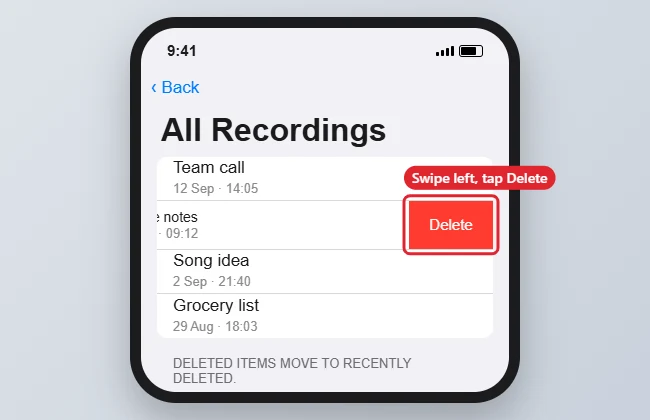
To delete a voice memo on an iPhone 7, open the Voice Memos app, swipe left on the recording and tap Delete (a trash icon on newer iOS versions). The recording moves to Recently Deleted, where it stays for a set time before it’s removed for good, so you can still recover it if you change your mind. The same steps work on newer iPhones.
Quick Answer
Voice Memos > swipe left on a recording > Delete. Empty it from Recently Deleted to remove it at once.
Steps to Delete a Voice Memo
- Open the Voice Memos app.
- Find the recording in All Recordings.
- Swipe left on it and tap Delete or the trash icon. You can also tap the recording, then tap the trash icon.
- To delete several, tap Edit, select the recordings, then tap Delete.
- To remove them completely, open Recently Deleted, tap Edit and choose Delete All or delete individual items.
Recently Deleted Options
| Task | How |
|---|---|
| Recover a memo | Recently Deleted > tap the memo > Recover |
| Delete permanently | Recently Deleted > Edit > Delete or Delete All |
| Change how long deleted memos stay | Settings > Voice Memos > Clear Deleted |
Troubleshooting
- Deleted memo came back: If iCloud sync for Voice Memos is on, delete it on your other devices too, or wait for sync to finish.
- No Recently Deleted folder: Older iOS versions delete memos immediately, so back up recordings you may need.
- Want to keep a copy first: Tap the recording, then the more (…) button and Share or Save to Files. See recording a voice memo on iPhone 7.
- Recordings won’t play: See fixing voice memos not playing.
- Memos named after places: See location naming for voice memos.
Frequently Asked Questions
Does deleting a memo free up storage right away?
Not until it leaves Recently Deleted. Empty that folder to reclaim the space immediately.
Can I recover a memo after it leaves Recently Deleted?
Only from a backup, such as an iCloud or computer backup made before you deleted it.
Can I trim a memo instead of deleting it?
Yes. Tap the recording, tap the more (…) button, choose Edit Recording and use the trim tool.
Summary
- Open Voice Memos.
- Swipe left and tap Delete.
- Recover or permanently delete from Recently Deleted.
- Set Clear Deleted to control how long memos stay.

Kermit Matthews is a freelance writer based in Philadelphia, Pennsylvania with more than a decade of experience writing technology guides. He has a Bachelor’s and Master’s degree in Computer Science and has spent much of his professional career in IT management.
He specializes in writing content about iPhones, Android devices, Microsoft Office, and many other popular applications and devices.