You can’t use YouTube TV without a Google account. Every YouTube TV membership and every family member on it signs in with a Google account, and there’s no guest code or shared link that works around that. If you don’t want a Gmail address, you can create a Google account with the email address you already have. If someone in your household already pays for YouTube TV, they can add you through Family sharing, and you’ll still sign in with your own Google account.
Quick Answer
Create a free Google account (you can use a non-Gmail address), then either subscribe or ask your household’s YouTube TV family manager to invite you under Settings > Family sharing.
Create a Google Account With Your Existing Email
- Go to Google’s account sign-up page.
- Enter your name and birthday.
- When asked to choose a Gmail address, pick the option to use your existing email instead.
- Verify the email with the code Google sends, and set a password.
That account can sign in to YouTube TV without ever using Gmail.
Join a Household Membership
- The family manager opens YouTube TV, selects their profile picture, and goes to Settings > Family sharing.
- They invite you by email.
- You accept the invitation while signed in to your Google account.
- Sign in to YouTube TV on your TV, phone or computer with that account.
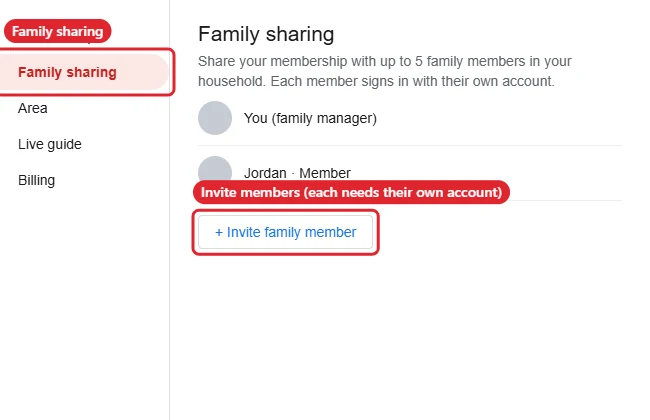
Family Sharing Rules
| Rule | Details |
|---|---|
| Accounts | Every member needs their own Google account |
| Members | The manager plus up to five others |
| Household | Members are expected to share the manager’s home area; YouTube TV checks location periodically |
| Streams | Simultaneous streams are limited per membership |
Sign In on a TV
On a smart TV or streaming device, open the YouTube TV app. It shows a code and a web address. Visit the address on your phone or computer, sign in to your Google account, and enter the code.
Once you’re signed in, see how to use the YouTube TV app on iPhone or iPad.
Troubleshooting
- Invite didn’t arrive: Check the email address the manager used and your spam folder.
- “Not available in your area”: You may be outside the household’s home area. The manager can check Settings > Area.
- Using a work or school account: These often can’t join personal family groups. Use a personal Google account.
- Watching on a TV via phone? See screen mirroring from iPhone to a TV.
Frequently Asked Questions
Do I need Gmail for YouTube TV?
No. You need a Google account, but it can use any email address.
Can I share YouTube TV with someone in another house?
Family sharing is meant for one household, and location checks can block members elsewhere.
Does it cost extra to add family members?
No. Family sharing is included with the base membership.
Summary
- YouTube TV always needs a Google account.
- Create one with your existing email if you don’t want Gmail.
- Join a household membership through Family sharing.
- Sign in on TVs with the on-screen code.

Kermit Matthews is a freelance writer based in Philadelphia, Pennsylvania with more than a decade of experience writing technology guides. He has a Bachelor’s and Master’s degree in Computer Science and has spent much of his professional career in IT management.
He specializes in writing content about iPhones, Android devices, Microsoft Office, and many other popular applications and devices.