The quickest way to check DNS settings in Windows 10 is to open Command Prompt and run ipconfig /all; the DNS Servers lines under your active adapter show which servers you’re using. You can also see them in Settings > Network & Internet: choose your Wi-Fi or Ethernet connection and look at the IPv4 DNS servers in its properties. Windows 10 reached end of support on October 14, 2025. Consumer Extended Security Updates (ESU) now run until October 12, 2027.
Quick Answer
Press Windows + R, type cmd, press Enter and run ipconfig /all. Find DNS Servers under the adapter that has an IPv4 address.
Method 1: Command Prompt
- Press Windows + R, type cmd and press Enter.
- Type
ipconfig /alland press Enter. - Scroll to the adapter you’re using (Wi-Fi or Ethernet) and read the DNS Servers lines. The first is the primary server.
Method 2: Settings
- Open Settings > Network & Internet.
- Click Wi-Fi or Ethernet, then click your connection.
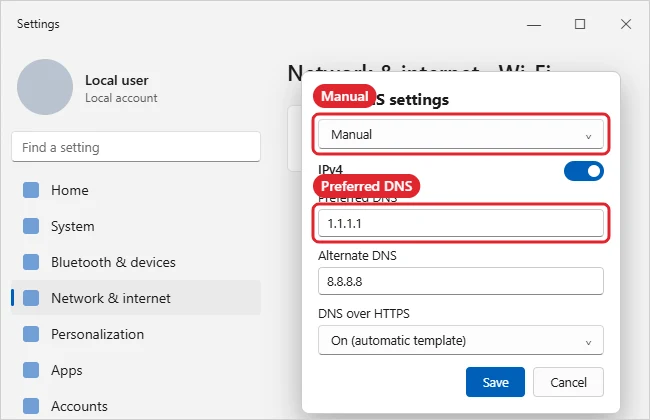
- Scroll to Properties to see IPv4 DNS servers, or click Edit under IP settings to see whether DNS is automatic or manual.
Method 3: PowerShell or Control Panel
- PowerShell: run
Get-DnsClientServerAddressto list DNS servers for every adapter. - Control Panel: Network and Sharing Center > Change adapter settings > right-click the adapter > Properties > Internet Protocol Version 4 > Properties.
Reading the Result
| What you see | Meaning |
|---|---|
| Your router’s address, such as 192.168.1.1 | The router forwards DNS to your provider or its own setting |
| 1.1.1.1, 8.8.8.8 or 9.9.9.9 | A public DNS service chosen on this PC or router |
| An address like fec0:0:0:ffff::1 | A default IPv6 placeholder; usually no DNS server is set for IPv6 |
| A company address | Set by your workplace network or VPN |
Troubleshooting
- Sites won’t load but the network is connected: Clear the DNS cache. See clearing the DNS cache.
- Test that DNS works: Run
nslookup example.com; it shows the server used and the address returned. - Still no connection: See resetting the network adapter.
- Need your IP address too? See checking your IP address.
Frequently Asked Questions
How do I change DNS servers?
In Settings, click Edit under IP settings, choose Manual, turn on IPv4 and enter preferred and alternate DNS addresses.
Is it safe to use public DNS?
Well-known public DNS services are widely used. Your workplace may require its own servers, so check before changing a work PC.
Does a VPN change my DNS?
Often yes. While connected, ipconfig /all shows the VPN adapter’s DNS servers.
Summary
- Run ipconfig /all in Command Prompt.
- Read DNS Servers under the active adapter.
- Or check the connection’s properties in Settings.
- Use nslookup to test and flush the cache if needed.

Kermit Matthews is a freelance writer based in Philadelphia, Pennsylvania with more than a decade of experience writing technology guides. He has a Bachelor’s and Master’s degree in Computer Science and has spent much of his professional career in IT management.
He specializes in writing content about iPhones, Android devices, Microsoft Office, and many other popular applications and devices.