Windows 10 uses both IPv4 and IPv6 by default and prefers IPv6 when it’s available. Turning IPv6 off can help troubleshoot certain VPN leaks, older routers, or apps and games that misbehave on IPv6 networks. However, Microsoft recommends leaving it on, because some Windows features expect it. This guide shows how to turn IPv6 off for one adapter, for every adapter with PowerShell, and the safer middle ground: telling Windows to prefer IPv4 instead of disabling IPv6 entirely.
Quick Answer
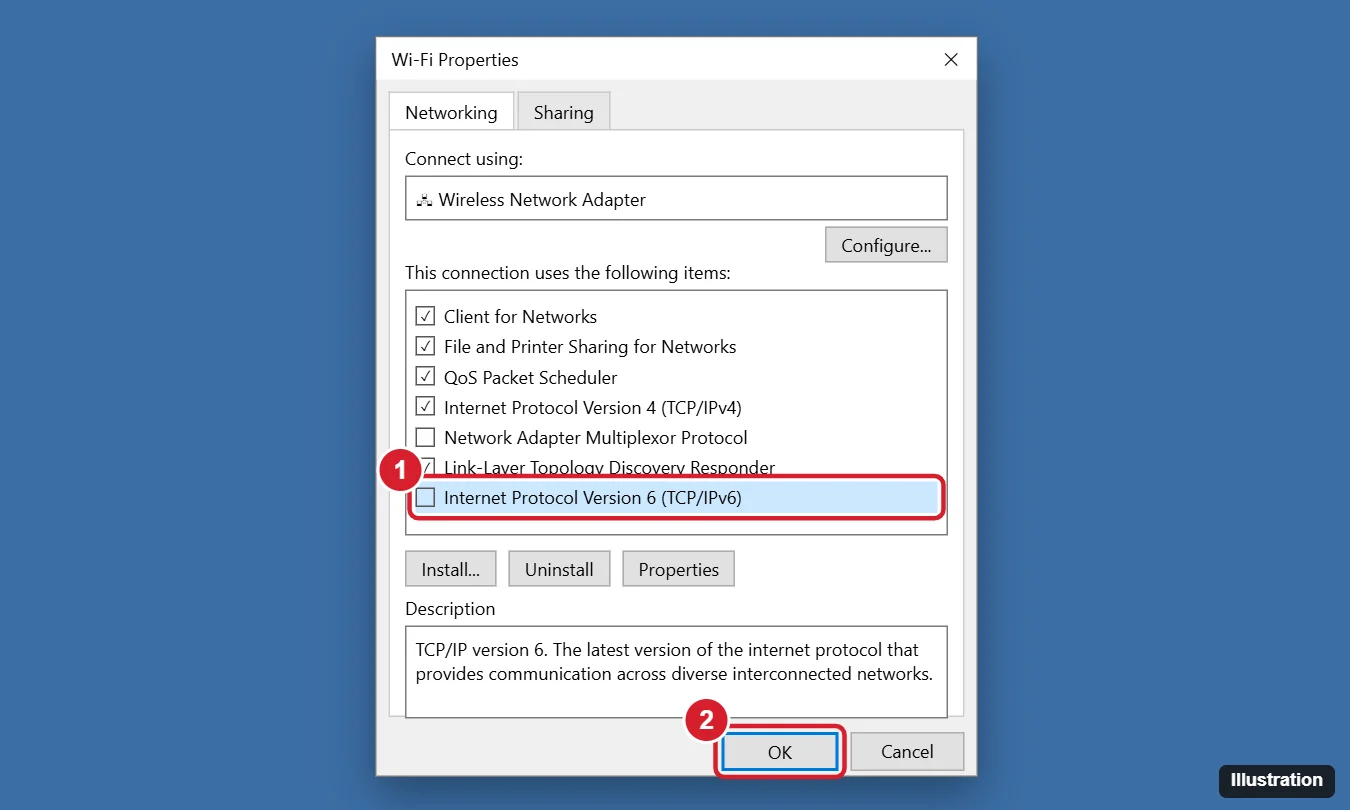
Press Windows key + R, type ncpa.cpl, and press Enter. Right-click your network adapter (Wi-Fi or Ethernet), choose Properties, uncheck Internet Protocol Version 6 (TCP/IPv6), and click OK. Repeat for other adapters you use.
Should You Disable IPv6?
| Good reasons | Reasons to leave it on |
|---|---|
| Troubleshooting a specific connection or app problem | Many internet providers and sites now work best over IPv6 |
| A VPN that doesn’t handle IPv6 and leaks traffic | Some Windows components expect IPv6 and may behave unexpectedly without it |
| An old router or network device with broken IPv6 support | Home groups, some peer-to-peer features, and future networks rely on it |
If your goal is simply to use IPv4 first, use the Prefer IPv4 option below instead of turning IPv6 off.
Method 1: Disable IPv6 on One Adapter
- Press Windows key + R, type
ncpa.cpl, and press Enter. Or go to Settings > Network & Internet > Change adapter options. - Right-click the adapter you use (Wi-Fi or Ethernet) and choose Properties.
- Uncheck Internet Protocol Version 6 (TCP/IPv6).
- Click OK. The change applies immediately.
To turn IPv6 back on, check the box again.
Method 2: PowerShell (All Adapters or One)
Open PowerShell as administrator and run:
| Task | Command |
|---|---|
| See IPv6 status on each adapter | Get-NetAdapterBinding -ComponentID ms_tcpip6 |
| Disable on one adapter | Disable-NetAdapterBinding -Name "Wi-Fi" -ComponentID ms_tcpip6 |
| Disable on all adapters | Disable-NetAdapterBinding -Name "*" -ComponentID ms_tcpip6 |
| Turn it back on | Enable-NetAdapterBinding -Name "*" -ComponentID ms_tcpip6 |
Method 3: Prefer IPv4 Instead of Disabling (Recommended)
Microsoft’s guidance is to adjust IPv6 through the DisabledComponents registry value rather than unchecking the adapter box. Setting it to 0x20 makes Windows prefer IPv4 while keeping IPv6 available.
- Open Command Prompt as administrator.
- Run:
reg add "HKLM\SYSTEM\CurrentControlSet\Services\Tcpip6\Parameters" /v DisabledComponents /t REG_DWORD /d 0x20 /f - Restart the PC.
| DisabledComponents value | Effect |
|---|---|
| 0x20 | Prefer IPv4 over IPv6 |
| 0x10 | Disable IPv6 on non-tunnel interfaces |
| 0x01 | Disable IPv6 on tunnel interfaces |
| 0xFF | Disable IPv6 on all interfaces except loopback |
To undo, delete the value (reg delete "HKLM\SYSTEM\CurrentControlSet\Services\Tcpip6\Parameters" /v DisabledComponents /f) and restart.
Check Whether IPv6 Is Off
- Run
ipconfigin Command Prompt. If IPv6 is disabled, no “IPv6 Address” or “Link-local IPv6 Address” lines appear for that adapter. - Or run
Get-NetAdapterBinding -ComponentID ms_tcpip6and check that Enabled shows False.
Troubleshooting
Some apps or features stopped working after disabling IPv6
Turn IPv6 back on and use the Prefer IPv4 setting (0x20) instead.
IPv6 comes back after an update or VPN install
Some updates and VPN clients re-enable bindings. Recheck with the PowerShell command, or use the registry method, which persists.
My internet stopped working completely
Your network may be IPv6-only (rare at home, more common on some mobile hotspots). Turn IPv6 back on.
Frequently Asked Questions
Does disabling IPv6 make the internet faster?
Usually not. It can help if IPv6 on your network is misconfigured, but on a working network it makes no noticeable difference.
Is this the same on Windows 11?
Yes. The adapter properties, PowerShell commands, and registry value work the same way. See our guide to turning off IPv6 in Windows 11.
Should I disable IPv6 for gaming?
Only if a specific game or console connection has problems that go away when IPv6 is off. Otherwise, leave it on.
Summary
- Open
ncpa.cpl, go to the adapter’s Properties, and uncheck TCP/IPv6. - Or use
Disable-NetAdapterBinding -ComponentID ms_tcpip6in PowerShell. - Prefer the DisabledComponents = 0x20 setting to favor IPv4 without breaking IPv6.
- Check the result with
ipconfig, and turn IPv6 back on if anything breaks.

Kermit Matthews is a freelance writer based in Philadelphia, Pennsylvania with more than a decade of experience writing technology guides. He has a Bachelor’s and Master’s degree in Computer Science and has spent much of his professional career in IT management.
He specializes in writing content about iPhones, Android devices, Microsoft Office, and many other popular applications and devices.