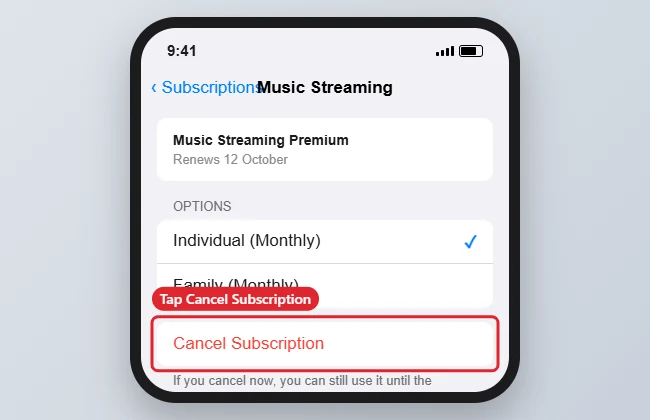
How you cancel a Tidal subscription on an iPhone depends on how you pay. If you subscribed inside the iPhone app and are billed through Apple, open Settings, tap your name, tap Subscriptions, choose Tidal and tap Cancel Subscription. If you pay Tidal directly, deleting the app won’t stop billing; cancel from your account page on Tidal’s website instead. These steps work on an iPhone 7 and on newer iPhones.
Quick Answer
Billed by Apple: Settings > your name > Subscriptions > Tidal > Cancel Subscription. Billed by Tidal: sign in on Tidal’s website and cancel from your account’s subscription settings.
Steps to Cancel Through Your iPhone
- Open the Settings app.
- Tap your name at the top.
- Tap Subscriptions. Enter your password or use Face ID or Touch ID if asked.
- Tap Tidal in the Active list.
- Tap Cancel Subscription and confirm.
If Tidal Isn’t in Your Subscriptions List
You’re most likely billed directly by Tidal (or through a phone carrier or other partner). Open Safari, go to Tidal’s website, sign in, open your account settings and look for the option to manage or cancel your subscription. Menu names change over time, so follow the current labels on the page. If you pay through a carrier bundle, contact that provider.
Billing Methods at a Glance
| How you pay | Where to cancel |
|---|---|
| Apple (in-app purchase) | Settings > your name > Subscriptions |
| Card or PayPal with Tidal | Your account page on Tidal’s website |
| Carrier or bundle partner | That provider’s account or support |
Troubleshooting
- No Cancel button: The subscription may already be cancelled; the screen then shows when access ends.
- Charged after cancelling: Check the receipt to see who billed you, then contact Apple or Tidal.
- Other subscriptions: See cancelling a subscription on iPhone, or cancelling AppleCare.
Frequently Asked Questions
Does deleting the app cancel my subscription?
No. Billing continues until you cancel through Apple or through Tidal.
Do I keep access after cancelling?
Usually yes, until the end of the current billing period.
Can I get a refund?
For Apple-billed charges, you can request one through Apple’s problem-reporting page; refunds aren’t guaranteed. For direct billing, contact Tidal support.
Summary
- Check how you’re billed.
- Apple billing: cancel in Settings > your name > Subscriptions.
- Direct billing: cancel on Tidal’s website.
- Access usually lasts until the period ends.

Kermit Matthews is a freelance writer based in Philadelphia, Pennsylvania with more than a decade of experience writing technology guides. He has a Bachelor’s and Master’s degree in Computer Science and has spent much of his professional career in IT management.
He specializes in writing content about iPhones, Android devices, Microsoft Office, and many other popular applications and devices.