The iPhone 15 has several microphones rather than just one, and knowing where they are helps when callers say you sound muffled, when a video has poor audio, or when Siri cannot hear you. Microphones are small holes or grilles that are easy to cover with a finger, a case, or a screen protector. This guide shows where each microphone is on the iPhone 15 family, what each one does, and how to test and clean them.
Apple does not publish exact microphone diagrams for every model, and positions differ slightly between the iPhone 15, 15 Plus, 15 Pro, and 15 Pro Max. The locations below reflect Apple's general layout for these models.
Quick Answer
The iPhone 15's main microphones are on the bottom edge, in the grilles on either side of the USB-C port. There is also a microphone near the rear cameras (next to the flash) and one at the top front, near the earpiece speaker.
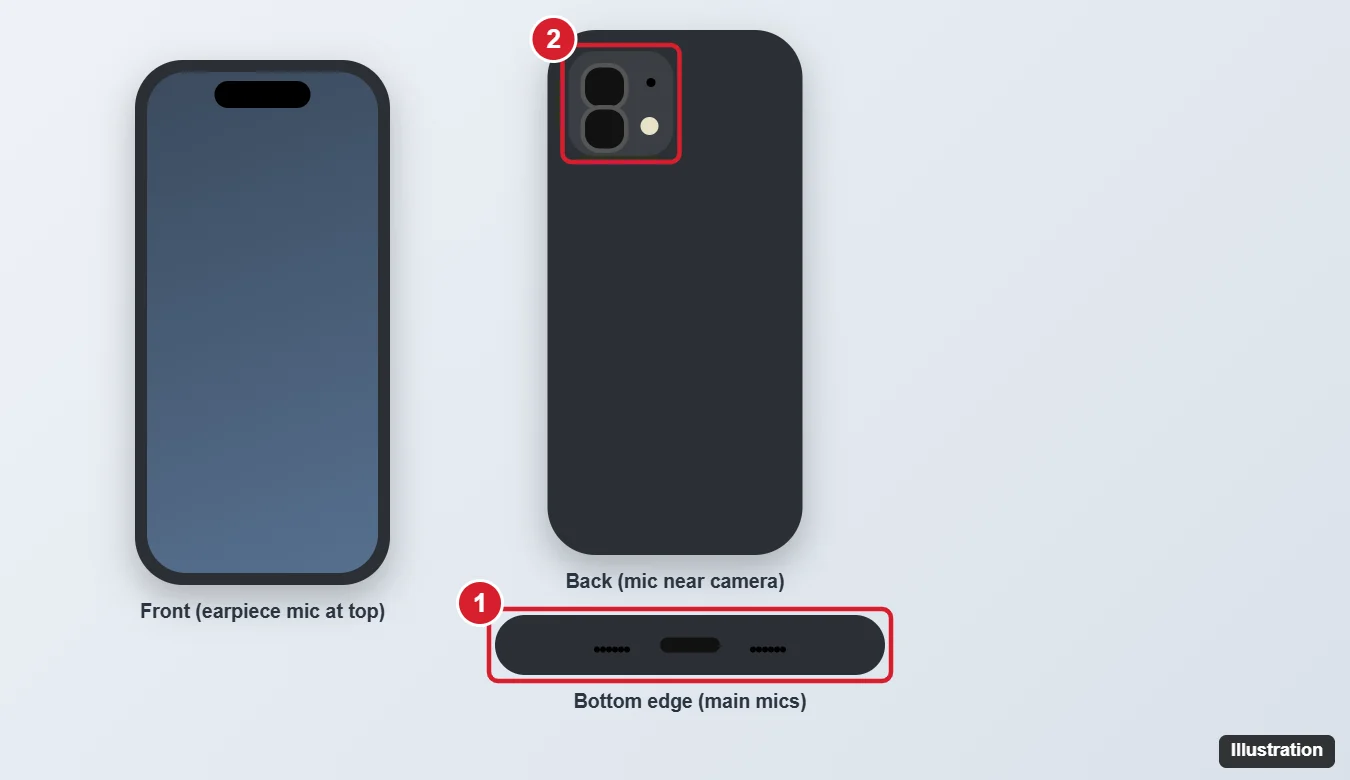
Microphone Locations and What They Do
| Location | Main use |
|---|---|
| Bottom edge, beside the USB-C port | Phone calls, voice memos, Siri, and voice messages |
| Back, near the cameras and flash | Video recording with the rear camera, noise reduction |
| Top front, near the earpiece | FaceTime and selfie videos, speakerphone, noise cancellation |
The iPhone uses these microphones together for features like noise reduction on calls and stereo audio in videos.
How to Test Each Microphone
- Bottom microphone: open Voice Memos, record a short clip while speaking normally, and play it back.
- Rear microphone: open Camera, record a video with the back camera, and play it back.
- Front microphone: record a video with the front camera, then play it back.
If one recording sounds muffled or silent while the others sound fine, that specific microphone is blocked or has a problem.
Improve Microphone Sound
Remove anything blocking the microphones
Take off your case and screen protector and test again. Some cases do not have openings that line up with the microphones.
Clean the microphone openings gently
- Power off the iPhone.
- Use a soft, dry, clean toothbrush or a soft brush to gently remove lint from the grilles.
- Do not use pins, compressed air aimed directly into the holes, or liquids, which can damage the microphone.
Check Voice Isolation
During a call, open Control Center, tap Mic Mode, and choose Voice Isolation to reduce background noise. This is available for phone calls and many video-calling apps.
Check app permissions
Go to Settings > Privacy & Security > Microphone and make sure the app you are using is allowed to use the microphone.
Disconnect Bluetooth devices
If AirPods or a car system are connected, your iPhone may use their microphone instead. Turn off Bluetooth to test the built-in mics.
When to Get Service
If a microphone still does not work after removing the case, cleaning, restarting, and updating iOS, contact Apple Support or visit an Apple Store or Apple Authorized Service Provider. You can also run diagnostics through Apple Support if prompted.
Older model? See where the microphone is on iPhone 14.
Headset problems? See how to forget a Bluetooth device on iPhone 15.
Frequently Asked Questions
Where is the main microphone on the iPhone 15?
On the bottom edge, in the grilles next to the USB-C port.
Why do people say I sound quiet only on speakerphone?
Speakerphone relies more on the top and rear microphones. Check that your case or hand is not covering them.
Is the microphone location the same on the iPhone 15 Pro?
The general layout is similar: bottom-edge microphones, one near the rear cameras, and one near the front earpiece.
Summary
- Main microphones: bottom edge, beside the USB-C port.
- Rear microphone: near the cameras and flash.
- Front microphone: at the top near the earpiece.
- Test each with Voice Memos and front and rear videos, and remove cases or lint if audio is muffled.

Kermit Matthews is a freelance writer based in Philadelphia, Pennsylvania with more than a decade of experience writing technology guides. He has a Bachelor’s and Master’s degree in Computer Science and has spent much of his professional career in IT management.
He specializes in writing content about iPhones, Android devices, Microsoft Office, and many other popular applications and devices.