Need a name for your AirTag? Short, funny names work best, like Keyser Söze for your keys, Cashanova for your wallet, or Bag to the Future for a suitcase. Below you’ll find more than 100 ideas sorted by what you’re tracking, plus the steps to rename an AirTag and change its emoji in the Find My app on your iPhone, iPad, or Mac.
How to rename an AirTag on iPhone or iPad
- Open the Find My app and tap the Items tab.
- Tap the AirTag you want to rename.
- Swipe up on the item card and tap Rename Item. On some versions of iOS, this is called Change Name and Emoji.
- Pick a name from the list, or scroll to the bottom and tap Custom Name, then type your own.
- Tap the emoji next to the name to choose a different one.
- Tap Done or the checkmark to save.

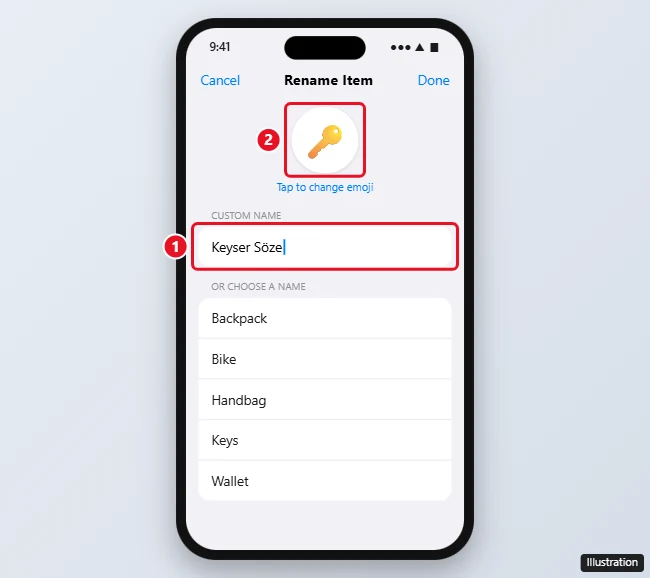
The new name shows up right away in Find My on all of your devices signed in to the same Apple Account.
How to rename an AirTag on a Mac
- Open Find My and click Items.
- Select the AirTag, then click the Info button (the small “i”) on the map.
- Click Rename Item, choose a name or Custom Name, pick an emoji, and click Done.
Only the AirTag’s owner can rename it. If someone shared an AirTag with you, you’ll see the name they chose.
Tips for picking a good AirTag name
- Make it Siri-friendly. You can ask Siri, “Where’s my name?” Names that are easy to say, like “Keymaster,” work better than long phrases or made-up spellings.
- Keep it short. Long names get cut off in the Items list and in notifications.
- Make it obvious. If you have several AirTags, “Wally the Wallet” beats “Tag 3” when you’re in a hurry.
- Leave out personal details. Skip your full name, address, or phone number. If you lose the item, use Lost Mode to share contact info instead.
- Use the emoji. A matching emoji (🔑, 👛, 🐶) makes the tag easy to spot on the map.
Funny AirTag names for keys
- Keyser Söze
- Locky Balboa
- The Keymaster
- Key-lo Ren
- Keyanu Reeves
- Low-Key
- Florida Keys
- Monkey
- Turnkey Tom
- Jingle Bells
- House Party
- Where Did I Put These
Funny AirTag names for a wallet or purse
- Cashanova
- Moneybags
- Wally
- The Bank of Me
- Broke Again
- Fort Knox
- Dolla Dolla Bill
- Mo’ Money
- Bag of Holding
- Purse-onality
- Credit Where It’s Due
- Tiny Vault
Funny AirTag names for luggage and travel bags
- Bag to the Future
- Suitcase Closed
- Carry-On Wayward Son
- Baggage Claim to Fame
- Jet Setter
- Wander Bag
- Lost in Transit
- Around the World in 80 Bags
- Roll With It
- Check Me Out
- Gate Crasher
- Overpacked
Funny AirTag names for a backpack or school bag
- Backpack Jack
- The Hump
- Bag of Tricks
- Strap In
- Homework Holder
- Snack Pack
- Zippy
- Rucksack Ralph
- Pack Attack
- Book Worm
Funny AirTag names for a car
- Parking Lot Roulette
- Where’d I Park
- Vin Diesel
- Wheely Good Car
- Carl
- The Batmobile
- Old Faithful
- Lightning
- Road Warrior
- Sir Honks-a-Lot
Funny AirTag names for a bike or scooter
- Pedal Pusher
- Spoke Signal
- Wheelie Nelson
- Cycle Path
- Two-Wheel Tony
- Gear Pressure
- Scoot Over
- Chain Reaction
AirTag names for a pet collar
Apple designed AirTags to track items, not people or pets, but many owners attach one to a collar anyway. If you do, a name that’s clearly your pet’s makes the tag easy to find in a hurry.
- Houdini
- Escape Artist
- Sir Barks-a-Lot
- Furball Finder
- Catastrophe
- Where’s Waldo the Dog
- Lost Paws
- Mr. Whiskers’ Whereabouts
- Good Boy GPS
- Wanderpaws
Funny AirTag names for everyday stuff
- TV remote: Couch Crevice, The Clicker, Remote Possibility
- Umbrella: Rain Man, Ella, Under My Umbrella
- Laptop bag: The Office, Work Mode, Macbag
- Gym bag: Sweat Box, Gains Train, Rep Bag
- Headphones case: Earl, All Ears, Sound Asleep
- Camera bag: Snap Judgment, Shutterbug, Picture This
- Golf bag: Fore!, Tee Time, Hole in One
- Guitar case: Six-String Sam, Pick Me Up, Stairway to Heaven
Clever one-word AirTag names
If you want something short and easy for Siri to understand, try one of these: Scout, Compass, Radar, Beacon, Boomerang, Homing, Tracker, Echo, Ping, Magellan, Columbus, Nomad, Rover, Bolt, Waldo.
Tag not updating? See fixing an AirTag that is not reachable.
Frequently asked questions
Can I use emoji in an AirTag name?
Yes. Every AirTag has an emoji icon that you can change, and you can also type emoji into a custom name.
Can people near my AirTag see its name?
The name shows in Find My for you and anyone you share the AirTag with. It isn’t what strangers see if they find your lost item. To share contact details with a finder, turn on Lost Mode.
Can I rename an AirTag someone shared with me?
No. Only the owner can rename it or change its emoji.
Can I engrave a name on an AirTag?
Yes, when you buy it from Apple. For ideas, see our AirTag engraving ideas.

Kermit Matthews is a freelance writer based in Philadelphia, Pennsylvania with more than a decade of experience writing technology guides. He has a Bachelor’s and Master’s degree in Computer Science and has spent much of his professional career in IT management.
He specializes in writing content about iPhones, Android devices, Microsoft Office, and many other popular applications and devices.