Windows 11 no longer has an official way to install APK files. Microsoft ended support for Windows Subsystem for Android on March 5, 2025, and the Amazon Appstore for Windows went with it. Today your choices are Google Play Games for PC, which runs only Google-approved games, or a third-party Android emulator that can sideload APKs.
Quick Answer
For Android games, install Google Play Games for PC. For other APKs, install a reputable Android emulator, turn on virtualization, and open the APK inside the emulator. Only install APKs from sources you trust.
How to Run APK Files on Windows 11
- Check that virtualization is on in your PC’s firmware settings (Task Manager, Performance, CPU shows Virtualization: Enabled).
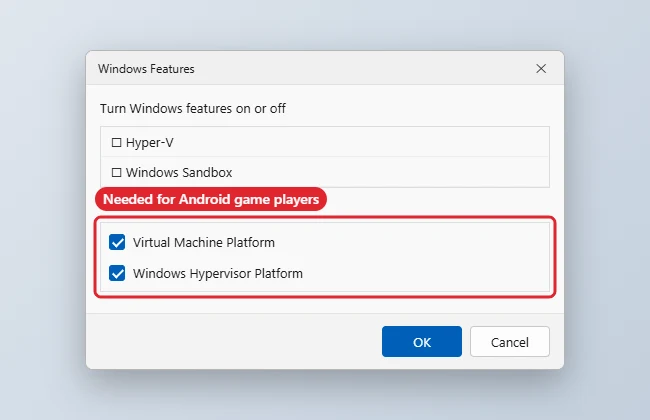
- Turn on Virtual Machine Platform and Windows Hypervisor Platform in Turn Windows features on or off, then restart.
- For games, install Google Play Games for PC and sign in with your Google account.
- For other apps, install a well-known Android emulator from its official website.
- Inside the emulator, use its Install APK option or drag the APK file onto its window.
- Open the app from the emulator’s home screen.
Options After the Android Subsystem
| Option | What it runs |
|---|---|
| Google Play Games for PC | Approved Android games only |
| Third-party emulator | Most APKs and Play Store apps |
| Phone Link apps | Mirrors apps from some Android phones |
| Windows Subsystem for Android | Support ended March 5, 2025 |
| Web or Windows versions | Often the simplest alternative |
Troubleshooting
- Emulator will not start: make sure virtualization is enabled and that Hyper-V settings match the emulator’s requirements.
- App crashes: try a different Android version profile in the emulator.
- Security warning: APKs from unknown sites can contain malware; stick to the Play Store inside the emulator where possible.
- Related: how to run Android apps on Windows 11 and getting the Play Store on Windows 11.
Frequently Asked Questions
Can I still use Windows Subsystem for Android?
No. Microsoft ended support on March 5, 2025.
Is sideloading APKs legal?
Installing apps you are entitled to use is fine. Avoid pirated or modified APKs.
Do emulators slow down my PC?
They use a lot of memory; 8 GB or more is recommended.
Can I run APKs on Windows 10?
The same emulator approach works on Windows 10.
Summary
- Enable virtualization.
- Turn on the needed Windows features.
- Use Google Play Games for games.
- Use a reputable emulator for other APKs.
- Install only trusted APKs.

Kermit Matthews is a freelance writer based in Philadelphia, Pennsylvania with more than a decade of experience writing technology guides. He has a Bachelor’s and Master’s degree in Computer Science and has spent much of his professional career in IT management.
He specializes in writing content about iPhones, Android devices, Microsoft Office, and many other popular applications and devices.