Te reo Māori uses macrons (tohutō) over long vowels: ā, ē, ī, ō, and ū. Word can type them in three ways: the Māori keyboard built into Windows, Word’s Unicode shortcut, or the Symbol dialog. The Māori keyboard is the fastest if you write in te reo often.
Quick Answer
Add the Māori keyboard in Settings, Time and language, Language and region, then press the backtick key (grave accent, left of 1) followed by a vowel to get a macron. In Word you can also type the code, such as 0101, and press Alt+X to get ā.
How to Type Māori Macrons in Word
- Open Settings, Time and language, Language and region, and click Add a language. Search for Māori, install it, and add its keyboard.
- Switch to the Māori keyboard with Windows+Space.
- In Word, press the backtick key (to the left of 1), then a vowel, to type ā, ē, ī, ō, or ū. Hold Shift with the vowel for capitals.
- Without the keyboard, type the Unicode code (for example 0101) and press Alt+X right after it.
- Or open Insert, Symbol, More Symbols, choose Latin Extended-A, select the letter, and click Insert.
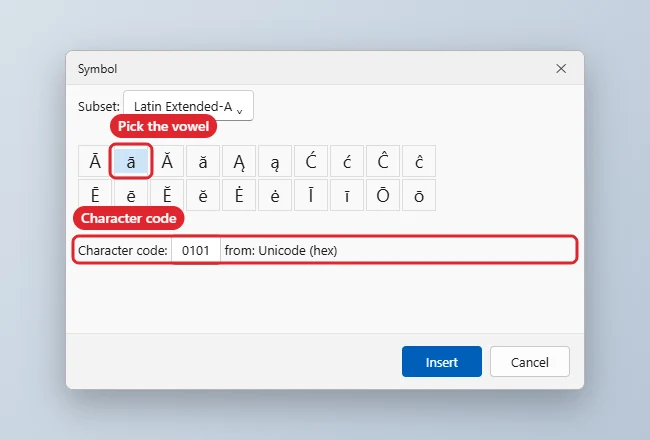
Macron Codes for Alt+X
| Letter | Type, then Alt+X |
|---|---|
| ā / Ā | 0101 / 0100 |
| ē / Ē | 0113 / 0112 |
| ī / Ī | 012B / 012A |
| ō / Ō | 014D / 014C |
| ū / Ū | 016B / 016A |
Troubleshooting
- The backtick key types a normal backtick: the Māori keyboard is not active. Check the language indicator on the taskbar.
- Alt+X converts the wrong characters: add a space before the code, or select just the code before pressing Alt+X.
- For accents in other languages, see how to type accents on Windows 11.
- If macrons show as boxes, the font may not support them; read how to add a font to Word and choose one that does.
Frequently Asked Questions
Does AutoCorrect help with macrons?
Yes. You can add AutoCorrect entries, such as replacing Maori with Māori, in File, Options, Proofing, AutoCorrect Options.
Will macrons display on other computers?
Yes, in any modern font that supports Latin Extended-A characters, which includes most standard fonts.
Can I type macrons on a Mac?
Yes. Add the Māori keyboard in System Settings, Keyboard, Input Sources, then press Option and a vowel.
Summary
- Add the Māori keyboard in Windows Settings.
- Press the backtick key, then a vowel.
- Or type the code and press Alt+X in Word.
- Use Insert, Symbol as a fallback.

Kermit Matthews is a freelance writer based in Philadelphia, Pennsylvania with more than a decade of experience writing technology guides. He has a Bachelor’s and Master’s degree in Computer Science and has spent much of his professional career in IT management.
He specializes in writing content about iPhones, Android devices, Microsoft Office, and many other popular applications and devices.