Windows 11 doesn’t list your laptop’s screen size in Settings, but you can find it in about a minute. The most reliable ways are to look up your laptop’s model number (Settings > System > About) on the maker’s website, or to measure the screen diagonally from corner to corner, not including the bezel. A PowerShell command can also estimate it from the size the display reports to Windows.
Screen size is always the diagonal measurement in inches, such as 13.3, 14, 15.6, or 16 inches. Don’t confuse it with resolution (like 1920 × 1080), which Settings does show.
Quick Answer
Find your model in Settings > System > About, search the model’s specs online, or measure the visible screen diagonally and convert to inches.
Method 1: Look Up Your Laptop Model
- Press Windows + I to open Settings.
- Select System, then About at the bottom.
- Note the name at the top of the page, or the model under Device specifications. You can also press Windows + R, type
msinfo32, and read System Model. - Search for that model on the manufacturer’s support site. The spec sheet lists the display size.
The model number is also printed on a sticker under the laptop or on the original box. Here’s more on finding your computer’s model number.
Method 2: Measure the Screen
- Use a tape measure or ruler.
- Measure from the bottom-left corner of the visible screen to the top-right corner. Don’t include the plastic or metal frame.
- If you measured in centimeters, divide by 2.54 to get inches.
- Round to the nearest common size. For example, 39.6 cm is 15.6 inches.
Method 3: Estimate It With PowerShell
Most displays report their physical width and height to Windows. This method is usually accurate within a few tenths of an inch.
- Right-click Start and choose Terminal.
- Type this command and press Enter:
Get-CimInstance -Namespace root\wmi -ClassName WmiMonitorBasicDisplayParams | Select-Object MaxHorizontalImageSize, MaxVerticalImageSize - Read the two numbers. They’re the screen’s width and height in centimeters.
- Work out the diagonal: square both numbers, add them, take the square root, and divide by 2.54. For 34 × 19 cm, that’s about 15.3 inches, which is a 15.6-inch class screen.
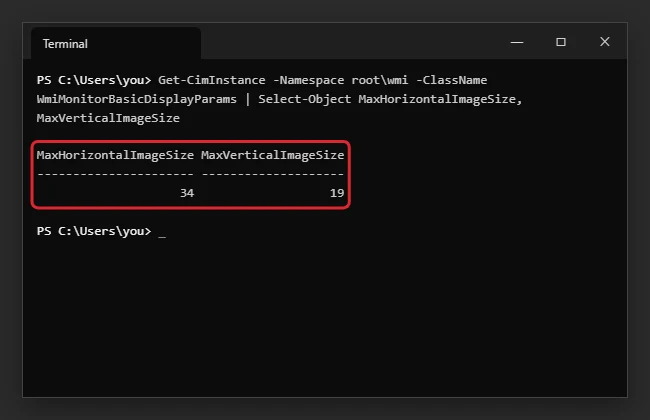
If you have an external monitor connected, you’ll see one line per display. The laptop screen is usually the first one.
Common Laptop Screen Sizes
| Size | Diagonal (cm) | Typical laptops |
|---|---|---|
| 13.3 to 13.6 inches | 34 to 35 | Ultraportables |
| 14 inches | 35.6 | Thin-and-light and business laptops |
| 15.6 inches | 39.6 | Everyday and budget laptops |
| 16 inches | 40.6 | Creator and performance laptops |
| 17.3 inches | 43.9 | Desktop-replacement and gaming laptops |
Check Resolution and Scaling Too
If you need screen size to buy a case or plan a display setup, also note your resolution in Settings > System > Display > Display resolution. The same page shows Scale, which controls how large text and apps look.
Troubleshooting
- The command shows 0 or odd numbers: Some displays and virtual machines don’t report their size. Use Method 1 or 2.
- The PowerShell result doesn’t match the spec sheet: The reported size is rounded to whole centimeters, so small differences are normal. Trust the spec sheet.
Frequently Asked Questions
Does screen size include the bezel?
No. It’s measured across the visible display area only.
Can I see screen size in DirectX Diagnostic Tool?
No. dxdiag shows the display name and resolution, not the physical size.
Summary
- Find your model in Settings > System > About and check its specs.
- Or measure the visible screen diagonally.
- Or use the PowerShell command and calculate the diagonal.

Kermit Matthews is a freelance writer based in Philadelphia, Pennsylvania with more than a decade of experience writing technology guides. He has a Bachelor’s and Master’s degree in Computer Science and has spent much of his professional career in IT management.
He specializes in writing content about iPhones, Android devices, Microsoft Office, and many other popular applications and devices.