Skip to content
Live2Tech
Menu

Featured Word Guides

Our most popular and well-liked how-to guides and tutorials about topics involving the Microsoft Word word-processing program.

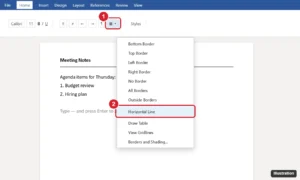
Word Home tab with the Borders menu open and Horizontal Line highlighted, plus a line typed with three hyphens in the document

How to Insert a Horizontal Line in Word (4 Easy Ways)

September 25, 2026January 16, 2023 by Kermit Matthews

Insert a horizontal line in Microsoft Word with a typing shortcut, the Borders menu, a shape, or a custom border, and delete lines Word adds automatically. Continue Reading How to Insert a Horizontal Line in Word (4 Easy Ways)

Categories Word Tags Featured Word Guides, Lines, word 2013
Word Options Display page with the formatting marks checkboxes highlighted under Always show these formatting marks on the screen

How to Hide Formatting Marks in Word 2013

October 12, 2026October 26, 2021 by Kermit Matthews

Hide formatting marks in Word 2013 and later with Show/Hide ΒΆ or Ctrl + Shift + 8, and turn off marks that stay visible in Word Options. Continue Reading How to Hide Formatting Marks in Word 2013

Categories Word Tags Featured Word Guides, Formatting, word 2013
Word processor Design tab with the Watermark button open, showing Confidential and Do Not Copy watermark thumbnails and the Custom Watermark and Remove Watermark options highlighted

How to Add a Watermark in Microsoft Word 2016

October 11, 2026June 8, 2021 by Kermit Matthews

Add a watermark in Word 2016: Design > Watermark, then pick one or choose Custom Watermark for text or a logo. Plus removing and one-page tips. Continue Reading How to Add a Watermark in Microsoft Word 2016

Categories Word Tags Background, Featured Word Guides

Join Our Free Newsletter

Featured guides and deals

You may opt out at any time.
Read our Privacy Policy

  • About Us
  • Contact
  • Disclaimer
  • Privacy Policy
© Live2Tech.com 2026
  • Popular
  • iPhone
  • Excel
  • Word
  • Docs
  • Sheets
  • Tutorials