Te reo Māori uses macrons (tohutō) over long vowels: ā, ē, ī, ō, and ū. Word can type them in three ways: the Māori keyboard built into Windows, Word’s Unicode shortcut, or the Symbol dialog. The Māori keyboard is the fastest if you write in te reo often: press the backtick key (left of 1), then a vowel.
How to Type Māori Macrons in Word
- Open Settings, Time and language, Language and region, and click Add a language. Search for Māori, install it, and add its keyboard.
- Switch to the Māori keyboard with Windows+Space.
- In Word, press the backtick key (to the left of 1), then a vowel, to type ā, ē, ī, ō, or ū. Hold Shift with the vowel for capitals.
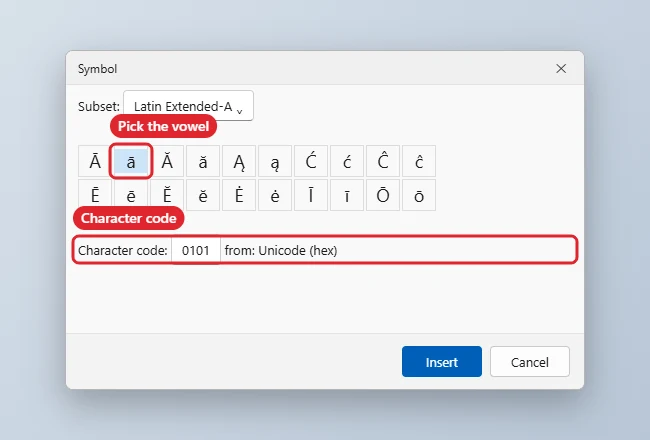
- Without the keyboard, type the Unicode code (for example 0101) and press Alt+X right after it.
- Or open Insert, Symbol, More Symbols, choose Latin Extended-A, select the letter, and click Insert.
Macron Codes for Alt+X
| Letter | Type, then Alt+X |
|---|---|
| ā / Ā | 0101 / 0100 |
| ē / Ē | 0113 / 0112 |
| ī / Ī | 012B / 012A |
| ō / Ō | 014D / 014C |
| ū / Ū | 016B / 016A |
When Macrons Don’t Come Out Right
- The backtick key types a normal backtick: the Māori keyboard is not active. Check the language indicator on the taskbar.
- Alt+X converts the wrong characters: add a space before the code, or select just the code before pressing Alt+X.
- If macrons show as boxes, the font may not support them; read how to add a font to Word and choose one that does.
Related: Put a line over a letter in Word.
More Questions About Māori Macrons
Does AutoCorrect help with macrons?
Yes. You can add AutoCorrect entries, such as replacing Maori with Māori, in File, Options, Proofing, AutoCorrect Options.
Will macrons display on other computers?
Yes, in any modern font that supports Latin Extended-A characters, which includes most standard fonts.
Can I type macrons on a Mac?
Yes. Add the Māori keyboard in System Settings, Keyboard, Input Sources, then press Option and a vowel.

Kermit Matthews runs Live2Tech from just outside Philadelphia. He is an IT specialist with over 20 years of experience, from a university help desk to small-business IT, IT management and his own consulting practice, and has written tech guides full time since 2020. Steps are checked against the current software on a real device or the maker’s official documentation. More about Kermit.