Skip to content
Live2Tech
  • iPhone
  • Windows
    • Windows 11
    • Windows 10
  • Office
    • Word
    • Excel
    • Powerpoint
    • Outlook
  • Google
    • Google Docs
    • Google Sheets
    • Google Slides
    • Gmail
    • Chrome
    • Google Drive
  • Mac & Apple
    • Mac
    • iPad
    • Apple Watch
  • All Tutorials

Windows 10

How-to guides and tutorials to help you perform specific tasks and use the Windows 10 operating system and its apps.

Windows Security Exclusions page with the Add an exclusion menu open showing File, Folder, File type and Process

How to Add an Exclusion to Windows Defender (Windows Security)

October 20, 2026April 28, 2026 by Kermit Matthews

Add a file, folder, file type or process exclusion in Windows Security, choose the safest type, and remove it later. Continue Reading How to Add an Exclusion to Windows Defender (Windows Security)

Categories Windows 10, Windows 11
Administrator Command Prompt window running the del command to delete files in the TEMP folder

How to Clear Temp Files in Windows 10

October 12, 2026April 28, 2026 by Kermit Matthews

Clear temp files in Windows 10 via Settings > System > Storage > Temporary files, the %temp% folder, or Disk Cleanup. Plus Storage Sense automation. Continue Reading How to Clear Temp Files in Windows 10

Categories Windows 10
Phone web browser with the page menu open and the Request Desktop Website option highlighted

How to Check Disk Space on Windows 10

November 5, 2026April 27, 2026 by Kermit Matthews

Check disk space on Windows 10: open File Explorer > This PC, or Settings > System > Storage for a breakdown. Plus Disk Management and cleanup tips. Continue Reading How to Check Disk Space on Windows 10

Categories Windows 10
Video meeting app Background and effects settings with Blur highlighted

How to Blur Your Background in Zoom on Windows 10

October 12, 2026April 7, 2026 by Kermit Matthews

Blur your background in the Zoom desktop app on Windows 10 from Background and effects or during a meeting. Continue Reading How to Blur Your Background in Zoom on Windows 10

Categories Windows 10
Terminal window installing pygame with pip and showing a successful install

How to Install Pygame on Windows 10

October 20, 2026April 3, 2026 by Kermit Matthews

Install pygame on Windows 10 or 11 with py -m pip install pygame, test it with the aliens example, and fix common errors. Continue Reading How to Install Pygame on Windows 10

Categories Windows 10
Notepad editing the hosts file with lines that block a website highlighted

How to Block Websites on Windows 10 and Windows 11

November 5, 2026March 26, 2026 by Kermit Matthews

Block websites on Windows 10 or 11 with the hosts file for every browser, or with Microsoft Family Safety for a child account. Continue Reading How to Block Websites on Windows 10 and Windows 11

Categories Windows 10, Windows 11
Command Prompt showing ipconfig output with the IPv4 Address line highlighted

How to Check Your IP Address on Windows 10

November 6, 2026March 4, 2026 by Kermit Matthews

Find your IP address on Windows 10 in Settings or with ipconfig, and learn the difference between your private and public IP. Continue Reading How to Check Your IP Address on Windows 10

Categories Windows 10

How to Wipe an SSD on Windows 10 (Securely)

October 23, 2026February 27, 2026 by Kermit Matthews

The most reliable way to wipe an SSD on Windows 10 is the drive maker’s Secure Erase or Sanitize tool, either in its Windows app… Continue Reading How to Wipe an SSD on Windows 10 (Securely)

Categories Windows 10
Video editor timeline with a clip selected and its trim handle highlighted

How to Trim a Video in Windows 10

November 5, 2026February 24, 2026 by Kermit Matthews

Trim a video on Windows 10 for free with Clipchamp by dragging the clip edges, or bring back the old Photos trim tool with Photos Legacy. Continue Reading How to Trim a Video in Windows 10

Categories Windows 10
Windows Task View with desktop thumbnails and the New desktop button highlighted

How to Use Multiple Desktops on Windows 10

October 12, 2026January 8, 2026 by Kermit Matthews

Create, switch and close virtual desktops on Windows 10 with Task View and shortcuts like Windows key + Ctrl + D. Continue Reading How to Use Multiple Desktops on Windows 10

Categories Windows 10

How to Allow Minecraft Through Firewall on Windows 10

November 5, 2026December 11, 2025 by Kermit Matthews

If Minecraft multiplayer or a local server is being blocked on Windows 10, allow the legitimate Minecraft or Java application through Microsoft Defender Firewall instead… Continue Reading How to Allow Minecraft Through Firewall on Windows 10

Categories Windows 10

How to Install Windows 10 on VMware Workstation (Step-by-Step)

November 4, 2026December 3, 2025 by Kermit Matthews

To install Windows 10 on VMware, download a Windows 10 ISO from Microsoft, open VMware Workstation Pro, and create a new virtual machine with File… Continue Reading How to Install Windows 10 on VMware Workstation (Step-by-Step)

Categories Windows 10
Windows taskbar input language flyout with two keyboard languages listed

How to Switch Keyboard Language in Windows 10

November 4, 2026November 10, 2025 by Kermit Matthews

Switch keyboard languages in Windows 10 with Windows key + Space or the taskbar, and add or remove keyboard layouts. Continue Reading How to Switch Keyboard Language in Windows 10

Categories Windows 10
Windows 10 Reset this PC dialog with the Keep my files and Remove everything options, Remove everything highlighted

How to Format a Windows 10 Laptop (Reset or Clean Install)

September 26, 2026August 29, 2025 by Kermit Matthews

Format a Windows 10 laptop with Reset this PC > Remove everything or a clean USB install, back up first and securely erase before selling. Continue Reading How to Format a Windows 10 Laptop (Reset or Clean Install)

Categories Windows 10
Windows 10 Settings Update and Security Recovery page with the Recovery tab and the Reset this PC Get started button highlighted

How to Do a Factory Reset on Windows 10 (Keep Files or Wipe)

October 20, 2026August 26, 2025 by Kermit Matthews

Factory reset Windows 10 with Reset this PC: keep files or remove everything, choose cloud or local reinstall, and reset a PC that will not start. Continue Reading How to Do a Factory Reset on Windows 10 (Keep Files or Wipe)

Categories Windows 10
Video creator studio content list with the options menu open on one of your own uploaded videos and Download highlighted

How to Get Audio From YouTube on Windows (Legitimate Ways)

September 26, 2026August 20, 2025 by Kermit Matthews

Get audio from YouTube legally on Windows: download your own videos in YouTube Studio, use the free Audio Library, or listen offline with YouTube Premium. Continue Reading How to Get Audio From YouTube on Windows (Legitimate Ways)

Categories Windows 10, Windows 11
Disk cloning utility with a source hard drive and a larger target SSD selected, and options to resize partitions and verify the clone

How to Clone a Hard Drive in Windows 10

November 5, 2026August 20, 2025 by Kermit Matthews

Clone a hard drive in Windows 10 with SSD maker software or Clonezilla, swap drives, fix boot problems, and extend partitions after cloning. Continue Reading How to Clone a Hard Drive in Windows 10

Categories Windows 10
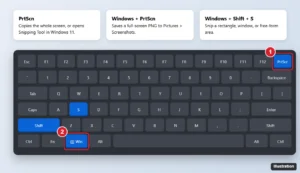
Laptop keyboard illustration highlighting the Print Screen key and the Windows plus Shift plus S shortcut

How to Take a Screenshot on a Dell Laptop or PC (Windows 10 and 11)

September 25, 2026August 19, 2025 by Kermit Matthews

Take a screenshot on a Dell laptop or desktop with PrtScn, Windows+PrtScn, or Windows+Shift+S, find the Print Screen key, and locate saved files. Continue Reading How to Take a Screenshot on a Dell Laptop or PC (Windows 10 and 11)

Categories Windows 10, Windows 11
Word title bar Quick Access Toolbar with the Undo and Redo buttons, Redo highlighted

How to Redo on Windows (Keyboard Shortcuts)

September 24, 2026August 15, 2025 by Kermit Matthews

Redo on Windows with Ctrl + Y, or Ctrl + Shift + Z in some apps. See redo shortcuts for Office, browsers, and File Explorer, plus Repeat. Continue Reading How to Redo on Windows (Keyboard Shortcuts)

Categories Windows 10, Windows 11
Windows File Explorer search box with content:invoice typed and matching files listed

How to Search for a Word on Windows (Pages, Files, and Apps)

September 24, 2026August 1, 2025 by Kermit Matthews

Search for a word on Windows with Ctrl + F in apps and browsers, find words inside files with File Explorer’s content: search, or use findstr. Continue Reading How to Search for a Word on Windows (Pages, Files, and Apps)

Categories Windows 10, Windows 11
Blue Windows recovery screen titled Choose an option with Continue, Use a device, Troubleshoot and Turn off your PC, Troubleshoot highlighted

How to Factory Reset an HP Desktop With Windows 10

September 27, 2026August 1, 2025 by Kermit Matthews

Factory reset an HP desktop on Windows 10 from Settings, with F11 at startup, or with the HP Cloud Recovery Tool, and back up and wipe it safely. Continue Reading How to Factory Reset an HP Desktop With Windows 10

Categories Windows 10
Illustration of a PC power supply side label with the model name and total rated wattage highlighted

How to Check Power Supply Wattage on Windows 10

October 20, 2026July 31, 2025 by Kermit Matthews

Windows 10 can’t show PSU wattage. Find it on the power supply label, your PC’s specs, or the model number, and learn how much wattage your PC needs. Continue Reading How to Check Power Supply Wattage on Windows 10

Categories Windows 10
Browser-based music studio with instrument tracks and a record button

Can You Get GarageBand on Windows? Best Legit Alternatives

September 27, 2026July 30, 2025 by Kermit Matthews

GarageBand has no Windows version. Use free alternatives like BandLab, LMMS or Waveform Free, or GarageBand on an Apple device you own. Continue Reading Can You Get GarageBand on Windows? Best Legit Alternatives

Categories Windows 10, Windows 11
Windows Features dialog with Virtual Machine Platform and Windows Hypervisor Platform checked for running Android emulators

How to Run Android Apps on Windows 10 (4 Ways That Work in 2026)

October 20, 2026July 29, 2025 by Kermit Matthews

Run Android apps and games on Windows 10 with Google Play Games on PC, Phone Link, or an emulator like BlueStacks, plus requirements and setup steps. Continue Reading How to Run Android Apps on Windows 10 (4 Ways That Work in 2026)

Categories Windows 10
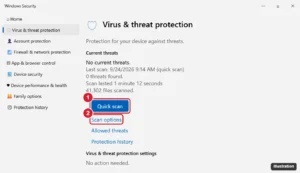
Windows Security Virus and threat protection page with the Quick scan button and Scan options link highlighted

How to Run a Virus Scan on Windows 10 (Quick, Full, and Offline)

October 20, 2026July 21, 2025 by Kermit Matthews

Run a virus scan on Windows 10 with Windows Security: quick, full, custom, and offline scans, scanning a file or USB drive, and what to do if threats are found. Continue Reading How to Run a Virus Scan on Windows 10 (Quick, Full, and Offline)

Categories Windows 10, Windows 11
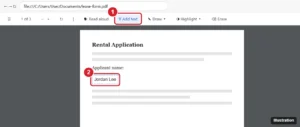
PDF open in Microsoft Edge with the Add text tool highlighted in the toolbar and a text box added to the page

How to Edit a PDF on Windows (Free and Paid Options)

September 29, 2026July 17, 2025 by Kermit Matthews

Edit a PDF on Windows for free with Microsoft Edge, change its text in Word, or use a full PDF editor. Includes tips for scanned PDFs. Continue Reading How to Edit a PDF on Windows (Free and Paid Options)

Categories Windows 10, Windows 11
Windows Recycle Bin window with a deleted file selected and the Restore option highlighted in the right-click menu

How to Recover Deleted Files in Windows 10 (7 Methods)

November 5, 2026July 17, 2025 by Kermit Matthews

Recover deleted files in Windows 10 from the Recycle Bin, OneDrive, File History, or Previous Versions, or with the free Windows File Recovery tool. Continue Reading How to Recover Deleted Files in Windows 10 (7 Methods)

Categories Windows 10
Disk Management showing a second drive with an old Windows partition, the right-click menu open and Delete Volume highlighted

How to Remove Windows From a Hard Drive (Old or Second Drive)

October 11, 2026July 17, 2025 by Kermit Matthews

Remove Windows from an old or second hard drive with Disk Management or DiskPart, delete a dual-boot entry, and securely erase a drive before selling. Continue Reading How to Remove Windows From a Hard Drive (Old or Second Drive)

Categories Windows 10, Windows 11
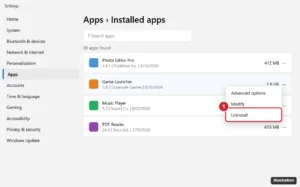
Windows 11 Settings Apps Installed apps list with the three-dot menu open on an app and the Uninstall option highlighted

How to Delete Apps on Windows 10 and 11 (4 Ways)

October 12, 2026July 15, 2025 by Kermit Matthews

Delete apps on Windows 10 and 11 from Settings, the Start menu, Control Panel, or winget, remove built-in apps, and fix apps that will not uninstall. Continue Reading How to Delete Apps on Windows 10 and 11 (4 Ways)

Categories Windows 10, Windows 11
Windows 10 Settings Display page with the Change brightness for the built-in display slider highlighted

How to Adjust Brightness in Windows 10

November 6, 2026July 14, 2025 by Kermit Matthews

Adjust brightness in Windows 10 in Display settings, Action Center, with keyboard keys, or Mobility Center, and fix a missing brightness slider. Continue Reading How to Adjust Brightness in Windows 10

Categories Windows 10
Windows Settings Fonts page showing a selected font family with its full name and a preview used before changing the system font

How to Change the Windows System Font (and Safer Alternatives)

October 20, 2026July 11, 2025 by Kermit Matthews

Windows has no setting to change the system font. Use text size and ClearType, change app fonts, or replace Segoe UI with a backed-up registry edit. Continue Reading How to Change the Windows System Font (and Safer Alternatives)

Categories Windows 10
Windows Setup screen asking where to install Windows, listing drive partitions with Delete, Format and New options

How to Reinstall Windows From a USB Drive (Windows 11 and 10)

September 26, 2026July 11, 2025 by Kermit Matthews

Reinstall Windows 11 or 10 from USB: create installation media with the Media Creation Tool, boot from USB, do a clean install, and restore drivers and files. Continue Reading How to Reinstall Windows From a USB Drive (Windows 11 and 10)

Categories Windows 10, Windows 11
Windows 10 Settings Backup page with Backup selected and the Add a drive button highlighted

How to Back Up Files on Windows 10 (4 Ways)

October 12, 2026July 11, 2025 by Kermit Matthews

Back up files on Windows 10 with File History, OneDrive and Windows Backup, a system image, or a manual copy, plus how to restore your files. Continue Reading How to Back Up Files on Windows 10 (4 Ways)

Categories Windows 10
Windows Scan app with the File type menu set to PDF and the Scan button highlighted

How to Convert a Scanned Document to PDF on Windows 10 (Free)

October 20, 2026July 10, 2025 by Kermit Matthews

Convert scanned documents to PDF on Windows 10 for free: scan straight to PDF with Windows Scan, combine images with Microsoft Print to PDF, and add OCR. Continue Reading How to Convert a Scanned Document to PDF on Windows 10 (Free)

Categories Windows 10, Windows 11
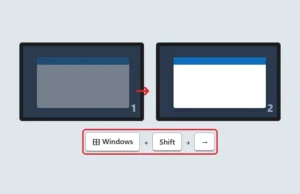
Two monitors with an app window moving from the left screen to the right screen and the keyboard shortcut Windows Shift Right Arrow shown

How to Make a Program Open on a Specific Monitor in Windows

September 29, 2026July 10, 2025 by Kermit Matthews

Make apps open on the monitor you want in Windows 10 and 11 by moving and closing them there, changing the main display, or using a window manager. Continue Reading How to Make a Program Open on a Specific Monitor in Windows

Categories Windows 10
Windows 10 Wireless Network Properties Security tab with the Show characters box checked to reveal the Wi-Fi password

How to Find the Wi-Fi Password on Windows 10

November 5, 2026July 9, 2025 by Kermit Matthews

Open Network and Sharing Center, click your Wi-Fi, then Wireless Properties > Security > Show characters. Or use netsh wlan show profile key=clear. Continue Reading How to Find the Wi-Fi Password on Windows 10

Categories Windows 10
Windows 10 File Explorer View tab with the Hidden items checkbox highlighted

How to See Hidden Files and Folders on Windows 10 (4 Ways)

October 20, 2026July 7, 2025 by Kermit Matthews

Show hidden files on Windows 10 from the File Explorer View tab, Folder Options, Settings, or Command Prompt, plus how to unhide a single file. Continue Reading How to See Hidden Files and Folders on Windows 10 (4 Ways)

Categories Windows 10
Windows sign-in screen after a wrong password with the Reset password link highlighted

How to Reset a Windows 10 or 11 Password Without Logging In

October 12, 2026July 7, 2025 by Kermit Matthews

Forgot your Windows password? Reset it from the sign-in screen with your Microsoft account, security questions, a reset disk, or another admin. Step by step. Continue Reading How to Reset a Windows 10 or 11 Password Without Logging In

Categories Windows 10, Windows 11
Windows File Explorer with an EPS file right-clicked and the Open with menu showing Inkscape, GIMP, and LibreOffice Draw

How to Open an EPS File on Windows

September 24, 2026July 7, 2025 by Kermit Matthews

Install a free app like Inkscape (with Ghostscript), GIMP, or LibreOffice Draw, then use Open with. How to convert EPS to PDF, PNG, or SVG, plus fixes. Continue Reading How to Open an EPS File on Windows

Categories Windows 10, Windows 11
Windows Activation settings page showing activation status with the Change product key option highlighted

How to Buy Windows 10 (and What to Buy Instead)

September 29, 2026July 7, 2025 by Kermit Matthews

Microsoft no longer sells Windows 10. Here is what to buy instead, how to activate a Windows 11 key, how to avoid fake key sellers, and options for old PCs. Continue Reading How to Buy Windows 10 (and What to Buy Instead)

Categories Windows 10
Windows 10 Colors settings with default Windows mode and the Start, taskbar, and action center checkbox highlighted

How to Change the Taskbar Color in Windows 10 (and Fix a Grayed-Out Option)

November 5, 2026July 4, 2025 by Kermit Matthews

Change the taskbar color in Windows 10 using accent colors and Dark mode, make it transparent, reset it, and fix a grayed-out taskbar color option. Continue Reading How to Change the Taskbar Color in Windows 10 (and Fix a Grayed-Out Option)

Categories Windows 10
Windows 10 Ease of Access Keyboard settings with Filter Keys, Sticky Keys, and the Filter Keys shortcut option highlighted

How to Unlock a Windows Keyboard

November 5, 2026July 4, 2025 by Kermit Matthews

Unlock a keyboard that stopped working on Windows: turn off Filter Keys, check Win Lock, Num Lock, and Fn Lock, and reinstall the keyboard driver. Continue Reading How to Unlock a Windows Keyboard

Categories Windows 10, Windows 11
Keyboard illustration with the Fn key and the Windows logo key highlighted, and a Win Lock indicator light above the keys

How to Unlock the Windows Key (7 Fixes That Work)

September 26, 2026July 2, 2025 by Kermit Matthews

Windows key not working? Unlock it with Fn + Windows or the Win Lock key, turn off keyboard Game Mode, and check registry settings that disable it. Continue Reading How to Unlock the Windows Key (7 Fixes That Work)

Categories Windows 10, Windows 11
Windows 10 Accounts settings with Family and other users and Add someone else to this PC highlighted

How to Create a Local Account on Windows 10 (4 Methods)

November 4, 2026July 2, 2025 by Kermit Matthews

Create a local account on Windows 10 without a Microsoft account using Settings, Command Prompt, or netplwiz, and make it an administrator. Continue Reading How to Create a Local Account on Windows 10 (4 Methods)

Categories Windows 10
Windows Security Virus and threat protection settings with the Real-time protection switch turned off and Tamper Protection below

How to Disable Windows Defender in Windows 10

September 24, 2026July 2, 2025 by Kermit Matthews

Turn off Windows Defender in Windows 10 temporarily, add exclusions instead, or let another antivirus take over. Plus how to turn protection back on. Continue Reading How to Disable Windows Defender in Windows 10

Categories Windows 10
Video editor with a clip on the timeline, the Crop button in the floating toolbar highlighted, and crop handles on the preview

How to Crop a Video on Windows 11 and 10 (Free)

September 29, 2026July 1, 2025 by Kermit Matthews

Crop a video on Windows 11 or 10 for free with Clipchamp, change the aspect ratio for social media, or use Shotcut or FFmpeg for exact pixel crops. Continue Reading How to Crop a Video on Windows 11 and 10 (Free)

Categories Windows 10, Windows 11
Windows Control Panel Change your name page with a new account name typed in the box and the Change Name button highlighted

How to Change the Admin Name on Windows 10 (Local and Microsoft Accounts)

November 5, 2026June 30, 2025 by Kermit Matthews

Change the account or admin name on Windows 10 for local accounts, Microsoft accounts, and the built-in Administrator, and what the change affects. Continue Reading How to Change the Admin Name on Windows 10 (Local and Microsoft Accounts)

Categories Windows 10
Windows 10 File Explorer with files selected, the right-click menu open on Send to, and Compressed (zipped) folder highlighted

How to Zip a Folder in Windows 10 (3 Ways)

November 5, 2026June 23, 2025 by Kermit Matthews

Zip a folder in Windows 10 with Send to > Compressed folder, the Share tab or PowerShell, unzip files, and use 7-Zip for passwords and better compression. Continue Reading How to Zip a Folder in Windows 10 (3 Ways)

Categories Windows 10
Windows Reset this PC dialog with the Keep my files and Remove everything options

How to Reset a Windows Computer to Factory Settings

October 12, 2026June 19, 2025 by Kermit Matthews

Reset a Windows 10 or 11 PC or laptop to factory settings. Choose Keep my files or Remove everything, use Cloud download, and reset a PC that won’t start. Continue Reading How to Reset a Windows Computer to Factory Settings

Categories Windows 10, Windows 11
Windows clipboard history panel opened with Windows plus V showing recent copied text and an image, with pin and delete options

How to View the Clipboard on Windows (Clipboard History)

September 27, 2026June 13, 2025 by Kermit Matthews

View clipboard history on Windows 11 and 10 with Windows + V, turn it on, paste earlier items, pin favorites, sync across devices and clear it. Continue Reading How to View the Clipboard on Windows (Clipboard History)

Categories Windows 10, Windows 11
Older posts
Newer posts
← Previous Page1 Page2 Page3 … Page13 Next →

Join Our Free Newsletter

Featured guides and deals

You may opt out at any time.
Read our Privacy Policy

Live2Tech

Plain-English, step-by-step guides for the devices and apps you use every day.

Apple

  • iPhone
  • iPad
  • Mac
  • Apple Watch

Windows

  • Windows 11
  • Windows 10

Microsoft Office

  • Word
  • Excel
  • Powerpoint
  • Outlook

Google

  • Google Docs
  • Google Sheets
  • Google Slides
  • Gmail
  • Chrome
  • Google Drive
  • About Us
  • Contact
  • Disclaimer
  • Privacy Policy
© Live2Tech.com 2026
  • iPhone
  • Windows
    • Windows 11
    • Windows 10
  • Office
    • Word
    • Excel
    • Powerpoint
    • Outlook
  • Google
    • Google Docs
    • Google Sheets
    • Google Slides
    • Gmail
    • Chrome
    • Google Drive
  • Mac & Apple
    • Mac
    • iPad
    • Apple Watch
  • All Tutorials