Skip to content
Live2Tech
  • iPhone
  • Windows
    • Windows 11
    • Windows 10
  • Office
    • Word
    • Excel
    • Powerpoint
    • Outlook
  • Google
    • Google Docs
    • Google Sheets
    • Google Slides
    • Gmail
    • Chrome
    • Google Drive
  • Mac & Apple
    • Mac
    • iPad
    • Apple Watch
  • All Tutorials

Windows 10

How-to guides and tutorials to help you perform specific tasks and use the Windows 10 operating system and its apps.

Windows 10 Touchpad settings with the Touchpad sensitivity dropdown open and options highlighted

How to Change Touchpad Sensitivity in Windows 10

October 20, 2026November 12, 2021 by Kermit Matthews

Change touchpad sensitivity in Windows 10 in Settings or your touchpad maker’s software, adjust cursor speed, and stop accidental palm taps. Continue Reading How to Change Touchpad Sensitivity in Windows 10

Categories Windows 10
Windows Create Shortcut wizard with a website address typed in the location box and the Next button highlighted

How to Put a Netflix Icon on Your Desktop (Windows 11, 10, and 7)

October 12, 2026April 29, 2021 by Kermit Matthews

Put a Netflix icon on your desktop with a website shortcut, install Netflix as an app from Edge or Chrome, or use the Store app, and give it the right icon. Continue Reading How to Put a Netflix Icon on Your Desktop (Windows 11, 10, and 7)

Categories Windows 7, Windows 10 Tags Netflix
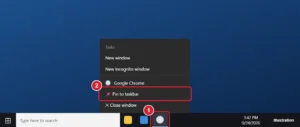
Windows 10 taskbar with the Chrome jump list open and Pin to taskbar highlighted

How to Add Google Chrome to the Taskbar in Windows 10

October 20, 2026April 22, 2021 by Kermit Matthews

Pin Google Chrome to the Windows 10 taskbar from the taskbar or Start menu, plus how to pin websites and Chrome profiles and fix a missing option. Continue Reading How to Add Google Chrome to the Taskbar in Windows 10

Categories Windows 10, Chrome
Laptop BIOS setup Main tab with the boot sound and boot animation options set to Disabled

How to Turn Off the Boot Sound and Animation on an Acer Predator

September 26, 2026August 24, 2020 by Kermit Matthews

Turn off the Acer Predator boot sound and logo animation in the BIOS by pressing F2 and disabling Boot Sound on the Main tab, or check PredatorSense. Continue Reading How to Turn Off the Boot Sound and Animation on an Acer Predator

Categories Windows 10, Windows 11
Windows 10 Print Server Properties dialog on the Drivers tab listing installed printer drivers

How to View Installed Printer Drivers in Windows 10

September 25, 2026June 8, 2020 by Kermit Matthews

View installed printer drivers in Windows 10 with Print Server Properties, Print Management, or PowerShell, check which driver a printer uses, and remove them. Continue Reading How to View Installed Printer Drivers in Windows 10

Categories Windows 10 Tags Printers
Folder Properties dialog with Size and Size on disk highlighted

How to View the Size of a Folder in Windows 10

October 20, 2026August 13, 2019 by Kermit Matthews

Check a folder size in Windows 10 with Properties, folder tooltips or Storage settings, and what Size on disk means. Continue Reading How to View the Size of a Folder in Windows 10

Categories Windows 10
windows 10 focus assist 3 How to Change Focus Assist Settings in Windows 10

How to Change Focus Assist Settings in Windows 10

November 5, 2026February 8, 2019 by Kermit Matthews

Getting control over the notifications on your devices can be a relaxing situation. We are so inundated with alerts, banners, notification sounds, and other types… Continue Reading How to Change Focus Assist Settings in Windows 10

Categories Windows 10
windows 10 open new folders in new windows 3 How to Open Each Folder in Its Own Window in Windows 10

How to Open Each Folder in Its Own Window in Windows 10

May 16, 2023January 11, 2019 by Kermit Matthews

Do you like to keep a lot of folders open on your computer so that you can quickly navigate between the different files and directories… Continue Reading How to Open Each Folder in Its Own Window in Windows 10

Categories Windows 10
windows 10 show people button 2 How to Show or Hide the People Icon in the Windows 10 Taskbar

How to Show or Hide the People Icon in the Windows 10 Taskbar

October 20, 2026December 27, 2018 by Kermit Matthews

Windows 10 has a feature called “People” that you can use to provide yourself with quick access to your contacts. This is made possible by… Continue Reading How to Show or Hide the People Icon in the Windows 10 Taskbar

Categories Windows 10
windows 10 activate airplane mode 3 How to Put Windows 10 in Airplane Mode

How to Put Windows 10 in Airplane Mode

October 12, 2026December 21, 2018 by Kermit Matthews

When you get on an airplane and you have electronic devices that you want to use, you will often be told by the flight attendants… Continue Reading How to Put Windows 10 in Airplane Mode

Categories Windows 10
windows 10 stop pop up on hover 4 How to Disable the Hover Display for Desktop Icons in Windows 10

How to Disable the Hover Display for Desktop Icons in Windows 10

October 20, 2026December 17, 2018 by Kermit Matthews

Sometimes the desktop icons on your computer are obvious, or have good descriptions. Some of these icons are very famous and recognizable by almost everyone.… Continue Reading How to Disable the Hover Display for Desktop Icons in Windows 10

Categories Windows 10
windows 10 lock screen notifications 5 How to Disable Lock Screen Notifications in Windows 10

How to Disable Lock Screen Notifications in Windows 10

November 5, 2026December 14, 2018 by Kermit Matthews

Your Windows 10 computer has a lot going on. Between all of the features in the operating system itself, your default apps and your installed… Continue Reading How to Disable Lock Screen Notifications in Windows 10

Categories Windows 10
Newer posts
← Previous Page1 … Page12 Page13

Join Our Free Newsletter

Featured guides and deals

You may opt out at any time.
Read our Privacy Policy

Live2Tech

Plain-English, step-by-step guides for the devices and apps you use every day.

Apple

  • iPhone
  • iPad
  • Mac
  • Apple Watch

Windows

  • Windows 11
  • Windows 10

Microsoft Office

  • Word
  • Excel
  • Powerpoint
  • Outlook

Google

  • Google Docs
  • Google Sheets
  • Google Slides
  • Gmail
  • Chrome
  • Google Drive
  • About Us
  • Contact
  • Disclaimer
  • Privacy Policy
© Live2Tech.com 2026
  • iPhone
  • Windows
    • Windows 11
    • Windows 10
  • Office
    • Word
    • Excel
    • Powerpoint
    • Outlook
  • Google
    • Google Docs
    • Google Sheets
    • Google Slides
    • Gmail
    • Chrome
    • Google Drive
  • Mac & Apple
    • Mac
    • iPad
    • Apple Watch
  • All Tutorials